
Last updated on April 26th, 2025 by Kenneth Ojeisekhoba
OXERBLOG > BLOG > HOW TO START A BLOG AND MAKE MONEY ANYWHERE
Disclosure: Oxerblog relies on its readers’ support through referral links. I may earn a commission for some of these, at no additional cost to you.
Blogging has become big business—and a lucrative career path—around the world.
Right now, you can start a blog, build a career, and grow a profitable online business from anywhere.
Thousands of people across the globe are making serious money from blogging. Some earn five, six, even seven figures annually.
The best part? You can start on a low budget and blog about almost anything—as long as there’s an audience interested in it.
With valuable content, smart optimization, monetization, and promotion, your blog can become a powerful income stream.
There are countless popular niches to choose from—especially if you bring a unique perspective or fresh voice to the table.
You can also tap into emerging topics that are gaining traction and growing in interest.
No matter which niche you pick, the core tools and steps for starting a blog are the same across the board.
In this guide, I’ll walk you through how to create your blog and get it online in as little as 30 minutes—even if you’re a complete beginner.
You’ll also discover how to optimize your content and promote your blog so it ranks on page one of Google.
And to wrap it all up, I’ll show you proven strategies to start earning money from your blog.
With that said, here’s a quick overview of what we’ll cover.
Table of Contents
▪ Stage One: Selection and Preparation
✓ Choose Your Best Blogging Niche
✓ The Tools You Need to Set Up Your Blog
▪ Stage Two: Purchase and Installation
✓ Step 1. Purchase Web Hosting and Domain Name
✓ Step 2. Choose the Best CMS – WordPress
▪ Stage Three: Designing and Content Creation
✓ Step 3. Select Your Preferred WordPress Theme
✓ Step 4. Add Content to Your New Blog
▪ Stage Four: Customization and Optimization
✓ Step 5. Add Essential Features With Plugins
✓ Step 6. Optimize Your Site for Search Engines
▪ Stage Five: Marketing and Monetization
✓ Step 7. Promote Your Blog to Your Target Audience
✓ Step 8. Popular Ways to Make Money from Your Blog
▪ Frequently Asked Questions (FAQs)
Now, let’s set the ball rolling.
8 Steps to Start A Blog that Makes Money (Anywhere)
Stage One: Selection and Preparation
The first stage is all about setting the tone for your blog.
The direction you take—and how far you go—depends on the choices you make right now.
That’s why it’s worth taking a little time to figure out what fits you best and sets you up for success.
▪ Choose Your Best Blogging Niche

For a beginner, choosing your best blog niche is where it all begins.
It is at the top of the list because it determines the scope of your content and the potential of your blog.
The niche you select defines what your content will focus on, and to a large extent, how successful your blog will be.
That is why researching your niche is such an important first step.
You don’t want a blog topic that is too narrow, leaving you little to write about.
Nor do you want one that is too broad where you can’t do the topic justice.
How to Find Your Best Blog Niche
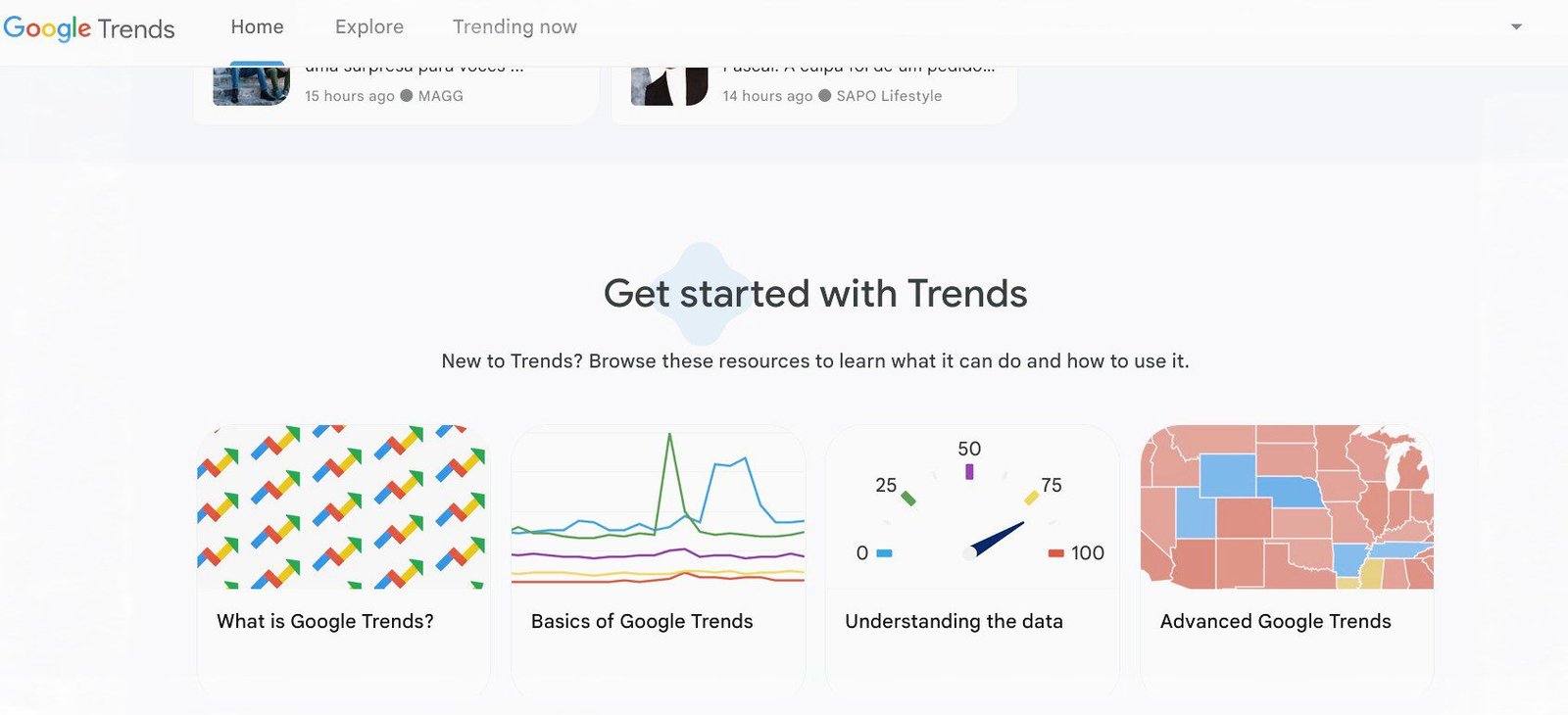
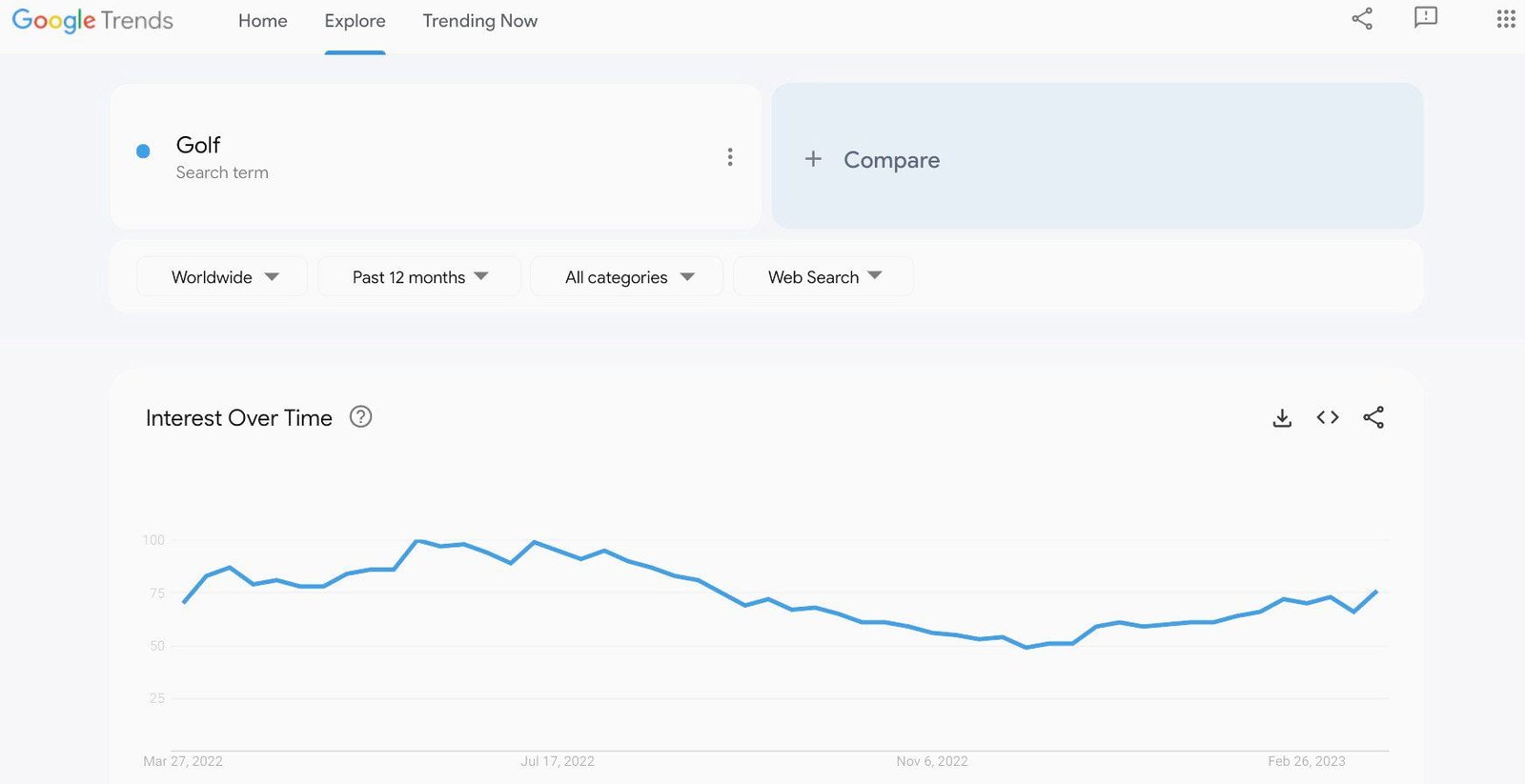
First, use a free tool like Google Trends to check the search interest in a potential blog topic. You can explore search trends in specific places, and at specific times. This will help you assess the popularity of your niche ideas.
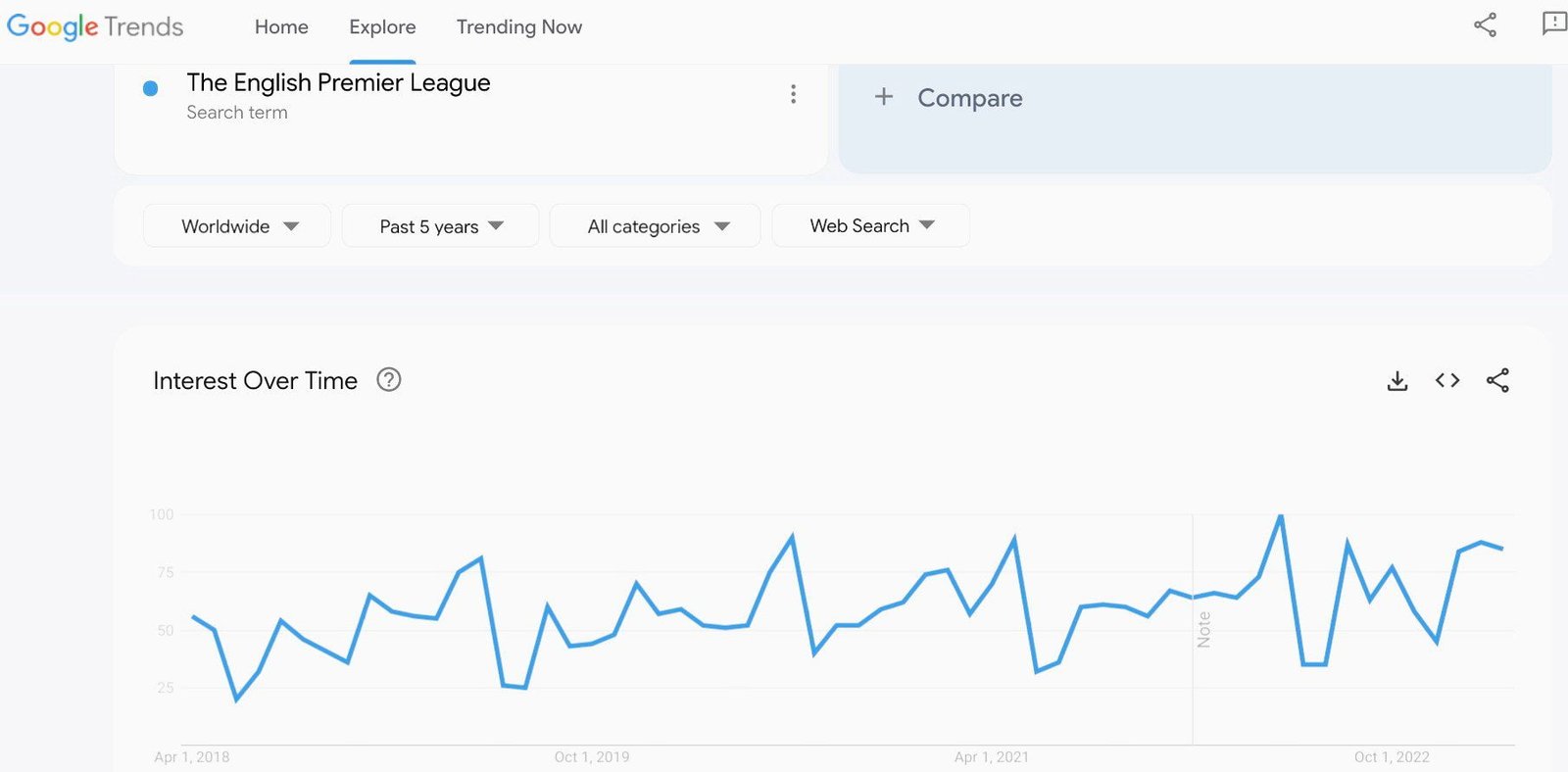
Second, choosing the right blog niche is all about balance. For instance, a niche like “Football” or “Farming” might be too broad. On the other hand, a topic like “The English Premier League Preseason” or “Carrot Farming” might be too narrow to create a successful blog around.
The sweet spot lies somewhere in between—where the topic is focused but broad enough to create diverse content. For example, “The English Premier League” or “Vegetable Farming” are both more manageable niches that still offer room for expansion.
A narrow topic can, however, serve as one of the subtopics within your broader blog niche.
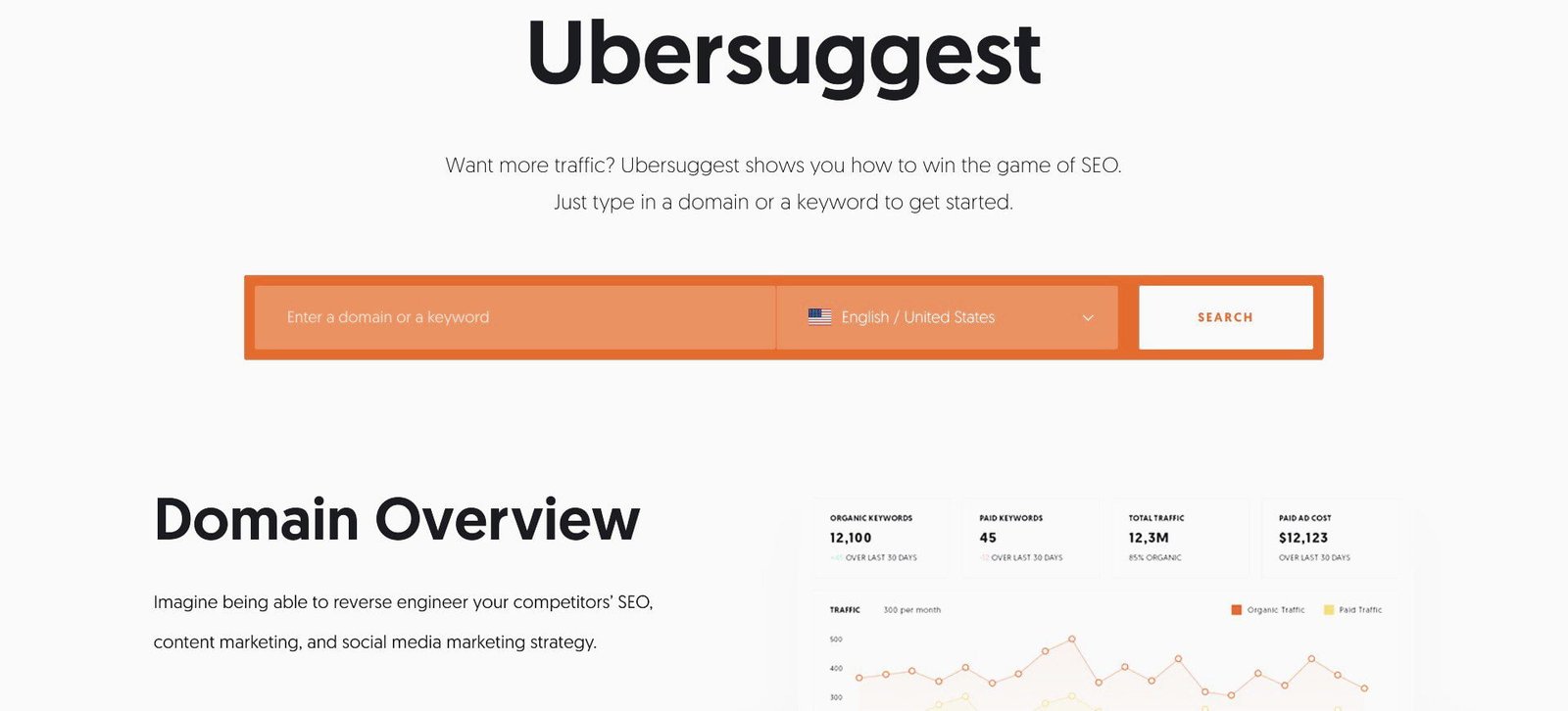
You can further refine your niche idea by checking the average monthly search volume using popular keyword research tools like Semrush, Ubersuggest, or AnswerThePublic.
While there are countless niche options to explore, it’s essential to choose one where you can consistently produce high-quality content and get the best results—because success relies on you always bringing your A-game.
Pick a niche that ensures you’ll stay relevant and successful for years to come.
So, what exactly is a blog niche?
A blog niche is a specific area of focus with a dedicated audience who share common needs, interests, and challenges that you are both knowledgeable about and passionate enough to address over the long term. And, of course, through this process, you can also generate income.
Above all, your niche should highlight what makes you unique.
Even in a highly competitive or “saturated” niche, you can bring a fresh and unique perspective.
As Google advices, your content could include “original research, breaking news, a new, useful service, or anything that other sites lack the resources or expertise to provide”.
You could also explore a ‘new’ topic, as long as it incorporates the five key elements that every perfect niche should have.
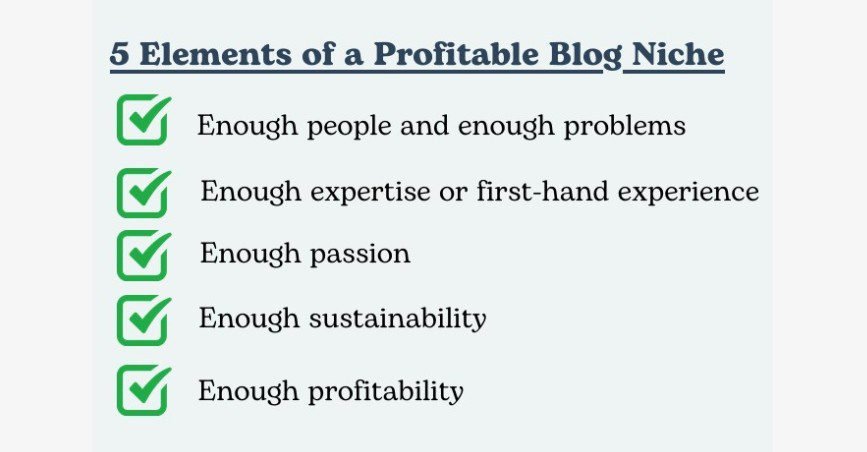
For a blog niche to be considered ideal, it must meet these five essential criteria.
So, your ideal niche should pass what I call the Enough Niche Test, demonstrating that it contains sufficient evidence of these five factors.
5 Factors that Determine Your Best Blogging Niche
1. Enough People/Problems
Does the niche have a sizable audience that is actively seeking information, and are there enough problems you can address with your content?
You can easily find out how many people are interested in a specific topic in different geographical locations using keyword tools like Ubersuggest, KeywordPlanner, or SEMrush. These tools will help you analyze the search volume for top keywords related to your niche.
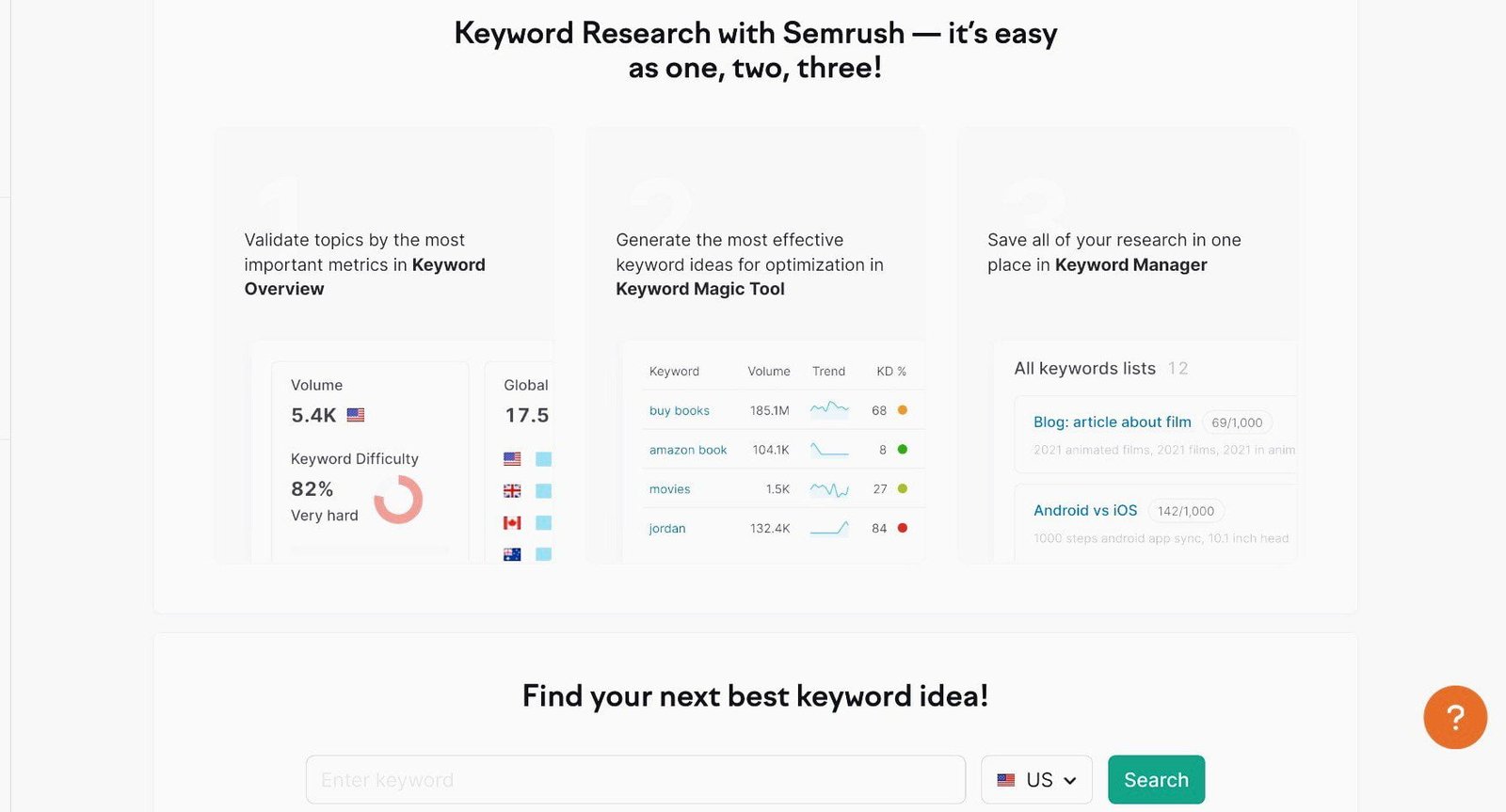
Popular niches often have high search volume, which means there is significant interest. However, they also tend to be highly competitive.
That said, if you have a unique angle or perspective to offer, even a competitive niche can be a viable option.
Google welcomes new, relevant, and reliable information that helpful users. If you find that existing content doesn’t fully address user needs, or if you have a unique perspective, there’s room for you to contribute, even in competitive spaces. It may take time, but with patience and persistence, you can succeed.
Alternatively, consider a more specific niche with less competition but still a sizable audience. You don’t want to invest time creating content for a topic with only a small following.
2. Proficiency
Do you have the requisite expertise to address the problems you’ve identified in the niche?
Before diving into a niche, ensure you have sufficient knowledge to tackle the search queries within it. This expertise can come from formal education or from hands-on experience. If you’ve spent years working in some particular fields, you can be considered an expert in that area.
Some niches, particularly those related to health, finance, and law, fall under “Your Money or Your Life” (YMYL) categories. These topics require high-level expertise due to their sensitive nature. Google expects content in these areas to be written by qualified professionals.
Other niches, such as “food”, “sports”, “freelancing”, “real estate”, “online business”, and “relationships” may require less formal expertise. If you have extensive experience in these fields, you can still be seen as an authority, even without formal qualifications.
However, within broad niches, it is crucial to narrow your focus to a specific area where you have expertise.
For instance, while writing about general sports may be challenging, focusing on a more specific topic, such as Golf or the PGA Tour, could be a great way to stand out.
3. Passion
Are you really passionate about the topic?
Genuine passion is another important element of a perfect niche.
The mistake many people make is to hurriedly pick a niche, and when they’re well into it, they discover that they are not really passionate about it.
So they lose steam and stop creating content regularly.
Some even abandon the topic outright, especially if the results aren’t coming in fast enough as they had envisaged.
You can avoid that scenario by choosing a niche you’re enthusiastic about, from the start.
You have to love the topic to go at things full throttle.
And only you can tell whether you have real passion for a topic, and are ready to go all the way, no matter what.
4. Sustainability
Can the topic continue for a long time or is it likely to be a flash in the pan?
You don’t want to choose a niche that won’t be able to attract a sizeable audience all year round, for a long time.
For example, starting a blog on just Coronavirus, the Russian-Ukraine war, or the Fifa World Cup isn’t sustainable, though they’re sensational stories.
If anyone created a blog for just the pandemic, for instance, they wouldn’t be getting any more the number of visits they got in the thick of the disease.
Same with the Russian-Ukraine war – it isn’t going to last forever.
Even those directly affected by these events may become disinterested in the stories eventually.
Because at some point, you just want to put these painful memories behind you and move on.
So any blog built for the sole purpose of reporting stories like the pandemic, or the war will lose its relevance and usefulness at some point.
And I say this without disrespect for the beautiful memories of those who these avoidable events have taken from us.
You can make these major stories a part of what you write about at those moments and not the main focus of your blog.
So your perfect blog niche will still be gaining traction for decades.
5. Profitability
Are there enough money-making opportunities in the niche?
Your perfect niche should have multiple income streams – from display advertising to affiliate marketing, sponsored content, freelance gigs, paid membership, physical products, and much more (I’ll elaborate on this in Step 8 of this article).
Find out how other blogs are making money in your niche, and if possible how much they’re earning.
Some bloggers publish their income on their sites just to encourage others.
Besides, some websites have published the average earnings of bloggers in different niches.
This will give you an idea of how much you can earn if you work hard.
So, in summary, any niche for which the 5 checkboxes check off has a good chance of success.
You could have several topic ideas that will do well in the Enough Niche Test.
Whichever niche has the highest projections for all the 5 factors is your best bet.
Remember, any niche you choose will influence virtually everything else about your blog, including its future. So, you want to choose wisely.
See my article on selecting your best blog niche for more details.
Now you know how to pick your best niche, let’s look at the tools you need to build your blog.
▪ The Tools You Need to Start a Blog
To start a blog that will make you good money, you need to invest in a few important tools.
This will give you complete control and total freedom over your website.
Again, creating a blog is the same process everywhere in the world, and you need the same basic tools – just 3 of them – for the first stage.
▪ Domain name
▪ Web hosting
▪ CMS (content management system) or website builder
Domain Name

Your blog needs a name that it will be known by on the web. It is called a ‘domain name’. For example, the name of this blog is ‘www.oxerblog.com’ or simply ‘oxerblog.com’.
Your blog’s domain name will also serve as its home address on the Internet.
No blog can exist on the web without a domain name.
With that said, unlike we humans who can bear the same full names, no two blogs can have exactly the same domain name on the web.
I’ve always been intrigued by a former heavyweight boxing champion, George Foreman, who gave his exact names to all his five boys.
He is George Edward Foreman I, and his boys are George Edward Foreman II, III, IV, V, and VI.
Foreman said he wanted his sons to always have something in common.
I also love the idea of children bearing their parents’ full names, so I gave my only son mine.
You can’t do that on the Internet. Because two websites cannot share the same full domain name.
So, you’ll need to choose a domain name that is both unique and memorable.
Your users shouldn’t be racking their heads, trying to remember your domain name.
It should be easy to remember.
That’s why people scramble for short and memorable names.
Because they’re easier to spell, type and remember.
It should also be a name that is easy to pronounce, not a tongue twister.
It won’t be easy, though, finding one. With over 628 million domain names already registered, it looks as if all the ‘good’ names have already been taken.
Domain name speculators who flip domains also make it difficult to find a good name.
It is easier to come up with a long domain name than a short one.
Having said that, if you are really creative about it, you can still coin a short domain name that is unique and brandable.
Should you need some help, check out my article on choosing a good domain name.
Once you find a good name, you’ve got to register it quickly with a reputable domain name registrar so that someone else won’t take it.
However, if you are starting your blog now, hold on, I’ll show you how to register it for free.
But if you want to start your blog later, it will cost you an average of $15 to register it now for one year with a domain name registrar.
Web Hosting
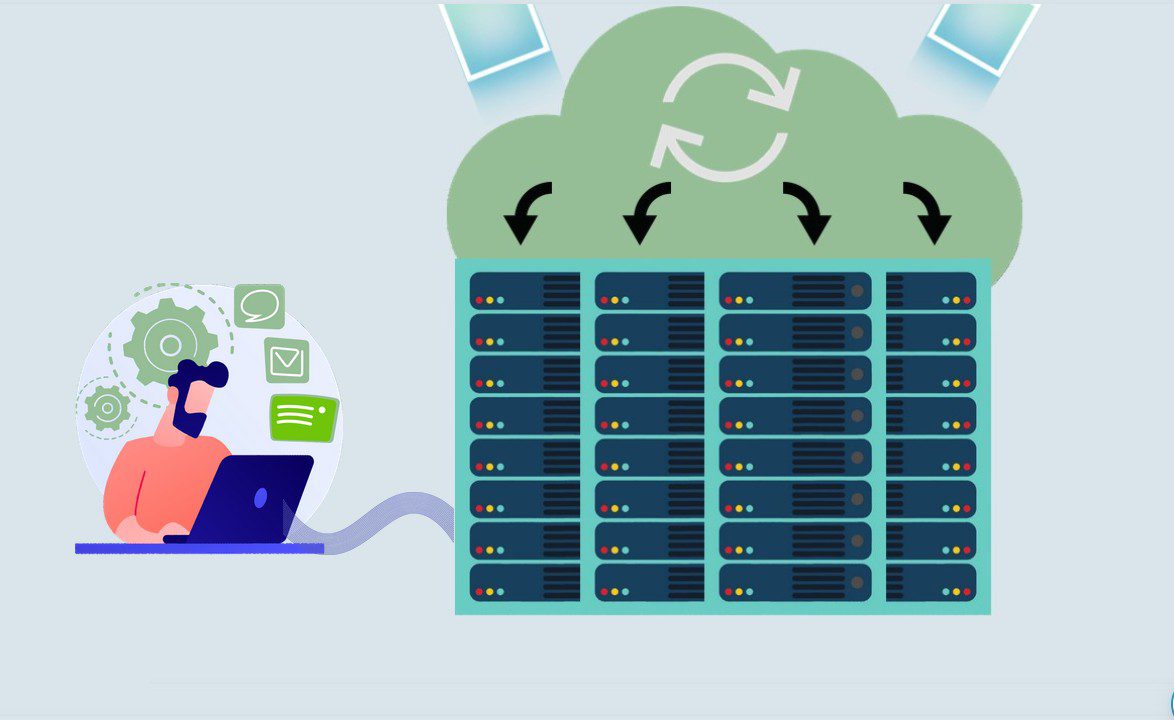
Your blog will need a secure home where it will live on the web.
Now, if you want to build a house for it by yourself, it will cost you a lot of money.
Thankfully, you don’t have to.
There are online real estate investors known as web hosts who have invested heavily into building different types of homes called hosting servers that they rent out.
There are thousands of web hosting companies on the Internet.
So, you can easily rent a home for your new blog from these hosting providers.
However, you want to be careful when choosing a web host and a hosting plan for your blog.
Many of them rack out too often, and this is not good for business.
So, choose a trusted hosting provider that will make sure your blog is available 24/7.
It should also be very affordable.
Very importantly too, your web host plays a big role in your site speed and security which can directly impact your rankings.
That’s why I recommend Bluehost.
They’re one of the best web hosting companies in the world.
They have a great deal of expertise and experience in hosting all kinds of websites.
And they’ve been doing this for about two decades now.
Currently, over 2 million websites call their platform home.
They’re arguably the favorite of new bloggers because they’re just a great host for new sites.
Bluehost has different types of web hosting.
But since you’re just starting out, it is best to start with a small space.
This type of hosting is called Shared hosting.
It is just ideal for your new site, though your blog will be sharing space and resources with other new and small websites.
Under Shared hosting, Bluehost has different plans.
Their Basic plan normally costs $11.99 a month.
However, Bluehost wants to see that you come online very quickly and easily too. So they’re offering big price cuts.
They’ve reduced the price by 75% for the first year.
So, it will only cost you just $2.95 a month as you’re one of my readers.
You’ll also get a one-year free domain if you start your blog now (More on web hosting later).
CMS (content management system)
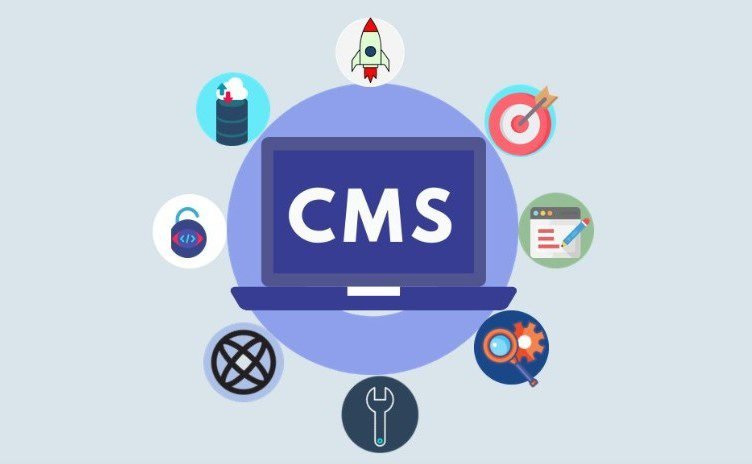
You need a CMS to build and design your new blog.
Just like web hosts, there are thousands of CMSs on the web.
Many of them are great platforms; however, WordPress is the best.
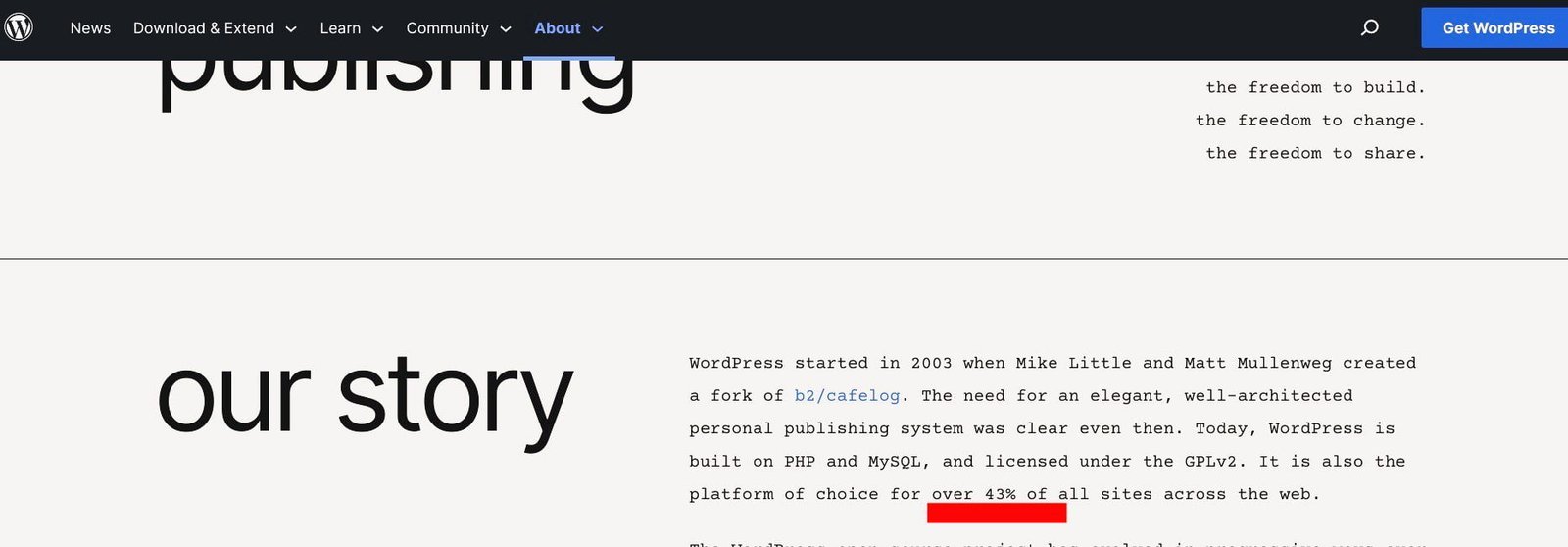
This is why it currently powers over 43% of all websites on the Internet.
WordPress is easy to use, and you can create all kinds of blogs and websites with it, regardless of your level of expertise.
It is free to use; but, you’ll need to purchase web hosting to access it.
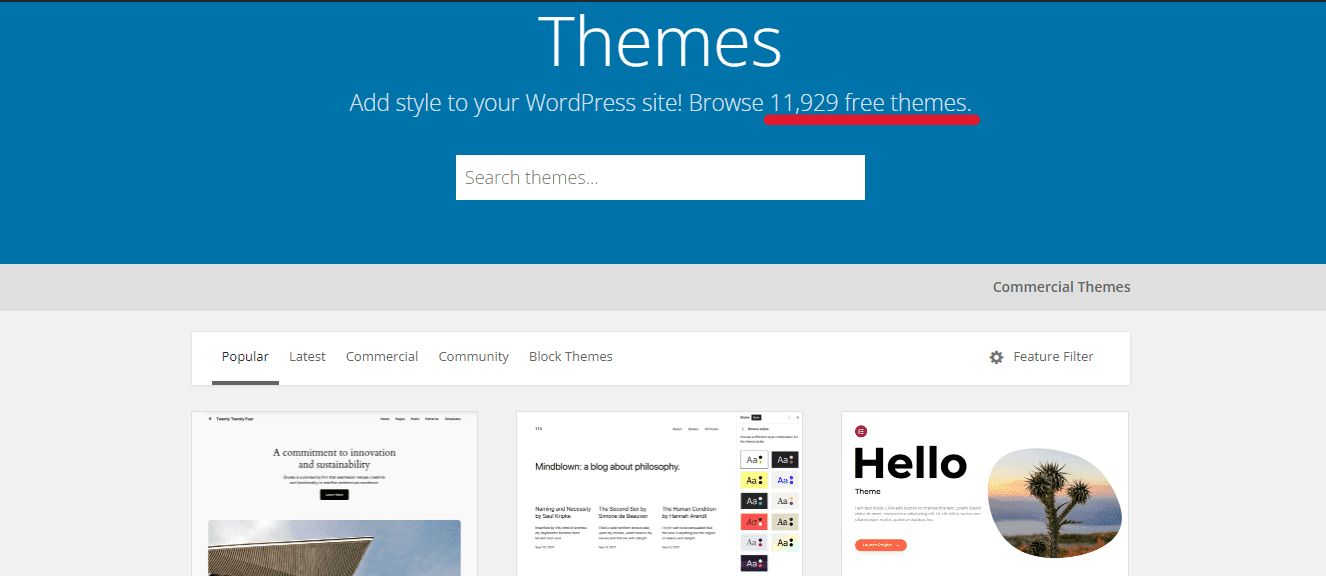
One thing WordPress has going for it is the large number of free themes that site owners can choose as their site design.
There are presently about 12,000 free WordPress themes and counting.
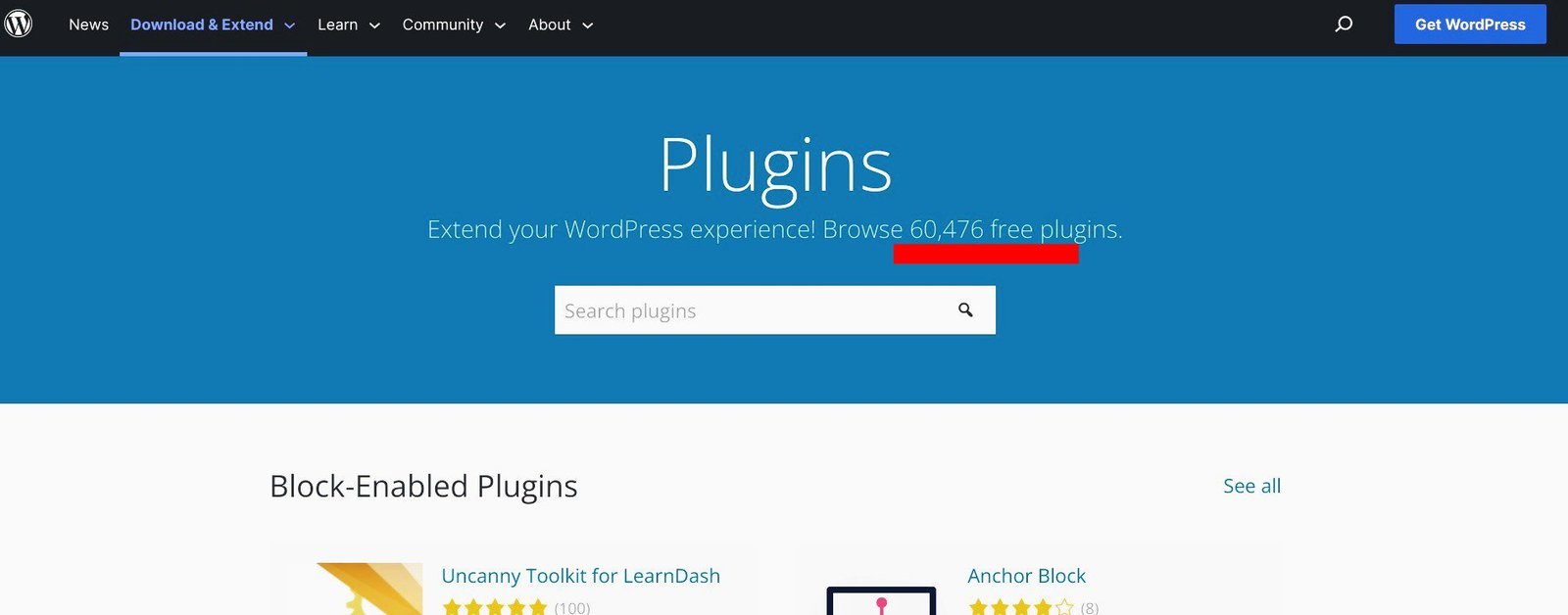
WordPress also has tons of free plugins − about 60,000 − that you can add to its core and create a unique website.
There are also thousands of premium WordPress themes and plugins that you can purchase if you want more advanced features on your blog.
This sea of themes and plugins makes WordPress tower above the rest.
Now you know all the tools you need, let’s begin your blog setup.
Stage Two: Purchase and Installation
This is the second stage of your blog setup process.
You’ll be making a little, but invaluable, investment here.
Every blogger making good money from their blogs today had to do the same initially.
This is the quickest, safest, and the best path to blogging success.
Step 1. Purchase Your Domain Name and Web Hosting
Again, setting up a blog begins with purchasing a domain name and web hosting.
A domain name costs an average of $15 a year with a domain name registrar while hosting costs $11.99 monthly on Bluehost.
So, both will cost you about $159 for the first year.
But Bluehost lets you kill two birds with one stone.
You will get web hosting at a discounted price of $2.95 monthly and a one-year free domain.
They’re so confident about their services that the offer comes with a 30-day money-back guarantee.
So if you purchase web hosting from them and are not satisfied, you’ll get a full refund.
Let’s proceed to Bluehost to purchase web hosting and get your free domain.
Once you’re on their page, click on the golden View Plans button to kick-start the process.
The next screen is the pricing card where you select your plan.
There are 4 different hosting plans here – Basic, Choice Plus, Online Store, and Pro.
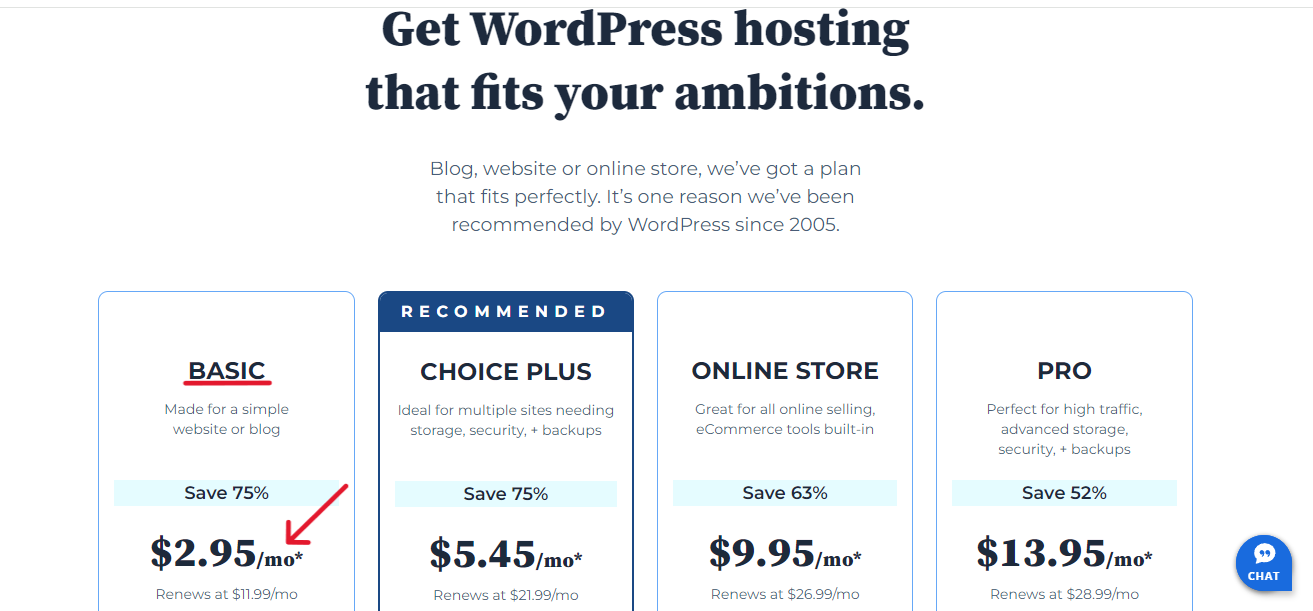
The Basic plan is an ideal choice for beginners.
It allows you to host up to 10 websites, should you want to start more blogs.
So, click on Select in the Basic column to continue.
On the next screen, you’ll find three options to set up your domain name.
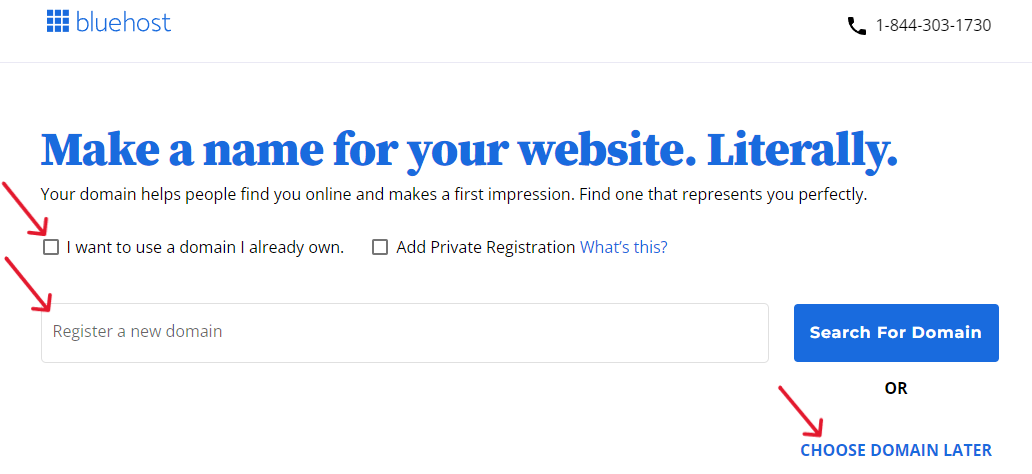
The first option is for you to use a domain you already own.
The second is for you to register a new domain.
And the third is for you to choose your domain later.
Since you want to create a new domain, type in the name you’ve chosen for your blog in register a new domain field.
By default, Bluehost adds the dotcom extension to your domain, as you’ll see on the next page (because it is the most popular globally). So, remember to add your preferred extension.
Then, click the blue Search for Domain button to continue.
This will bring you to The Cart page where you’ll choose your hosting duration preference.
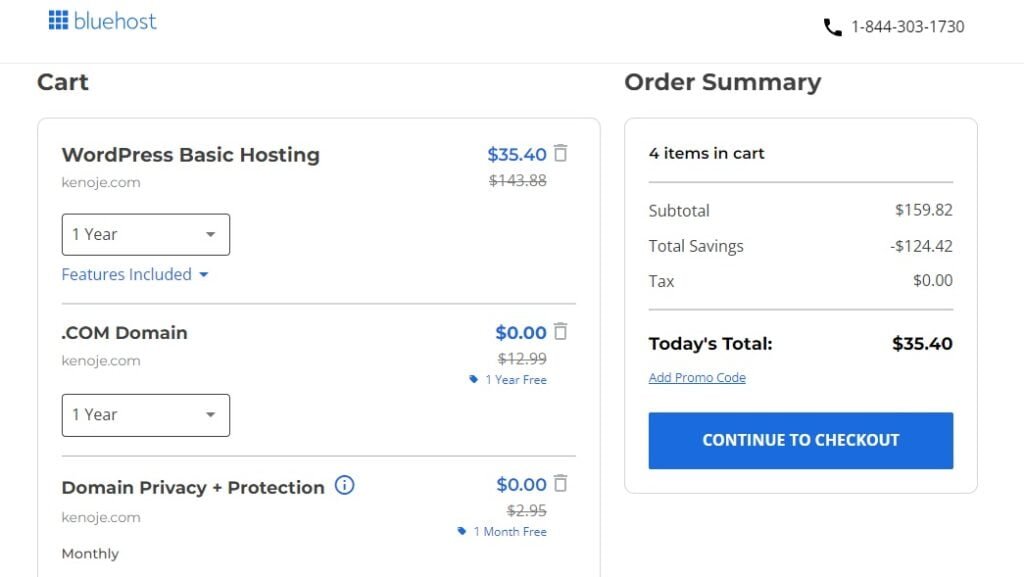
There are 3 options available – 1 month, 1 year, and 3 years.
Clearly, the 3-year plan is the best deal in the long run if you can afford it.
However, I recommend you start with the 1-year plan. You want to choose what you can afford, and not overburden yourself.
Also, delete from the cart optional extras you don’t need right now.
Once you’re satisfied with the Order Summary in the right column, click the blue Continue to Checkout button to proceed.
This will take you to the Checkout page where you will create your hosting account.
The first part is where you create your account.
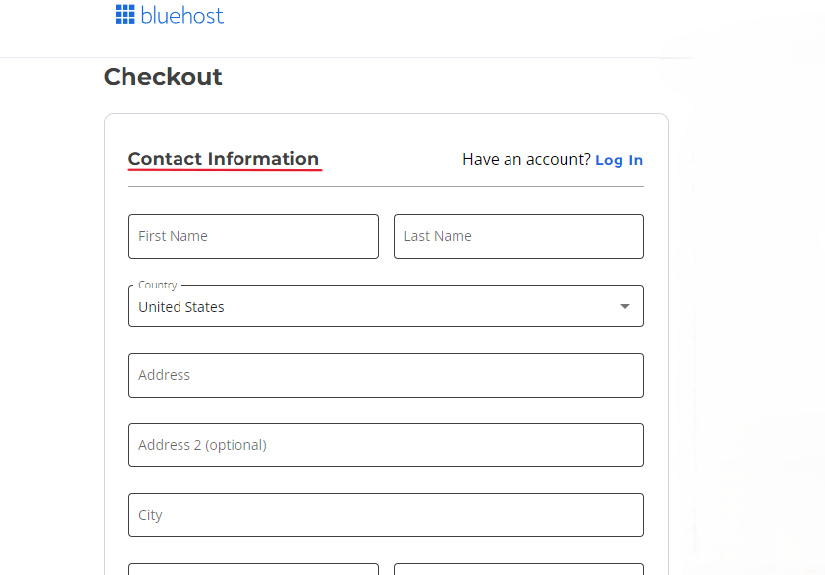
Make sure you fill all the fields with your accurate information.
The second part is where you’ll type in your account info, billing info, and billing address.
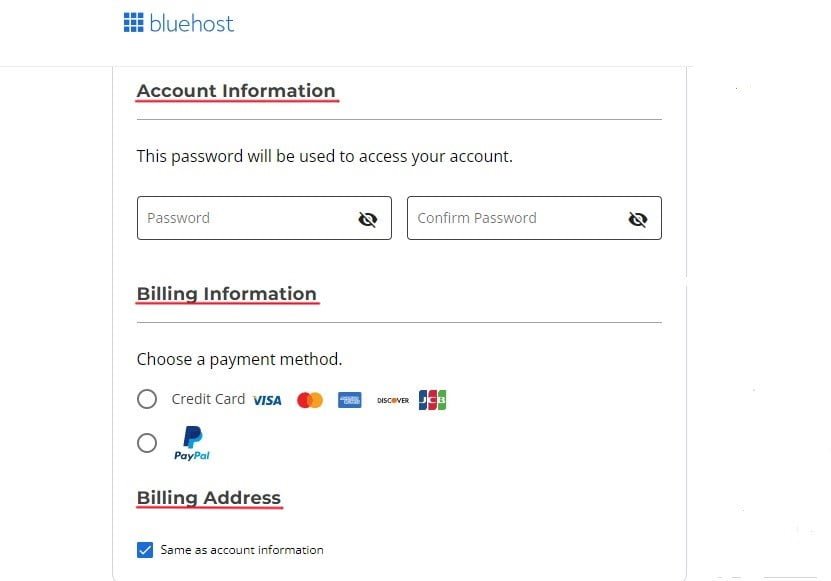
In the Account Information section, create a strong password that hackers won’t be able to crack easily.
This is the password that you will use to manage your hosting account. Choose a variety of characters to make it super strong.
In the Billing Information section, choose your preferred payment method.
You can either pay with your credit card or through PayPal. Make sure you enter your payment details correctly.
The Billing Address box comes checked by default. It is assumed to be the same as your account information.
Once you’re done, the Submit Payment button will turn blue. Click on it to complete the process.
And there you have it.
Once they confirm your payment, Bluehost will start setting up your hosting account.
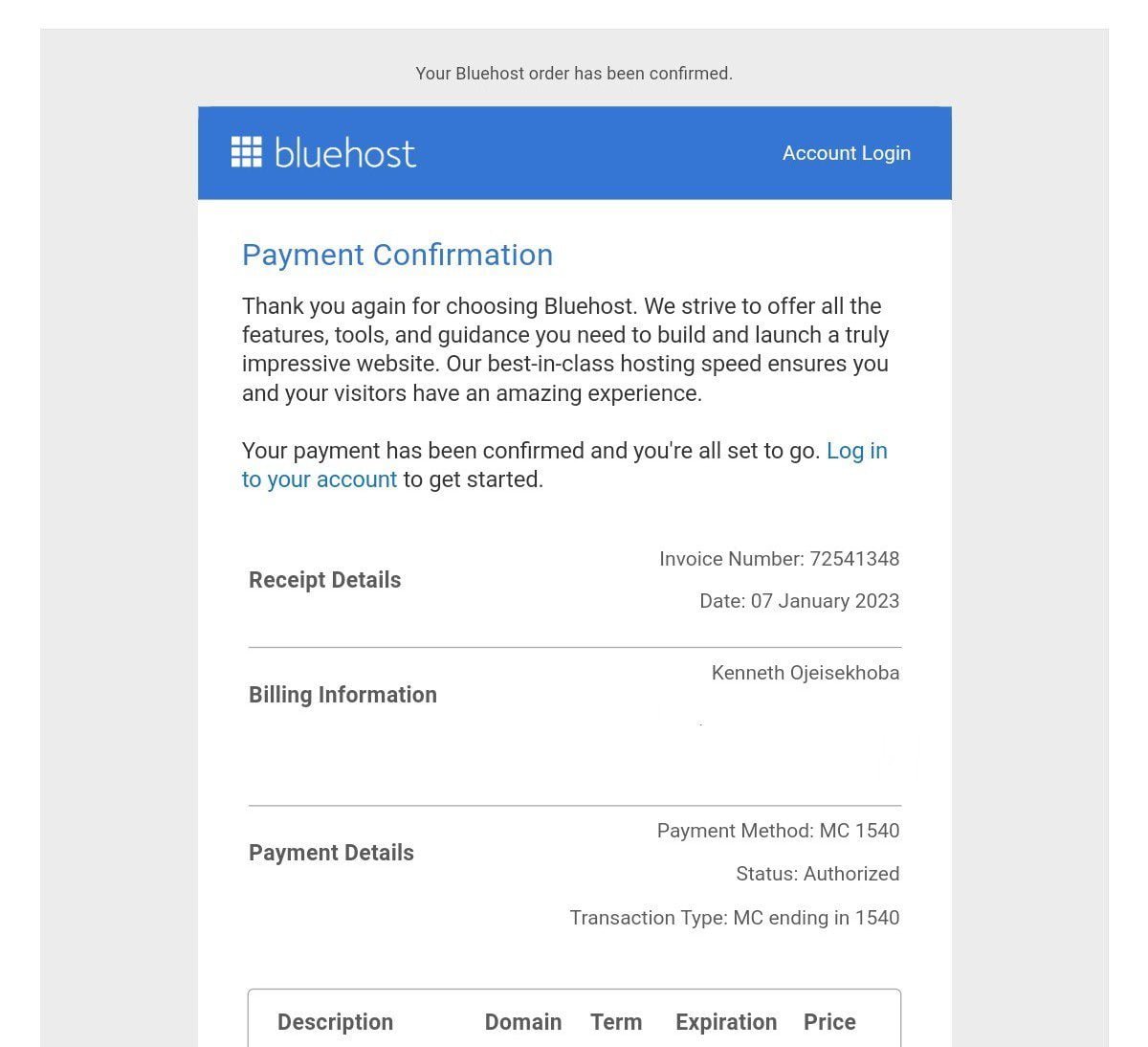
They will send you a congratulatory page with your receipt (similar to the one below), to acknowledge they’ve received your payment.
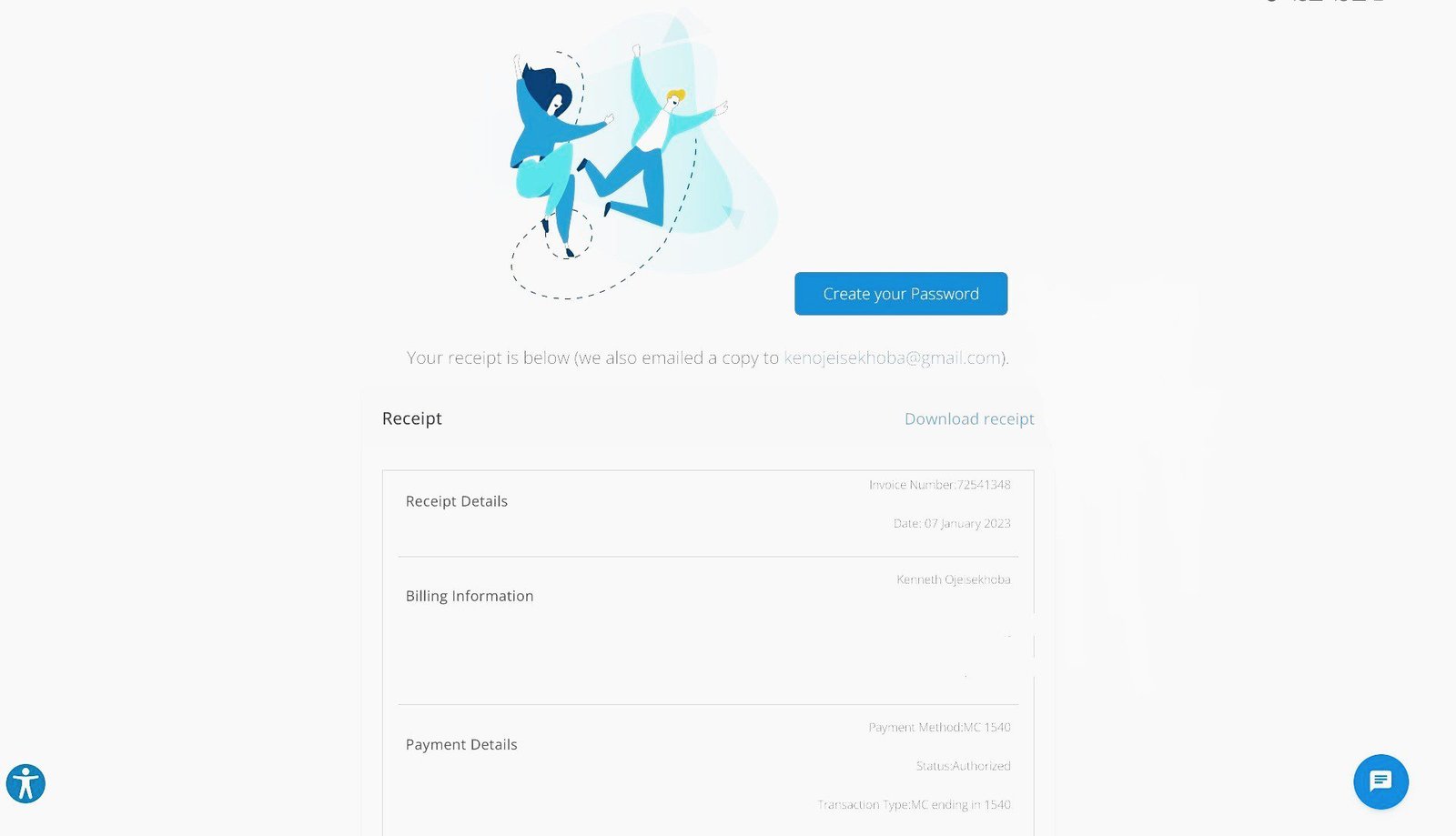
An email confirming your payment (like the one below) will also be sent to you.
Once your hosting account is ready, you can log in using the password you created earlier.
When you enter, you’ll see a few default themes that Bluehost has selected.
You want to skip this step because I’ll walk you through choosing and installing a WordPress theme later.
Step 2. Choose the Right Blogging Platform – WordPress.org

Many beginners who want to start a self-hosted WordPress blog make the mistake of creating a free site on WordPress.com.
The Free WordPress.com hosting offers limited features, including money-making opportunities.
If you want to build a blogging career and business, set up a robust WordPress.org site on a popular web host like Bluehost, instead of a free WordPress.com site.
One great thing about Bluehost is that they now automatically install WordPress for you.
So, you no longer need to go to your hosting account to install WordPress.
Simply click on the Start Building button to view the backend of your WordPress dashboard from where you’ll be working to set up and manage your blog.
Most of your work will be done using the tabs on the left area of your dashboard.
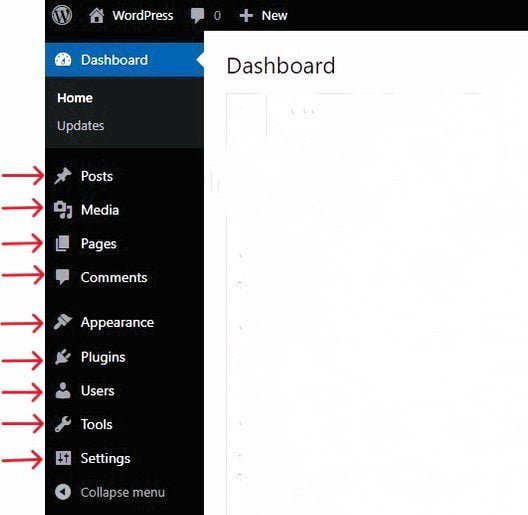
Let’s take a minute to get acquainted with them.
▸ Posts – This is where you’ll write, update, and publish all your blog posts
▸ Media – This is where you’ll upload and manage all your pictures
▸ Pages – This is where you’ll create, update, and publish all your static pages such as the About page, Homepage, etc.
▸ Comments – This is where you’ll monitor and manage all your users’ comments at the end of your blog posts
▸ Appearance – This is where you’ll change the appearance of your WordPress theme
▸ Plugins – This is where you’ll install, update, and uninstall plugins
▸ Users – This is where you can add anyone you want to grant access to the backend of your blog
▸ Settings – This is where you’ll make some basic customization to your blog
At this stage, let’s fine-tune some important settings that your blog needs from the get-go. They include:
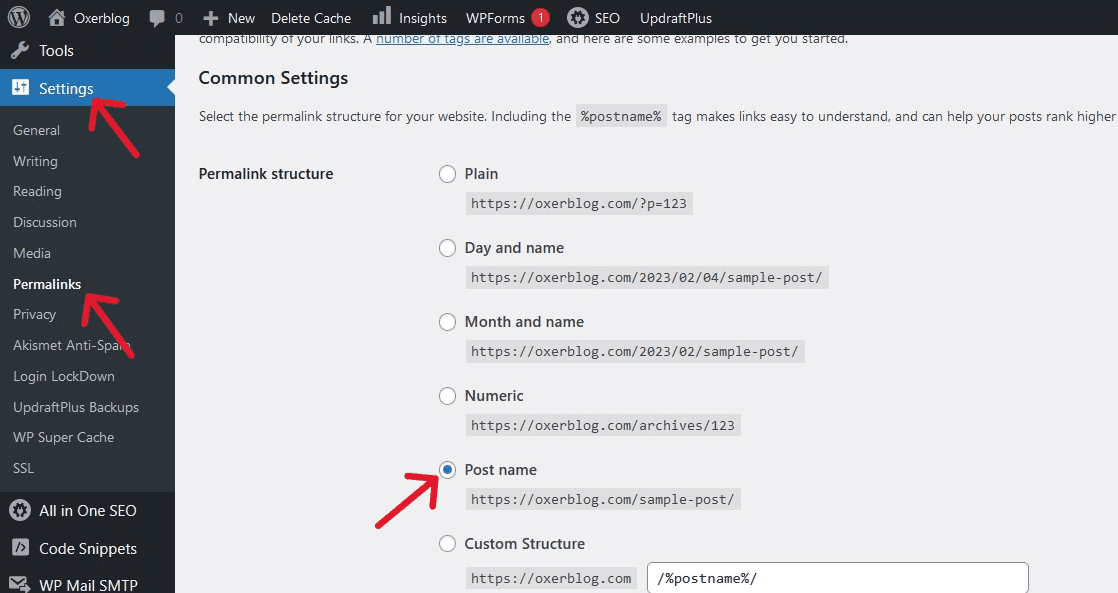
Your Site’s permalink settings
The permalink defines the URL (i.e. address) of each content type you add to your site – post, page, image, video, etc.
You want to choose a readable permalink structure that is the simplest for your blog (More on this later).
To choose your preferred permalink, click on Settings ≫ Permalinks.
Your Blog’s comments settings
You can enable users to write comments at the bottom of your blog posts.
That said, you want to vet them before publishing them.
To set it up, click Settings ≫ Discussions ≫ Before a comment appears. Check the box for Comment must be manually approved.
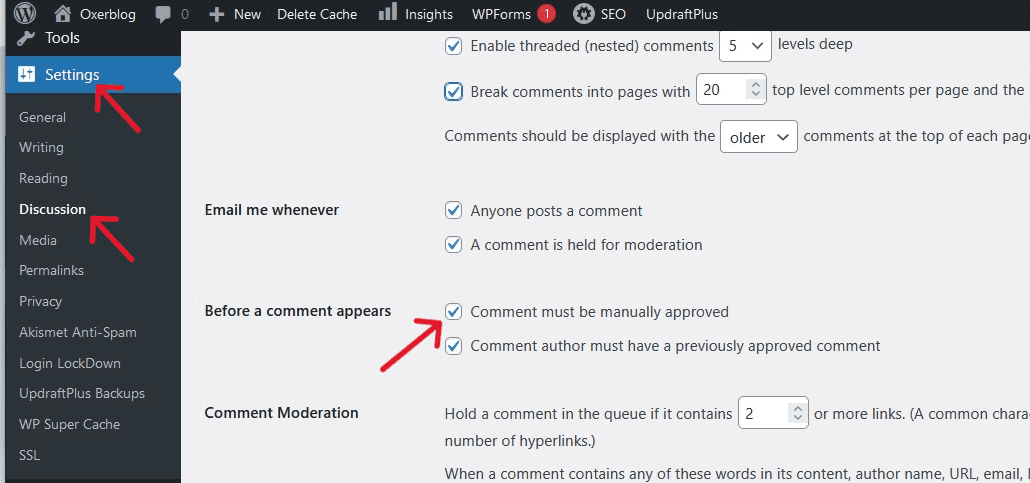
Click Save Changes at the bottom of the screen to save your changes.
Your site title and tagline settings
You want visitors to know your site’s title, i.e. your domain name, and your tagline, i.e. what your blog is all about in a short sentence.
To do this, go to Settings ≫ General.
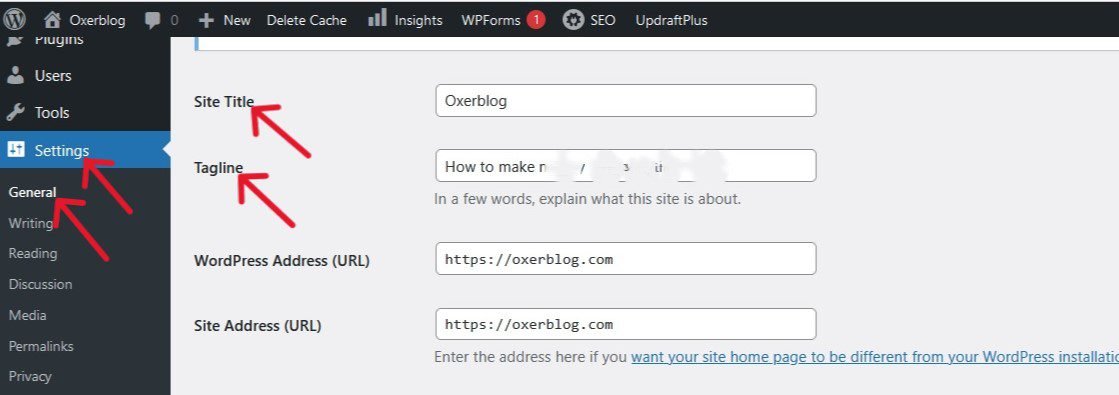
Remember to click on Save Changes to save your new settings.
Let’s begin the next stage of your blog setup process. This is where you’ll be choosing your site design and adding some content to your blog.
Stage Three: Designing and Content Creation
This is the stage where the building proper begins and it is fun-filled.
This is where you get to customize the look and feel of your site and write your blog’s first words.
To get started, find a WordPress theme close to what you want, in terms of simplicity and design.
Step 3. Select Your Preferred WordPress Theme
The building process begins with changing the appearance of your blog with a beautiful WordPress theme.
Your blog can go live at this point, but the default minimalist design does not have real drawing power.
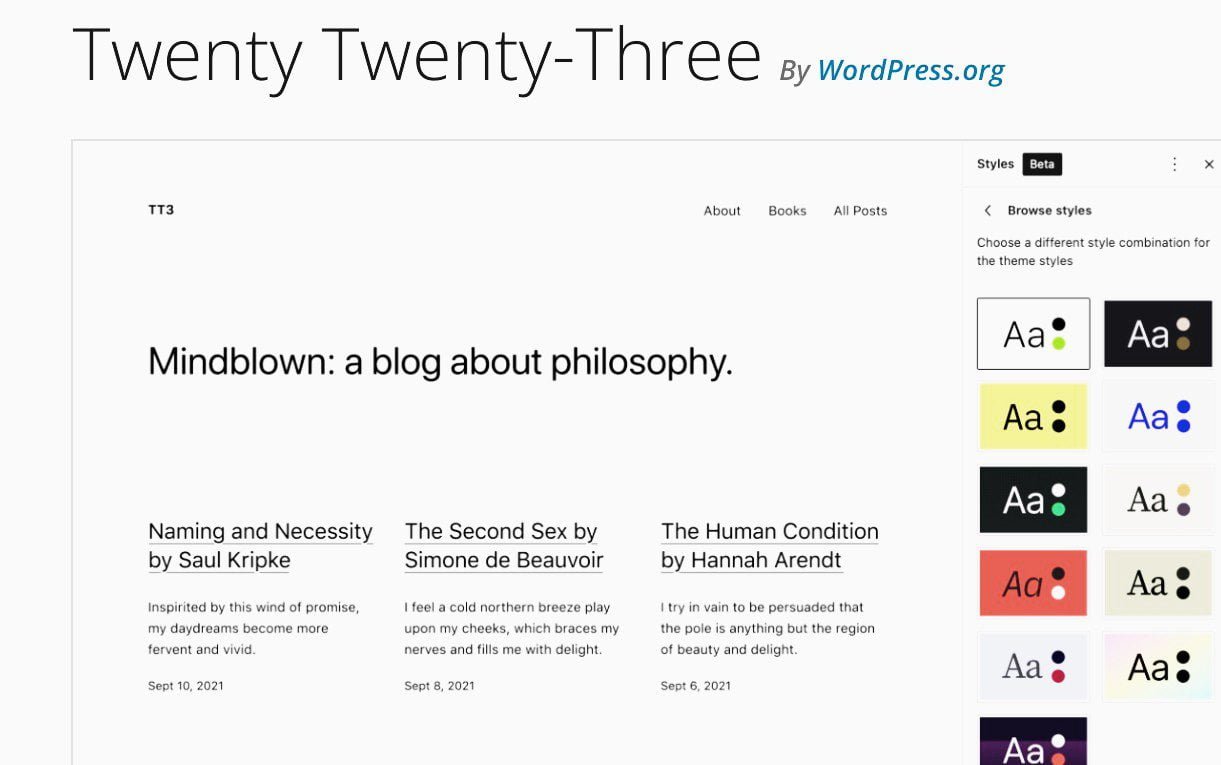
So, let’s give your blog some character that will make it stand out from the rest.
The easiest way is to simply use a ready-made theme.
Trying to customize the default theme may not be an easy task for a beginner.
So, select a ready-made theme that needs minimal tweaking.
When picking a WordPress theme for your blog, there are some qualities you should look out for.
Again, one of them is simplicity. The simpler the design, the better.
Another is mobile-friendliness.
According to statistics, across the world, more people access the web through mobile devices than through desktops and tablets.
So, more people will be visiting your blog with their smartphones.
Luckily, WordPress has a repository of thousands of simple, mobile-friendly themes it has approved.
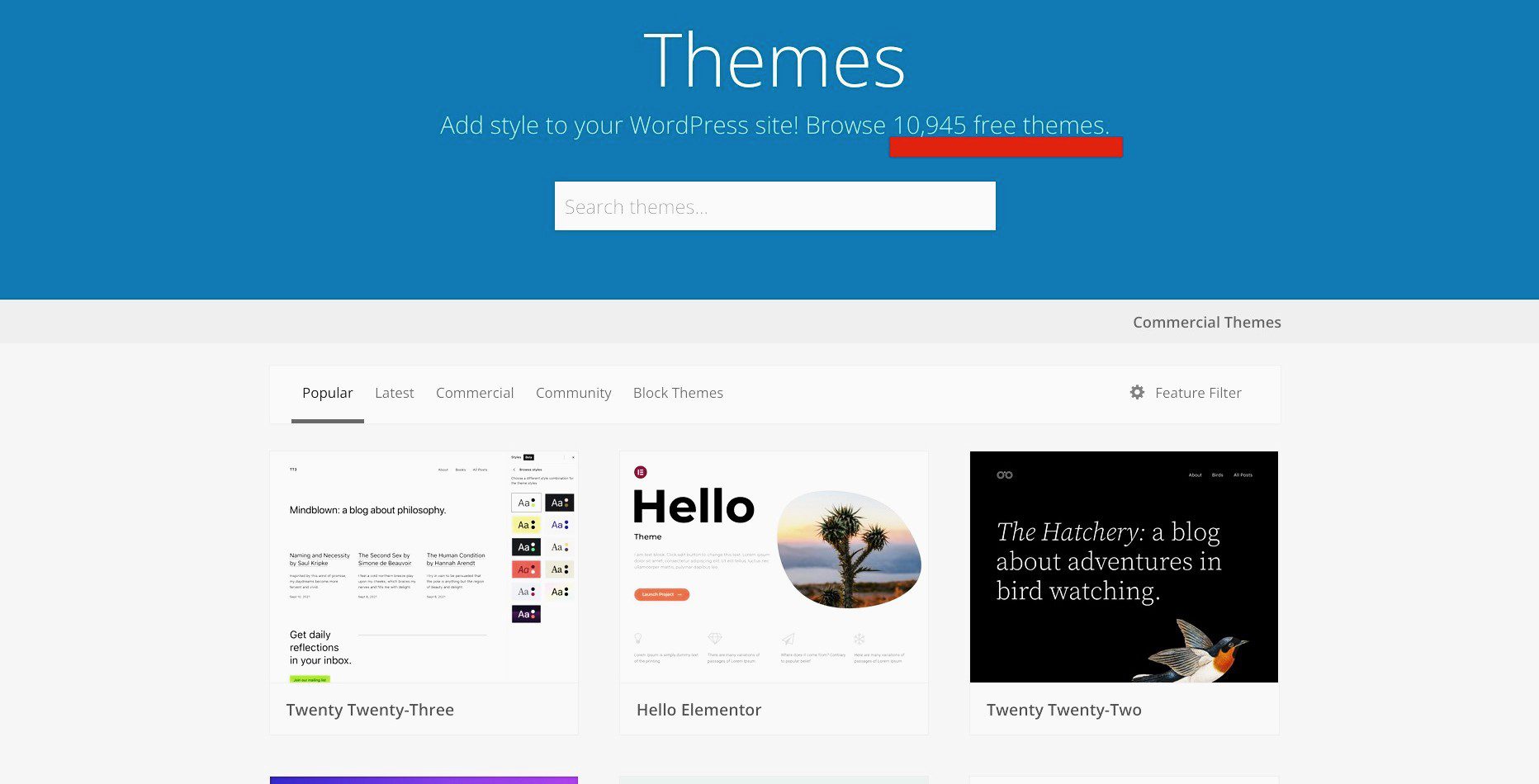
Now, there are two options for choosing a WordPress theme.
The first option is to pick a free theme.
Again, you have about 12,000 free WordPress themes you can pick from.
To search for a free theme, simply go to your WordPress dashboard, and on the left side bar, click on Appearance ≫ Themes.
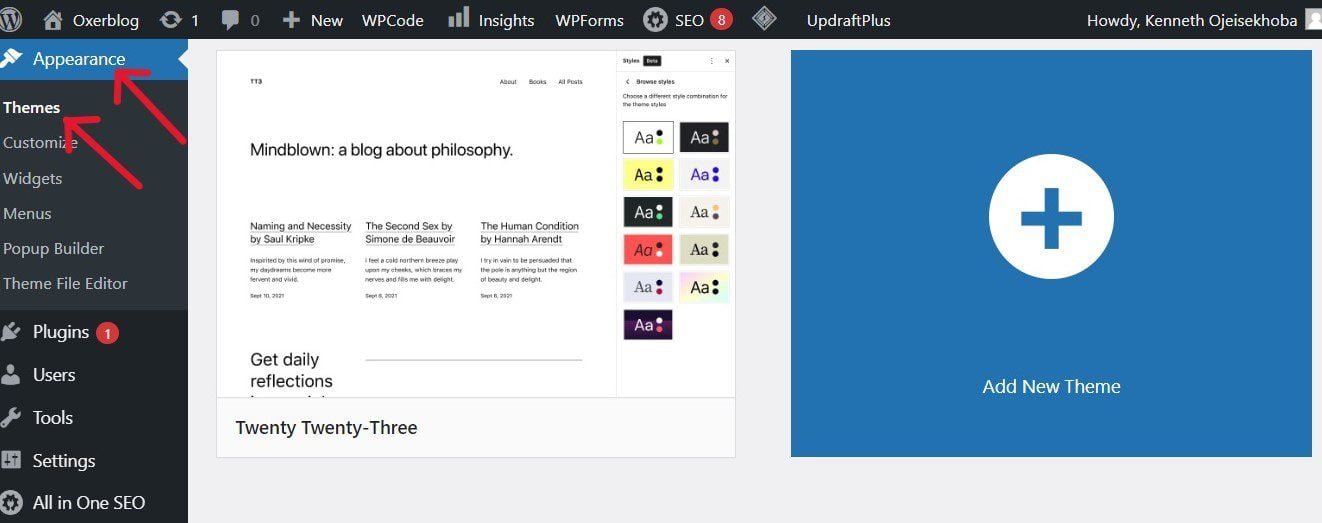
Then, click the Add New Theme button at the top of the screen.
On the next screen, you can browse all the free themes in the WordPress.org theme directory.
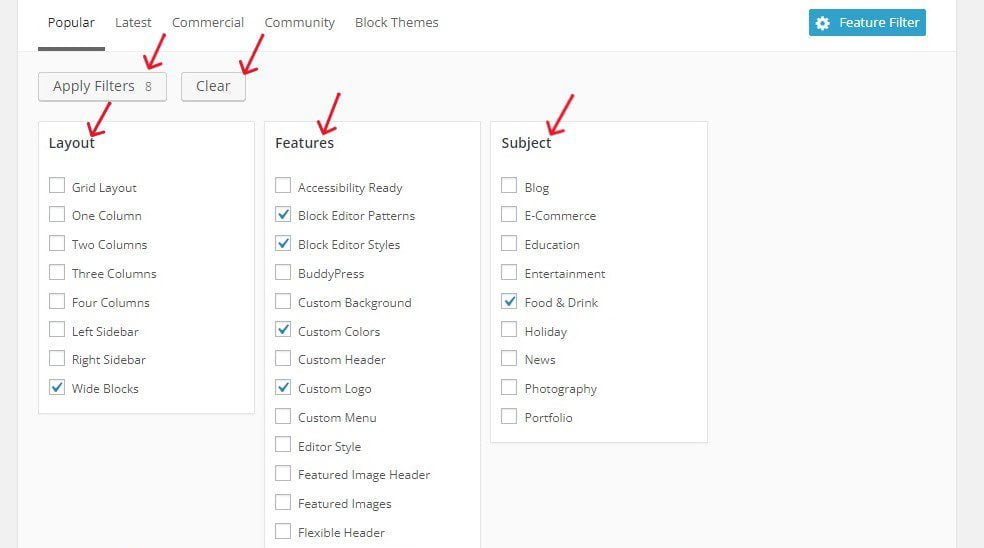
There are feature filters like Popular, Latest, Commercial, Community, and Block Themes that you can use to sort them.
If you’ve decided on your blogging niche, you can sort for specific themes using the advanced Feature Filter options – Layout, Features, and Subject.
For example, if you want to start a food blog, you can find free WordPress themes designed specifically for that niche.
Simply check the Food and Drinks box under Subject and the checkboxes for the features and layouts you want on your theme. Then click on Apply Filters.
WordPress will bring up some themes that fit your specifications.
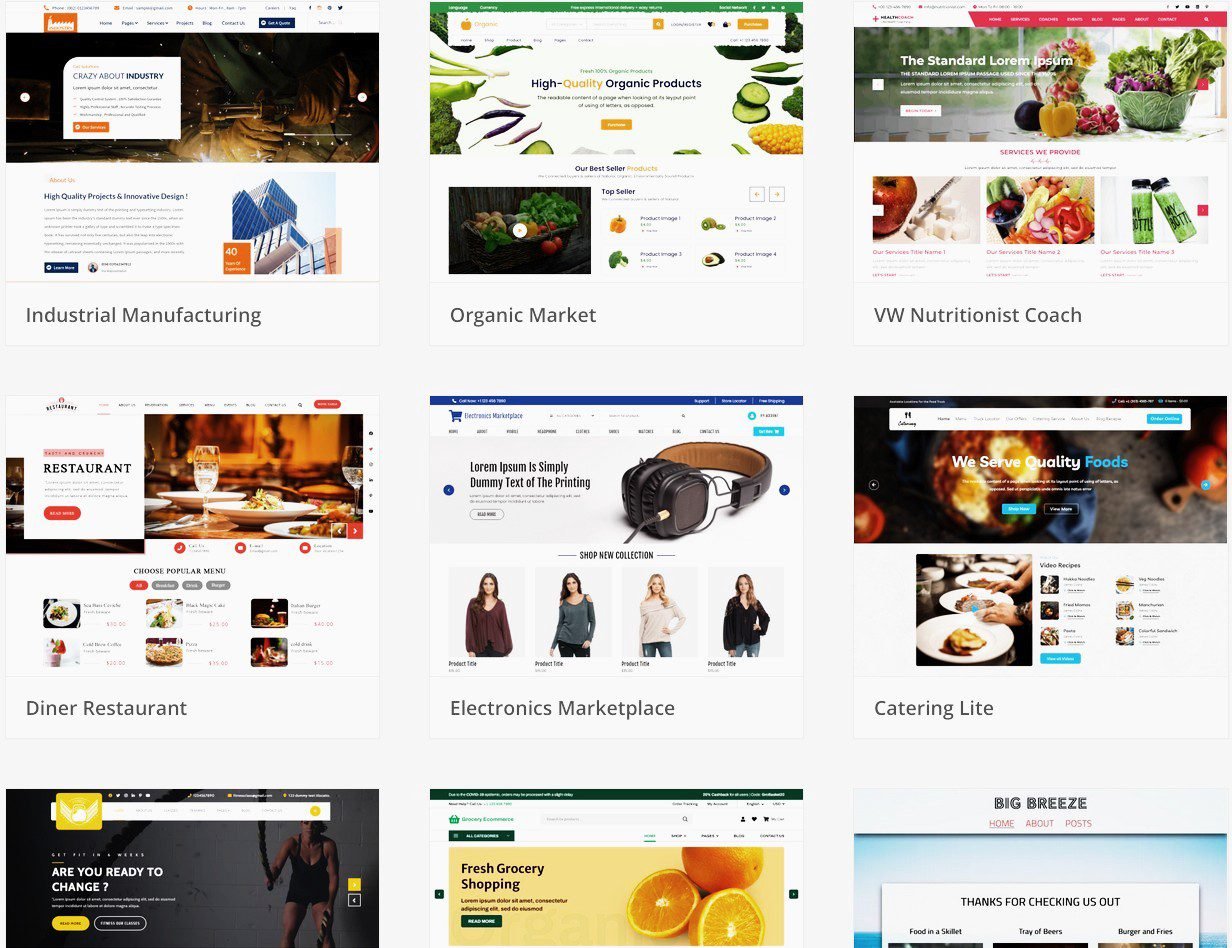
If any theme catches your attention, simply hover your mouse pointer over it to bring up the preview button.
Then click on it to check it out.
Check out the features, style, colors, layout, fonts, and other features, to see if it is a theme you like and can customize to your taste.
Again, you should look for simple designs and great layouts, to improve user interaction with your blog.
Once you find a theme you like, hover your mouse over it to bring up the Install button. Click on it to install it.
Wait for the theme to completely install.
After it’s been installed, a blue Activate button will appear. Click on it to activate it (You need to activate it to be able to use it).
If none catches your fancy, click the Clear button to delete the check marks and tick off a new set of features.
Then click on Apply Filters to bring up new sets of themes until you find your preferred choice.
The second option is to purchase a paid theme.
There are thousands of premium themes that you can buy from third-party websites.
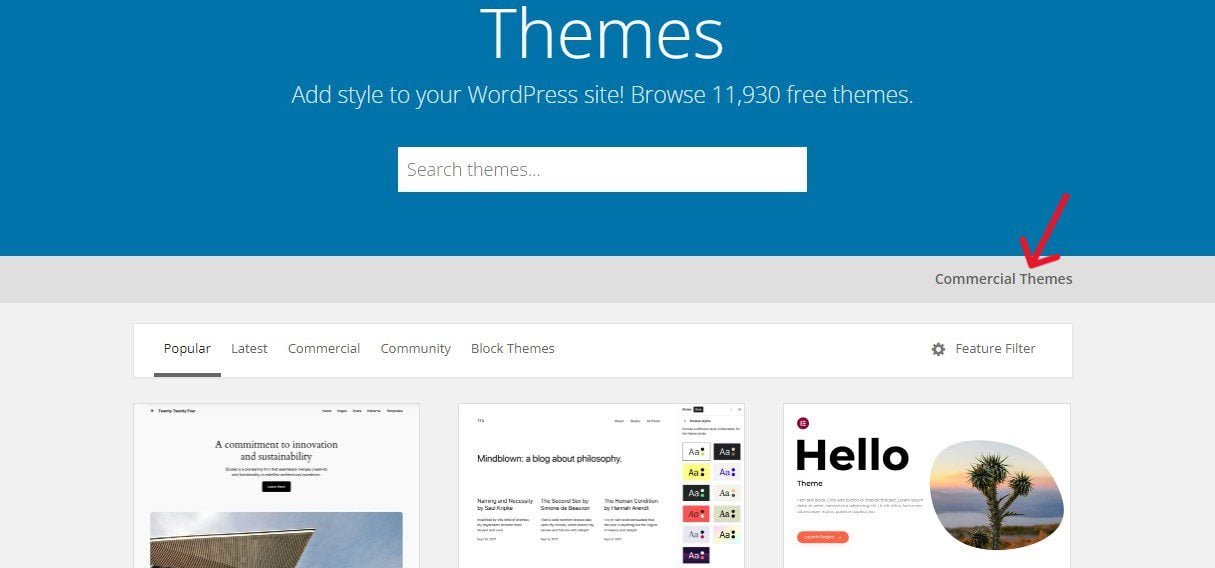
You can find some of them in the WordPress theme directory. Simply click on Commercial Themes at the top right-hand corner of the page.
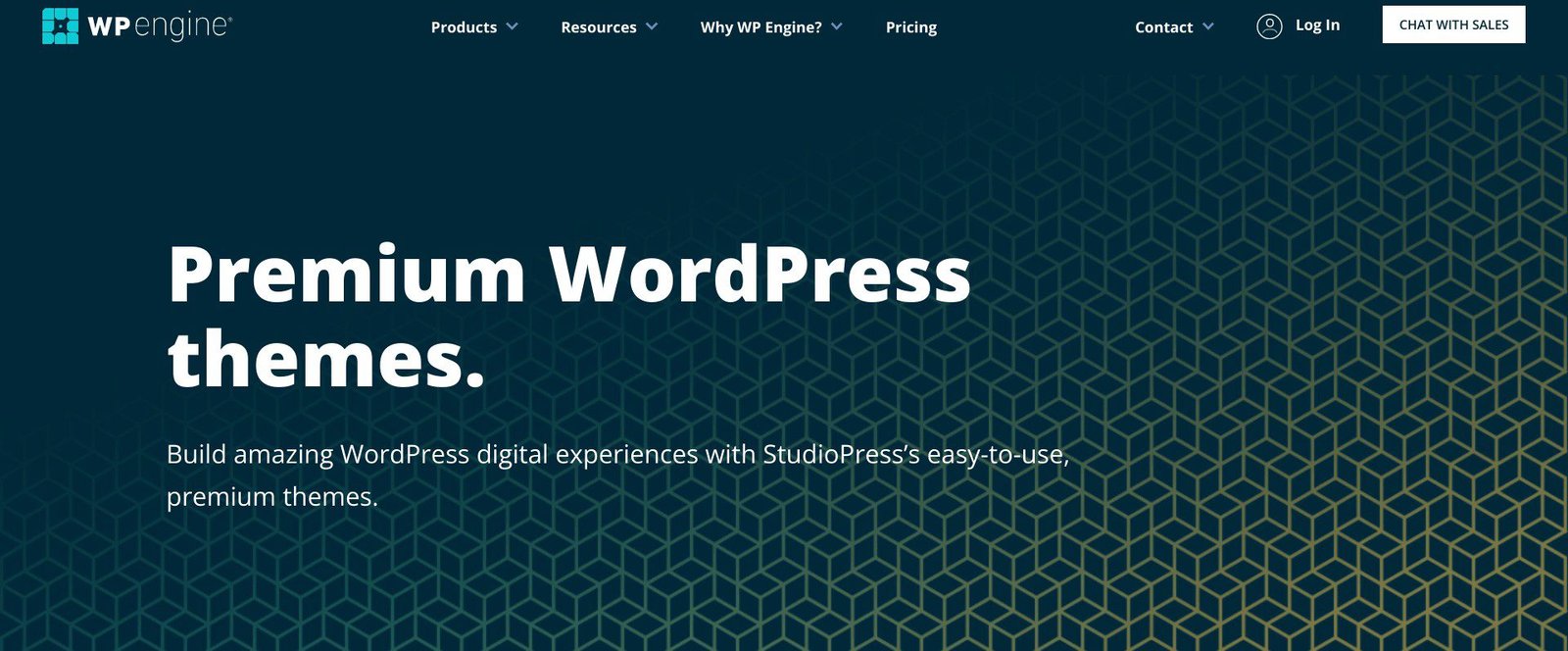
To find more premium themes, visit marketplaces like ThemeForest, Envato, StudioPress, etc., or the websites of individual developers.
Some people prefer paid themes because they have 24/7 support behind them.
You can buy a premium WordPress theme for keeps. The price range is between $20 and $150.
However, if you’re just starting out, you can start with a free theme to cut costs. Many free themes are good enough and will meet your needs.
As your blog grows, you can then upgrade to a premium theme.
Customize your theme
By default, virtually all WordPress themes come with some customization options. That said, they vary from theme to theme.
So, you want to choose a theme that allows you, to a large extent, to make the changes that fit your brand.
To launch your theme customizer interface, click Appearance ≫ Customize in your WordPress dashboard.
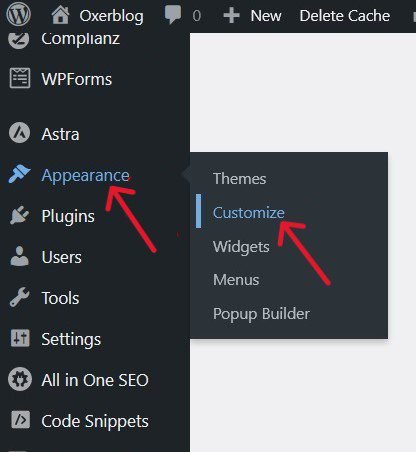
You can make all kinds of changes to your theme to make it uniquely yours – from its color to header, footer, sidebar font, and so much more.
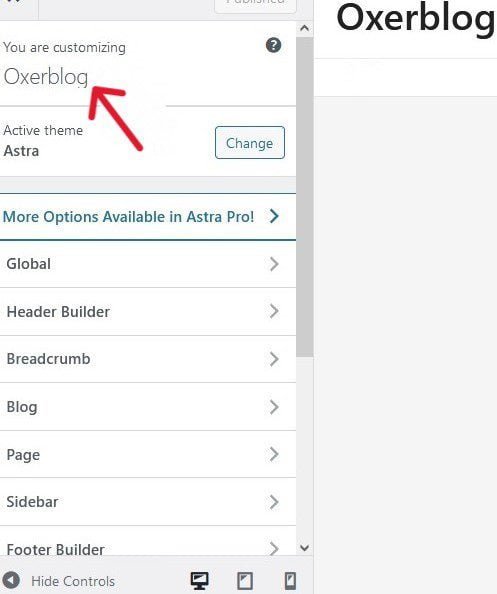
However, make very simple changes. Because again, simplicity is a hallmark of a great site.
As you tweak it, a good theme will allow you to preview your changes before you publish them to make them permanent.
You can add more custom designs to your theme with a drag-and-drop page builder like SeedProd or Divi. It is a plugin so you don’t need to learn codes.
Once you select and customize your design, the next stage is to add content to your blog.
Step 4. Add Content to Your New Blog
Again, by default, WordPress allows you to create two types of content using the Posts and Pages tabs on the left sidebar of your dashboard.
At first glance, both screens look the same.
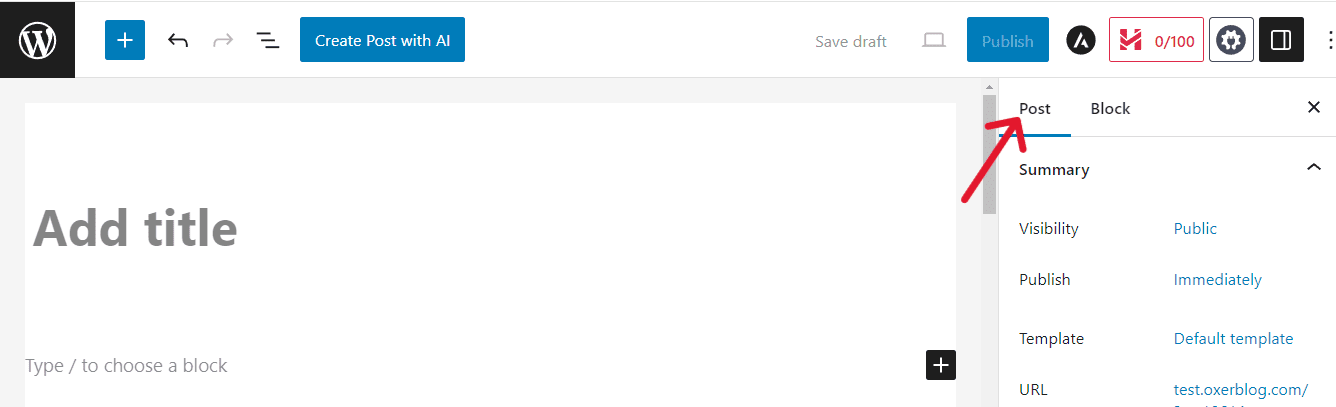
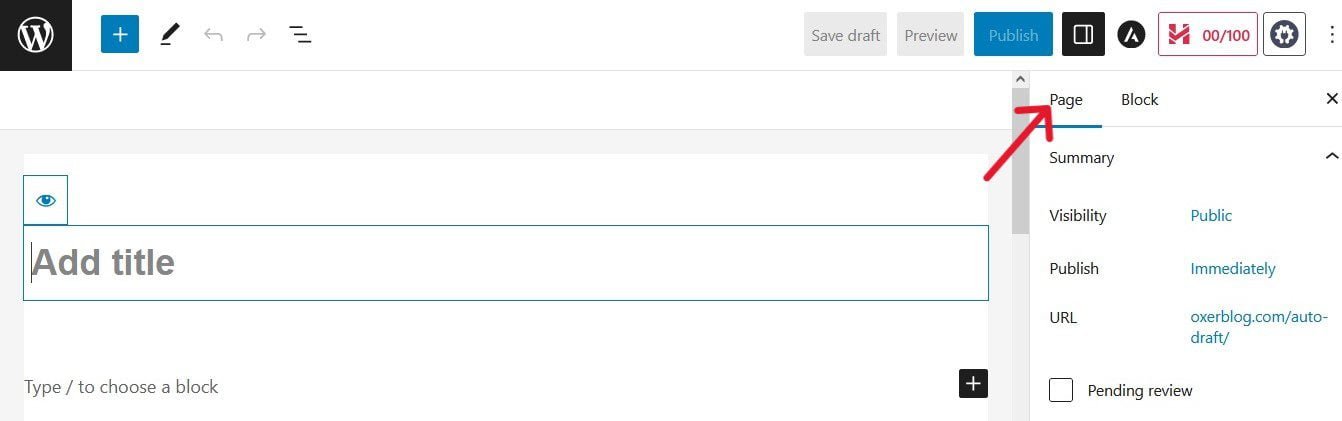
However, they’re different, and each has its specific use. So they cannot be used interchangeably.
The post editing screen is only used to create and edit posts, while the page editor is for creating and editing pages.
In other words, the post editor cannot create pages, and the page editor cannot create posts, because they’re different.
Posts are constantly evolving content that is susceptible to time and date and, as such, requires frequent updating. For example, the post you’re reading now.
Pages are unchanging, one-off content that is immune to time and date and can remain relevant for as long as the blog is functional. For example, my homepage.
However, you can also redesign your homepage every once in a while, if you want to.
Posts make up the bulk of a blog’s content. That’s why they’re called ‘blog posts’. So, you’ll be creating a lot of them over time.
A post is simply a piece of content that includes text, images, videos, infographics, and other items of content regularly published on a blog in reverse chronological order. And the newest is always on top for easy access.
Once you have decided on your blog post ideas, you can go ahead and create your first blog post.
Create your first blog post
To get started, click on Posts ≫ Add New Post in your WordPress admin area.

This will bring up the in-built WordPress editor for creating a new entry.
The WordPress editor is quite similar to the popular word-processing tools.
Again, this is where you will create all your blog posts.
The new editor was released in December 2018 and comes with a unique feature called Blocks.
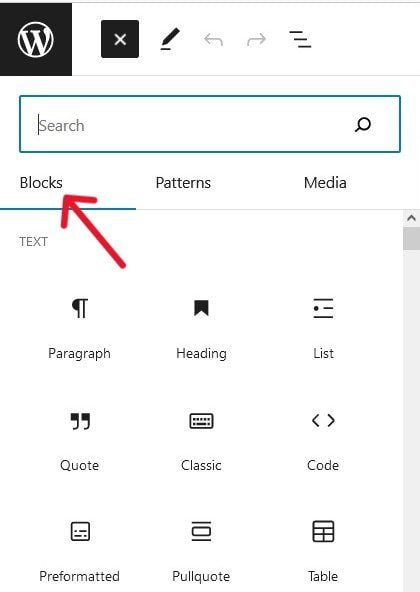
That’s why it is called the WordPress block editor (nicknamed Gutenberg editor).
Because it’s beginner-friendly, you can easily learn how to use the WordPress editor to create great-looking posts and pages.
The block editor has more than 50 different blocks ready for use, and you can add more through WordPress plugins.
They allow you create separate content layouts for each and every item you want to add to your blog post.
So, each feature on your post such as your heading, paragraph, list, image, video, table, quote, and all other items, can have their own distinct block.
Click the blue Toggle block inserter (+) sign on the top left corner of your screen, or the black Add block (+) button on the right of the white area, to view the different blocks.
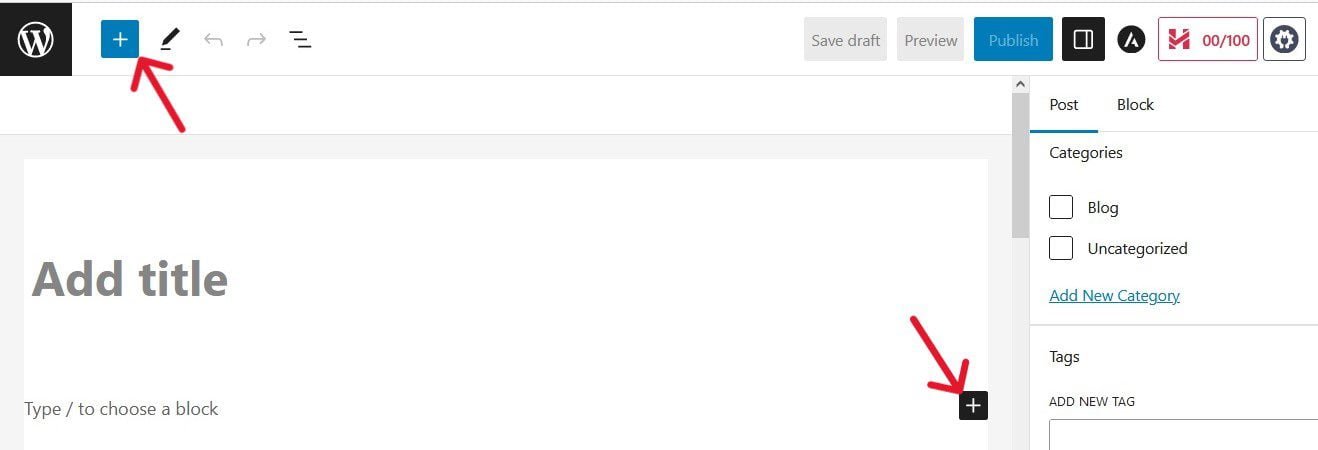
To write your first blog post, type your title into the Add title field which is automatically the first block.
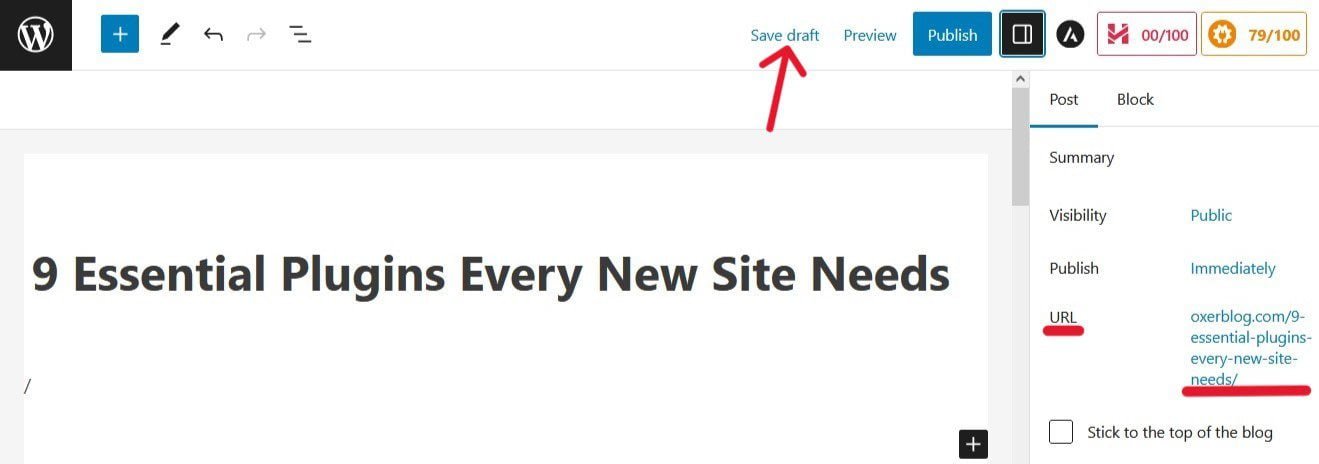
Once you add your title and save the post as a draft, its URL is instantly generated with the keywords in your heading.
For example:
To add content to your post, move the cursor with your mouse or the tab key on your keyboard to the large text area below your title.
You can either start with the default paragraph block or type a slash (/) to choose a different block.
You can change a block by clicking the existing block or any of the (+) buttons.
You’ll want to add at least relevant images, screenshots, etc. to your blog posts to boost your content and make it more engaging.
To add a new image, move the text cursor to where you want to insert it; then click on the (+) icon to select the Image block.

Click Upload (if you want to add it from your computer), Media Library (if you’ve already uploaded it to the backend of your blog), or Insert from URL (to enter the image’s URL).
I prefer using the Media Library channel for my images, even when uploading them from my computer.
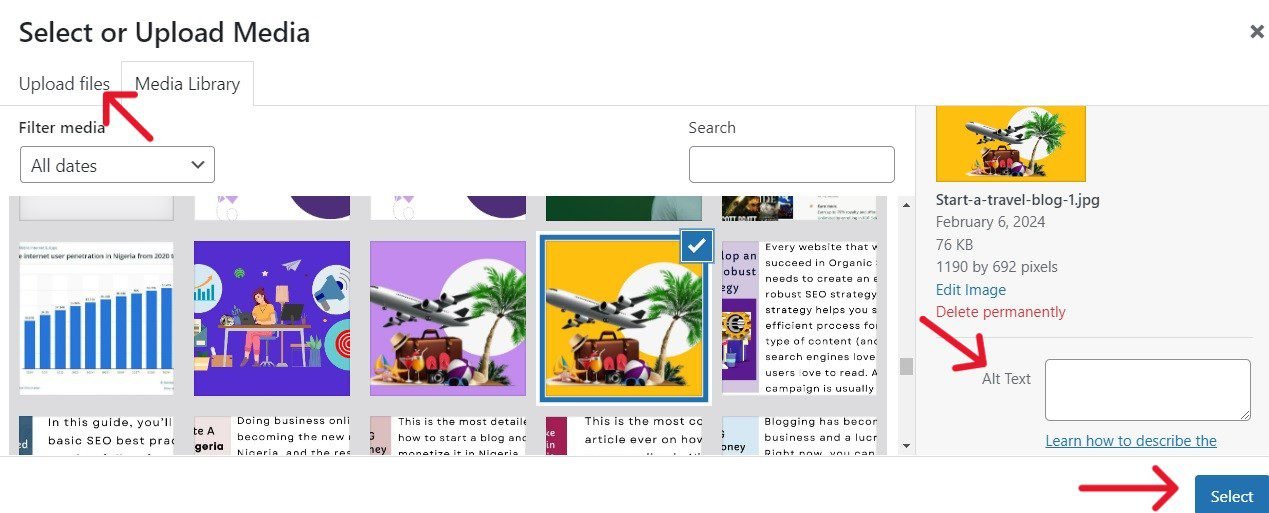
Once you choose the image to add to your post, write the Alternative Text and click on the blue Select at the bottom right corner. And it will instantly appear where you want it.
You can also write the Alternative Text in the right column of the post editor, after adding the image. Then scroll down to add the Title Attribute under the Advanced menu.
Next, if need be, resize your images to what you want after adding them to your content.
Simply scroll down the Settings tab in the right column of the edit screen to select your preferred size.
Make sure it displays well on all devices with the View button at the top of the editor.
You can also add links to your image. Click on the image to bring up the link icon at the top the editor.
Posts also have some unique features that you won’t find on pages. Two of these are Categories and Tags.

They can be used to organize your blog posts into groups; however, both of them are different.
If used correctly, they can improve your SEO rankings.
All blog posts are required to be filed under a category at least, and WordPress automatically files them under the default Uncategorized category.
So, it is important to create a new default category for your blog posts.
When you done writing, you can preview your post in all devices – mobile, desktop, and tablet – before you publish it.
Simply click the View button at the top of the screen to do so.
You also want to check for grammar and spelling mistakes, your content layout and flow, your conversational tone, etc.
You should optimize your content for search engines before you publish it (more on this in a bit).
Once you’re satisfied with the post, click the blue Publish button to make it live.
Congratulations! Your first blog post is now live.
You can add more posts to your WordPress blog using the same process.
Create your blog’s static pages
Your blog will also need important static pages such as the homepage, About page, Contact page, etc.
Simply go to Pages ≫ Add New Page in your WordPress dashboard.
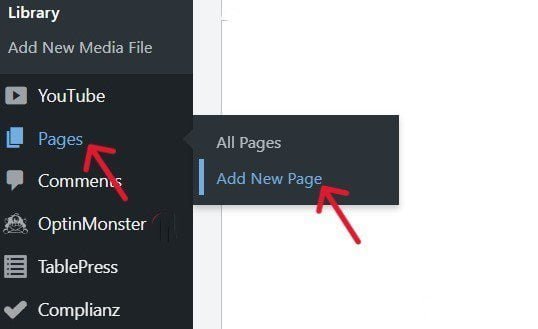
This will launch the editor for creating pages.
The process is basically similar to how you create your blog posts.
Stage Four: Customization and Optimization
This is the second-to-the-last stage of your blog setup.
This is where you’ll modify your blog to suit your needs, and improve its content to help it appear and rank in search results.
How you want your blog to function and perform is completely up to you.
Step 5. Add Essential Features Using Plugins
There are essential features that every blog must have to give it the basic functionality that is required to get it up and running.
There are countless WordPress plugins available that you can use to add these features (and more), to extend your blog in any way imaginable.
Again, presently you can access about 60,000 free plugins in the WordPress plugin directory.
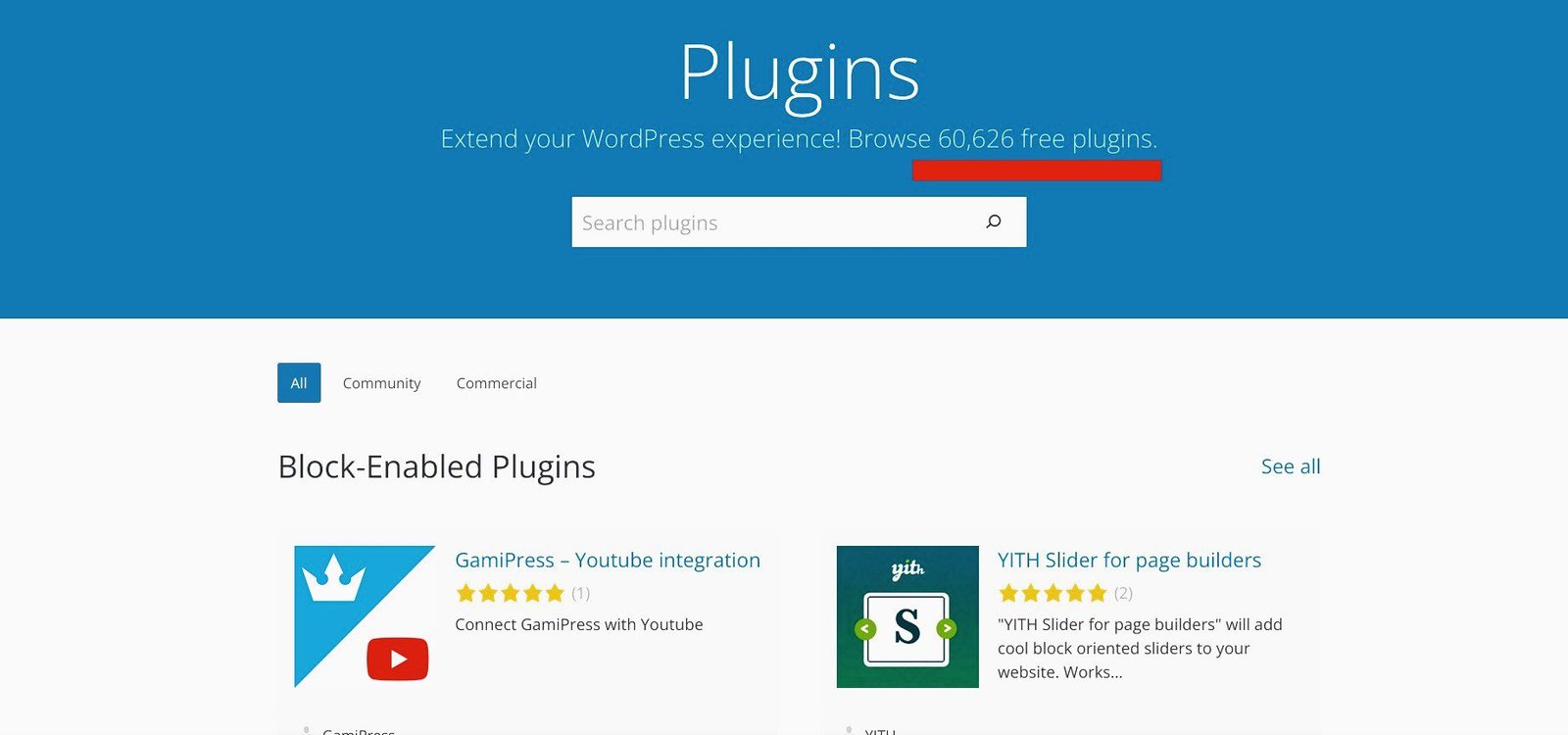
And that number keeps growing by the day.
In addition, thousands of premium plugins are available on third-party sites like ThemeForest or the individual creator’s website.
So, the good news is there’s a plugin for every feature you need; if it isn’t available yet, it can be created.
This is why WordPress is so different from the rest.
It is important, however, that you keep the cost of building your website to a minimum when you’re just starting out.
So, start small with only the essential features you can add with free plugins.
The free version will get your new blog up and running.
That said, the sheer number of free WordPress plugins often leaves new bloggers scratching their heads about what’s what.
To make it easy for you, I have listed below the essential features that every blog must have to run smoothly, and the best free plugin options available to add them.
Your blog will need:
▸ A Contact form for users and visitors to get in touch with you easily.
WPForms Lite is the best form builder plugin in the market.
▸ Custom landing pages, homepage, more theme customization, etc.
SeedProd Lite is the number one drag-and-drop page builder in the market.
A good alternative is Elementor or Divi.
▸ Improve its search visibility and rankings.
All in One SEO is probably the best SEO plugin available. It currently has 3+ million active users.
A good substitute is Yoast SEO with over 5 million installs.
▸ An efficient email marketing system.
HubSpot is probably the best free email tool for building and sending personalized emails in minutes.
A good alternative is Convertkit.
▸ To improve its speed and performance.
WP Super Cache is the number one free caching plugin. It currently has more than 2 million active installs.
A good alternative is W3 Total Cache with 1 million+ active installs.
▸ Backups for its content just in case.
UpdraftPlus is the world’s highest ranking and most popular scheduled backup plugin. Presently it has 3 million + active installations.
A good replacement is Duplicator wtith 1 million + active users.
▸ To secure its content from hackers.
Sucuri Security is a top WordPress malware scanner and in all matters related to website security. Presently, it has nearly 1 million active users.
▸ Google Analytics (GA) to track all your visitors – how many visits, how they linked to your site, and what their activities are on your blog.
MonsterInsights is the easiest and best way to set up Google Analytics on your blog.
▸ To be protected from spammers.
Akismet Anti-Spam Protection is the most trusted anti-spam for WordPress and currently has over 5 million active installs.
▸ To connect with visitors after their visit.
PushEngage is the market’s most powerful and user-friendly web push notification service. It currently has 10,000+ active installs.
▸ To set a custom 404 error page to keep visitors on your site.
Custom 404 Pro is a great plugin for displaying and redirecting your customized 404 error page in WordPress. It currently has 10,000+ active installations.
Your website is almost done – you just have two steps left before we look at ways to make money from your blog.
Step 6. Optimize Your Site for Search Engines
About half of your users will visit your blog via organic search results.
According to

What that simply means is that if your website doesn’t appear and rank high on page 1 of search results, more than half of your target audience will not even know your website exists.
That’s why you need to get your blog posts ready for Google Search.
You need to make sure that every aspect of your site runs smoothly and is well-optimized for SEO.
This is the only way your posts stand a chance of ranking in Search.
According to Backlinko, only 0.63% of searchers visit page 2 upward.
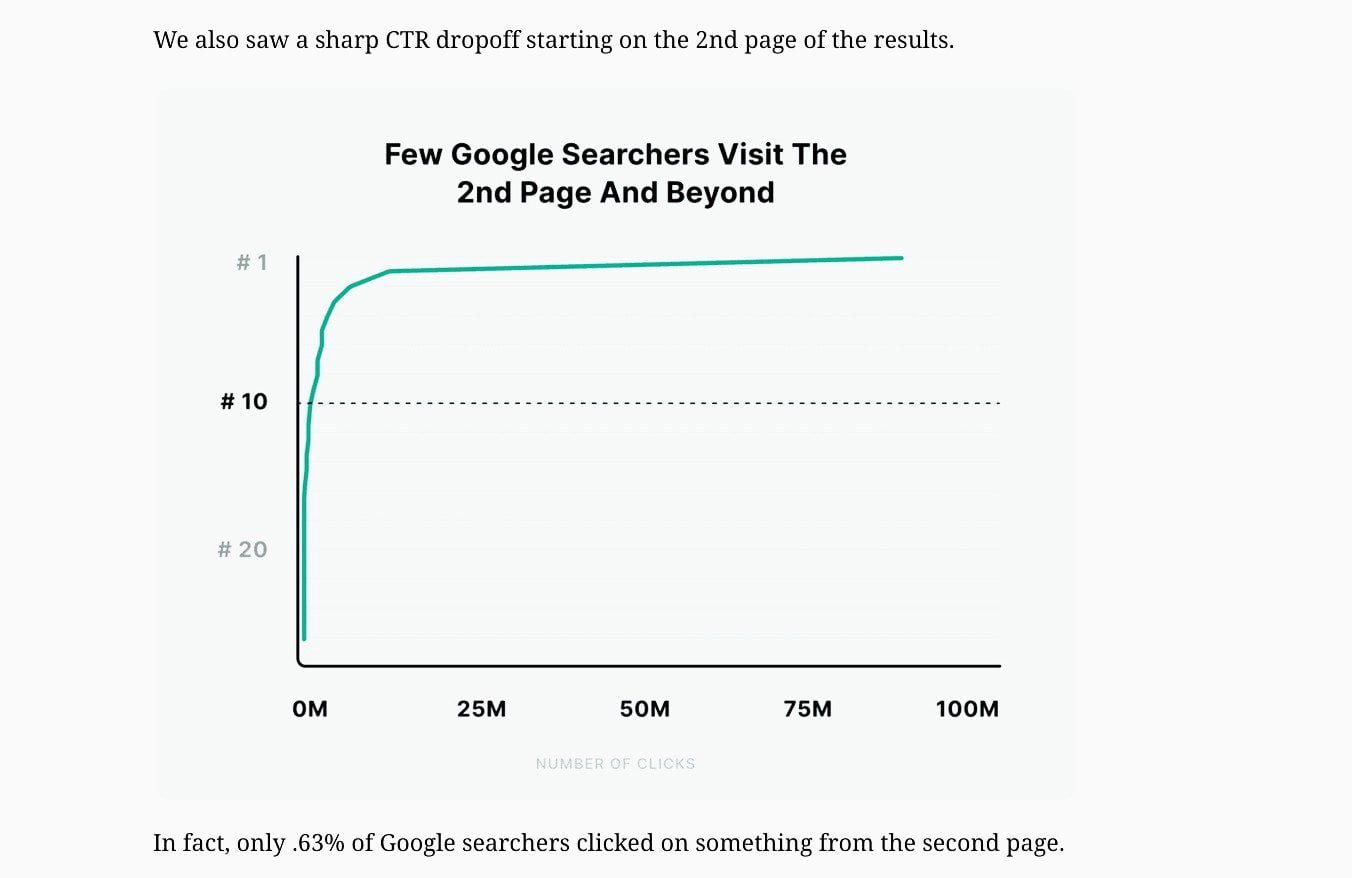
So you wouldn’t want your content buried in the second page of search results, would you?
‘Optimized for SEO’ simply means you take the time to create exceptional content that fully answers search queries.
Then, you go the extra mile to ensure visitors have a swell time on your site, to attract more traffic.
When you make your content search-friendly, search engines will easily find and gladly serve it among the best answers.
And users will thank you for giving them a memorable experience on your site.
They will tell others, who themselves will spread the word, and they all will keep coming back for more.
And once search engines see that more users love your posts, they will continue to rank your blog high in organic search results.
With that, let’s see how to optimize your posts for search engines:
I have grouped them into 3 categories:
▪ On-Page SEO
▪ Off-Page SEO, and
▪ Technical SEO
Let’s take a look at them one by one.
On-Page SEO
On-page SEO involves creating useful content for searchers, and optimizing your posts so that search engines find and feature them in search results.
Below are some of the essential steps you need to take to improve your on-page SEO.
1. Do Keyword Research for Every Post
Keywords (or SEO keywords) are terms your target readers type into search engines to find what they want.
Google says keywords are the most basic factor that it uses to determine the relevance of a post to a search query.
So, your SEO campaign should begin with finding the keywords your target audience uses to quickly find specific content.
You want to also find out the search volume, intent, and competition for these keywords.
If you are just starting out, consider focusing on those keywords you can bring fresh perspectives to.
Free SEO tools like Google Autocomplete, Google Trends, AnswerThePublic, among others, will also come in handy here.
2. Write Quality Content for Each Post
Once you have found a bunch of keywords, the next step is to create fresh, unique, and helpful content around them.
The best practice, however, is to choose one lead keyword per post. Then, optimize your content around it, to improve your search rankings for that term.
Weave your lead keyword neatly into one of the introductory paragraphs of your post, without going overboard.
As you write, strike the right balance between keyword frequency and keyword stuffing.
Include synonyms and related keywords to add more context to your content and make it richer.
This can help users and search engines better understand the topic.
3. Create an Engaging Title for Each Post
Your post title is the first on-page SEO element.
Your post title is the title text that summarizes in a few words its content to users and search engines in the <head> element of each HTML document.
Since the content of every post is different, you should create unique title text for each that accurately describes what the post is about in about 60 characters.
Search engines refer to your page title to identify its topic, and to differentiate it from other posts on your blog.
So, write high-quality post titles, because they are crucial for SEO.
Your post title is not the same as your title link.
However, if your post is served in Search, Google says its title text can be used as the title link for the search result.
Also, give priority to your lead keyword by frontloading it in your post title.
It simply means your main keyword should be at the beginning of your post title, where possible.
This will help Google to easily identify the primary keyword for each post.
4. Use Headings to Chunk Your Content
Depending on importance, organize your content by assigning different sections under different headers.
The headline is usually the main heading, H1.
WordPress by default comes with the Add Title field for your main heading.
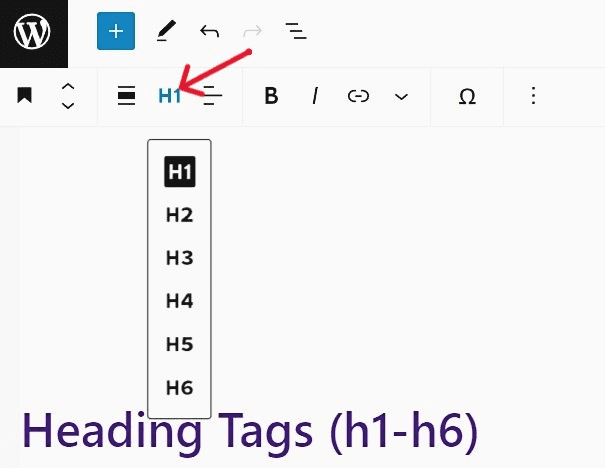
So you may not need to use the H1 tag again.
You only need to structure your content using heading 2 (H2) to heading 6 (H6), depending on how lengthy the post is.
This will improve the appearance of your post and make it easy and enjoyable to read.
That way, readers can easily skim your content, quickly grasp what it contains, and zero in on the area(s) that interests them the most.
However, use headings only where it makes sense.
Your heading tags should include your main keyword for each post. And it should be short and relevant to their section and the whole content.
5. Create A Unique URL for Every Post
Each post should have its individual address, just like all pages, images, videos, etc. have theirs.
For example, here is the URL for one of my posts:
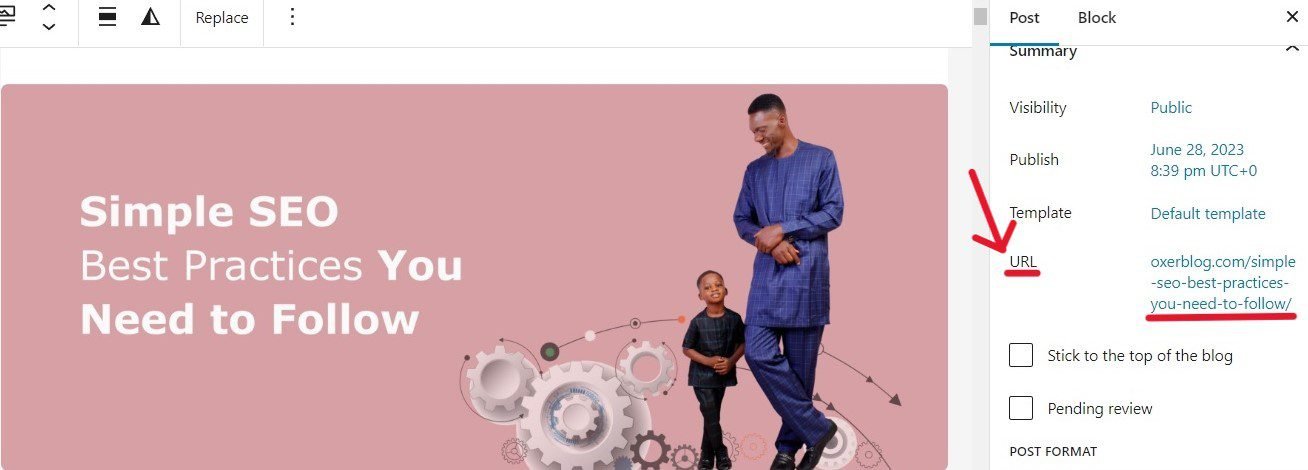
Without a separate URL, search engines cannot find, crawl, index, and serve each of your posts in search results.
Google also features your post URL as a breadcrumb to help users to understand the content.
So using descriptive words in your URLs can improve your click-through rate in search results.
Each post should have a different URL that describes its unique content.
So, make sure no two posts have the same or confusingly similar addresses.
Also, use only words (including keywords) to create user-friendly URLs for your posts. This can improve site navigation for users.
6. Write Great Meta Description Tags for More Clicks
A meta description tag is a brief summary of a post (or page) that can help visitors easily understand what the content is all about.
Google sometimes features your meta descriptions as snippets for your posts in search results. Which can attract more clicks to your blog.
So, alongside title links and URLs, a snippet conveys to users the focus of a post in search results.
For example, here is what the snippet for this post looks like:
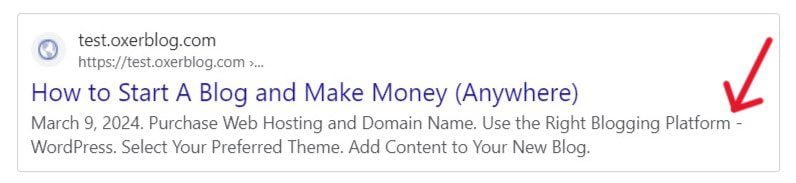
So, include every critical information about a post in your description, that can prompt visitors to click your result.
7. Add SEO-optimized Images to Your Posts
Images play a big part in how visitors find websites for the first time.
So, as much as possible, add unique and SEO-optimized images to buttress your well-written text.
It’s been proven that sites with original, relevant pictures rank higher in Google Search than websites with stock images.
Make sure you place each image near the text that they’re supporting.
Your images should have a short filename and alternate text describing it to users and search engines.
Also, add keywords to the image description, to help Google and visually-impaired people easily identify the image.
8. Use Clickable Internal Links Between Related Posts.
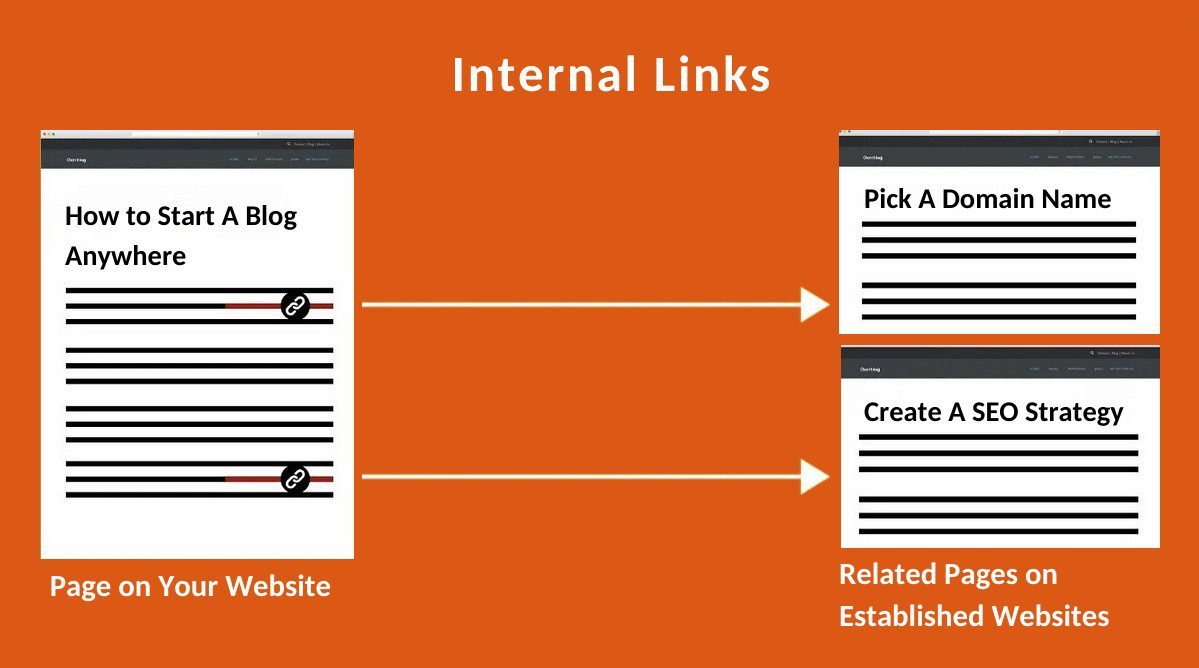
Internal links are links within your website, between sections of a post, and between two posts.
For a new blog, it’s crucial to use meaningful and clickable internal links to connect all important posts and pages, as recommended by Google.
First, they make your website easy for users and search engines to navigate.
Second, the authority of high-ranking content robs off on new or low-ranking posts, which can help their positions in search results.
Use short, descriptive, keyword-rich anchor text that gives a basic idea of what the linked page in each link is all about.
9. Create External links to Big-Time Websites
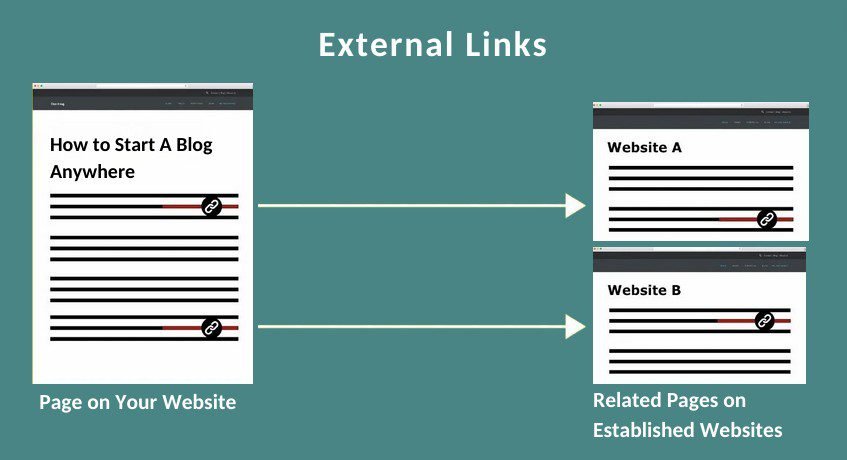
External (or outbound) links are links from your post to top-ranking websites, aiming to provide your users with a better understanding of a topic.
According to a previous study, websites with external links rank higher in search results than those without links.
Make sure the anchor text in your external links is concise, descriptive, clickable, and relevant.
Don’t forget to include your target keyword in every link to have maximum impact.
Off-Page SEO
Off-page SEO refers to the process of obtaining references and building links from other websites to your blog.
The main way to accomplish this is by acquiring organic backlinks.
10. Get Quality Backlinks from Other Sites to Yours
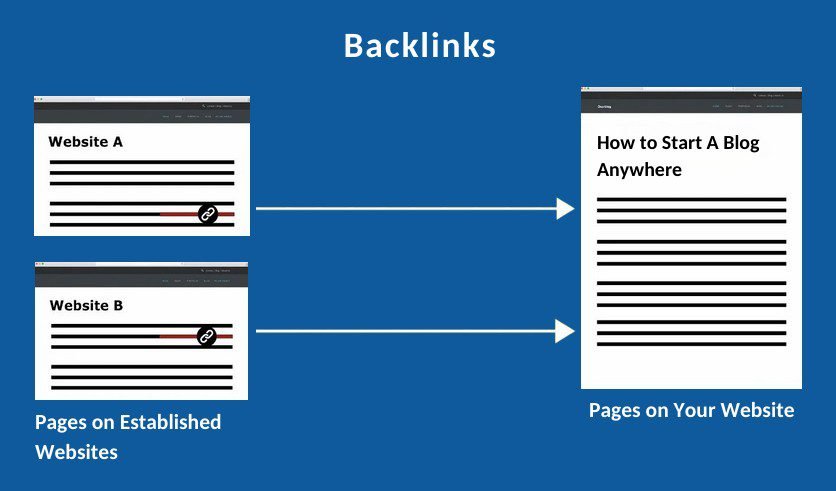
Backlinks are links from other websites that direct users to your website.
They are among Google’s top 3 ranking factors.
When you start a new blog, you won’t have any backlinks initially.
But as you invest time and resources in creating high-quality posts that meet search intent and are well-optimized for SEO, your blog will quickly become recognized as a valuable source of information.
Others will eventually begin to link to your content from their websites.
That said, links from relevant and well-established websites carry more weight than those from low-authority sites.
So, make sure to focus on acquiring high-quality backlinks from these websites.
Technical SEO
Technical SEO ensures that every aspect of your blog runs smoothly and is well-optimized for search engines.
This helps search engines find and crawl your site more quickly and helps users to navigate your blog easily.
Here are some key steps you need to take to improve technical SEO:
11. Choose the Simplest URL Structure
Your URL structure, also known as the permalink structure, determines the unique address of each post and each piece of content on your blog.
WordPress automatically enables the “Post name” option by default.
Because it is the most SEO-friendly permalink structure for blogs and simple websites. So you may not need to change it.
Having said that, if you’re setting up a News blog for example, you may prefer to use any of the date-structure options, so that dates can be part of your posts’ URLs.
The best URL structure, however, is the one that is the shortest, simplest, and most reader-friendly.
12. Prioritize Mobile-Friendliness

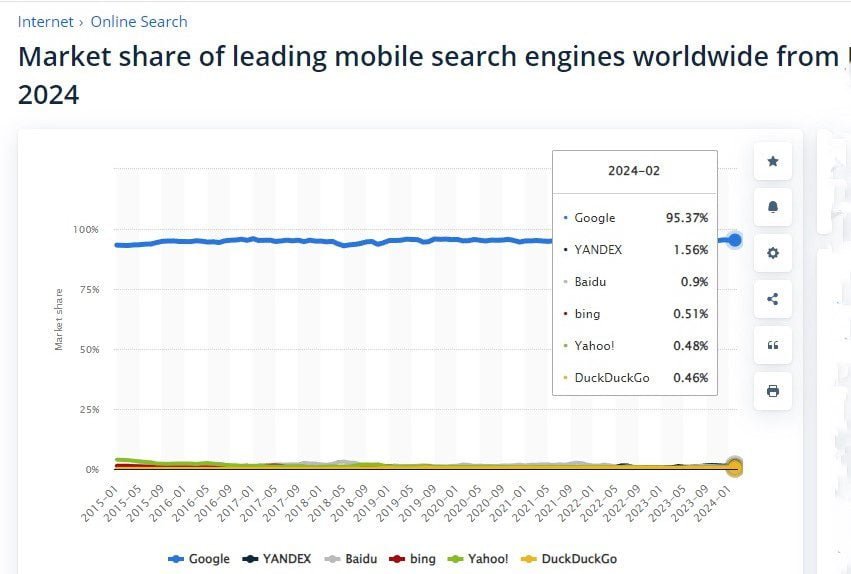
Statcounter’s data show that web traffic via mobile is exploding, not just globally, but also in virtually every country and region.
That’s why in 2019, Google launched a ‘mobile-first indexing’ for all new websites.
It simply means Google ranks posts in search results based on their mobile version, even when the search is initiated from a desktop.
So, if you want your site to do well in Search, you need to optimize it for mobile.
Over 96% of all mobile searches are done on Google, so you want pay attention to what they recommend.
You can use Google’s Lighthouse tool to see how your blog is fairing.
13. Secure Your Site with HTTPS

HTTPS simply means Hypertext Transfer Protocol Secure.
From day one, you need to keep your blog secure with HTTPS.
Because HTTPS has been a ranking factor since 2014. And it is an important element of Google’s page experience signal.
If you glance at any search result, you’ll see that only websites with HTTPS encryption are featured on the first page.
This is because, for Google, security is a top priority.
So, you want to make sure your posts are served over HTTPS. It will increase your chances of ranking higher in search results.
Besides, users don’t trust sites that aren’t well protected because they don’t want their data compromised.
Thankfully, all top WordPress hosting providers offer free SSL and built-in security to help websites keep their visitor and customer data safe.
Once your blog is hosted with one of them, you can be sure your site is secure with HTTPS.
14. Improve your Site Loading Speed
Users and search engines don’t like slow websites. So make sure each of your pages loads fast on all devices.
According to Think with Google, the possibility of a searcher clicking back increases 32% as page load time goes from 1 to 3 seconds.
And some users may never visit your site again.
Since 2018, site loading speed has been a ranking factor in mobile search results.
High-quality and useful content still holds sway over the web.
However, in cases where multiple posts have similar quality and content, Google says page speed becomes the deciding ranking factor.
You can measure your site’s current performance with Google’s speed tools.
To improve your site speed, you need to optimize your images for the web, select a lightweight theme, and use a caching plugin, and a CDN, among others.
15. Choose a Top Web Host Provider
The web hosting company you choose for your blog matters a lot.
While Google doesn’t rank you based on your web host and hosting plan, both can impact your website’s performance in search results.
For example, a web host that keeps nodding off will cause your rankings to dip. And downtime isn’t funny to users and Google.
So, you want to choose a web host with a 100% uptime guarantee and a track record, all year round.
Also, a web hosting plan with a small bandwidth will slow your site’s speed and performance.
While you can get started with Shared hosting, you want to upgrade to a higher plan with bigger bandwidth as your site’s needs evolve.
If need be, you can change your web host provider.
Some top web hosts include caching, cloud hosting, etc. in their hosting plans. This will boost your speed and rankings.
16. Add Your Blog to Google Search Console
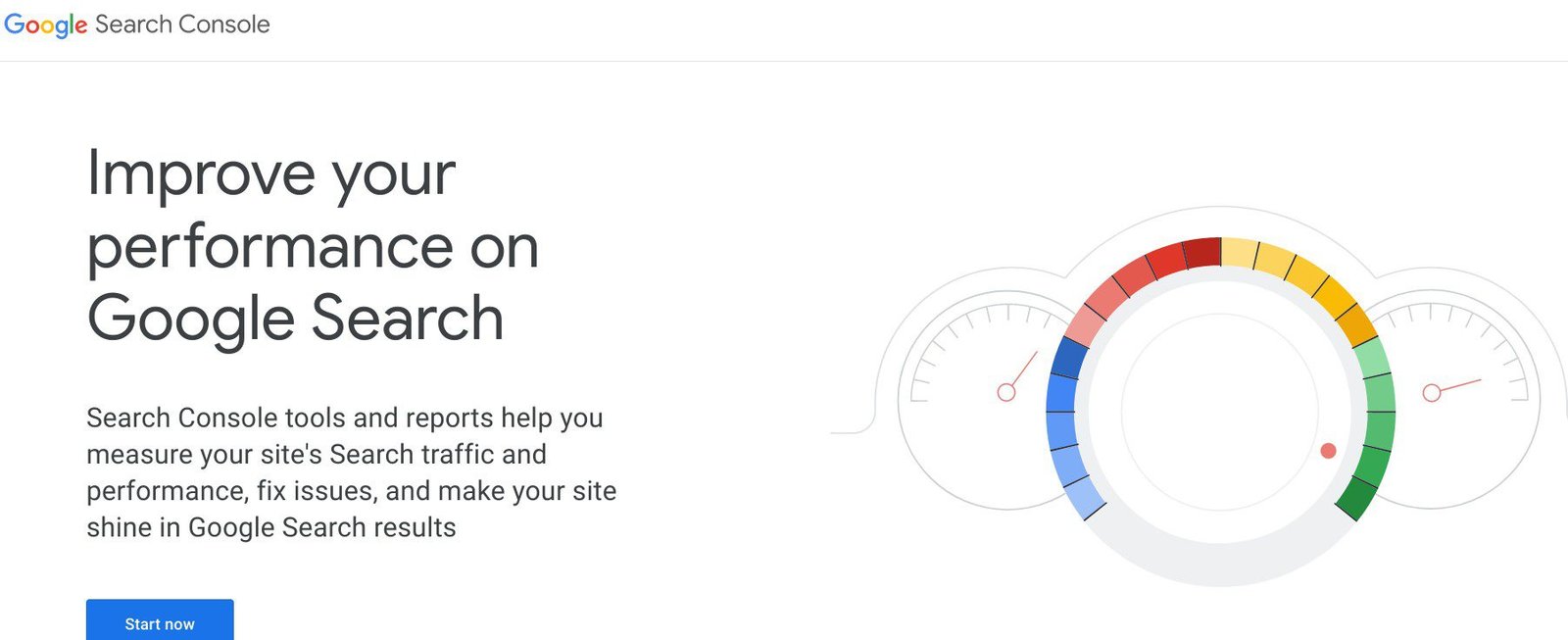
Google Search Console is a free umbrella tool you should sign up for from day one if you’re serious about optimizing your site to push for top rankings where you can attract more relevant traffic.
Google Search Console offers daily, site-wide data that can help you monitor and improve your blog’s position in Google Search.
These data include the number of views and clicks and your average position in search results.
So, you’re constantly keeping track of your blog’s performance in Google Search and making important adjustments, where necessary, to improve your rankings.
However, you don’t have to log in daily to view the Search Console dashboard. Google will alert you through email if there are issues you need to fix.
But you should check your site’s health at least once a month.
While you don’t have to sign up for Search Console to appear in Google Search results, this amazing free tool helps you to understand and optimize how Google and users see your site.
Stage Five: Marketing and Monetization
This is the last lap of building your blog.
This is the stage where all your hard work begins to pay off.
How successful your site becomes will depend largely on the promotional and monetization strategies you adopt, and how much work you put in.
So, you’ve got to give it your all from day one; there are no shortcuts.
Step 7: Promote Your Blog
Don’t leave anything to chance. Start beating the drum for your blog the moment it goes online.
That means you should put in place the strategies you want to use before you go live with your blog.
With effective marketing from day one, you can speed up the discovery of your posts by more potential readers, and widen your loyal user base.
This will also have a huge impact on your backlinks.
Let’s look at a few popular ways to promote your blog:
1. Set Up an Email Newsletter Strategy
Email newsletters are still as effective as ever because they remain a favorite means of communication for most people around the globe.
According to Internet Live Stats, over 284 billion emails are sent daily.
That’s why they are one of the best ways to promote your blog.
Email helps you to connect directly with your user base.
They usually are the first to know when your new post is ready, or any other good news you have to share about your blog.
But first, you’ll need to put an efficient strategy in place to establish and build a list of subscribers.
From day one, set up your email strategy with a popular marketing platform like Constant Contact or Aweber, to start building your subscriber base. Don’t wait until you have built a large audience.
Whatever you spend on email marketing is totally worth it.
According to Statista, it returned $36 on every $1 invested as of June 2020.
2. Publish Your Best Posts on Article Submission Sites

Free article submission sites are some of the best places to promote your new blog.
These sites allow you to showcase your original and best content for free.
Article submission is one of the most effective Internet marketing strategies with a huge ripple effect.
This opportunity gives you exposure, boosts your credibility, increases your traffic, and generates leads to your blog.
Also. this is one of the quickest ways to build the all-important, quality backlinks that can improve your organic search rankings, and boost your domain and page authority.
So, article submission is a proven off-page SEO and brand awareness strategy at no cost to you.
3. Exploit the Opportunities of Networking
Networking is the lifeblood of online relationships.
Thankfully, established blogs are always willing to give a hand by promoting other sites to their audiences.
So, from the outset, cultivate relationships with similar blogs – especially high-authority sites – in your niche and related niches.
First, find guest posting opportunities on quality sites, both big and small, in your community.
Second, leave sincere and helpful comments on their sites and share their content on social media to get on their radar.
Third, once you’ve got your guest post that can help their traffic, reach out to these blogs through personalized emails to see if they welcome the idea.
Some websites charge for guest posts because it is an easy way to build backlinks. The average cost of a guest post is $77.80.
Also, you can use your guest posts to build your email list by highlighting and linking to related content that people have to sign up for.
4. Share Your Posts on Social Media Platforms

Promoting your content on popular social networks like Twitter, Facebook, Instagram, Pinterest, etc. can help popularize your blog and improve your click-through rate (CTR).
In 2023, 30.2% of social media users worldwide used social media platforms primarily to find content such as blog posts, videos, etc. (Datareportal).
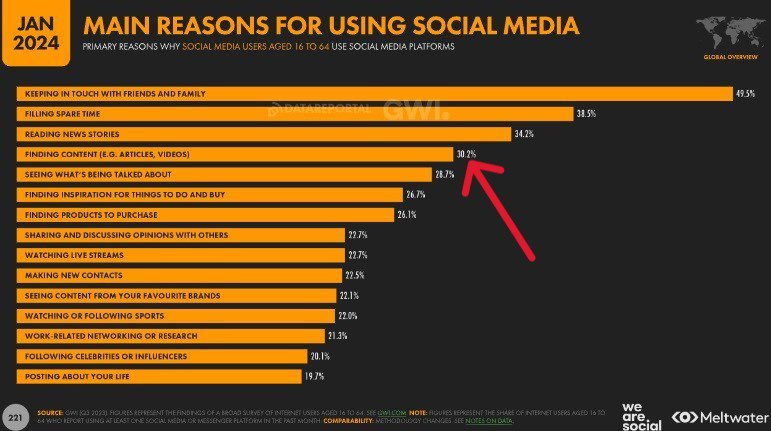
If your blog targets a particular demographic, this recent chart shows social media preferences by age and gender:
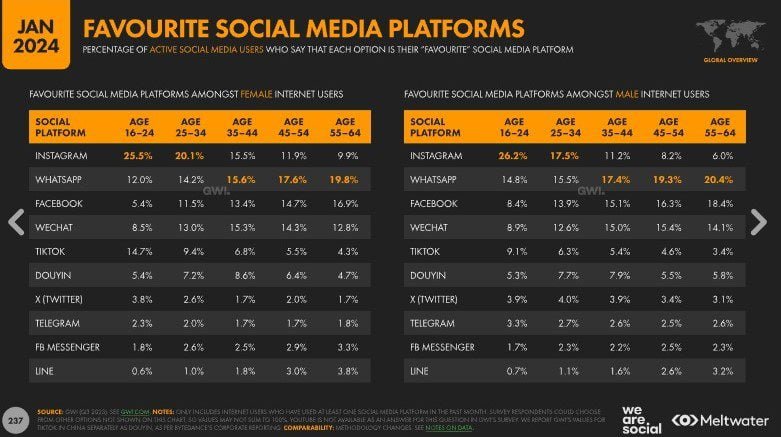
The best way to start your promotion is to find and follow people within your niche once you create an account on these social platforms.
For example, if you’re running a tech or food blog, you should search for blogs in your specific niche and follow them.
Interact with their posts by sharing sincere and encouraging comments to build awareness among people in that niche.
Then, you can begin to share your posts on these social platforms.
However, your promotional content on social media has to be compelling to prompt people to click through to your blog post.
For example, you can include a bullet-point summary of the post. You also want to add your optimized social media images.
You should also add clickable links to drive traffic to your blog.
In addition, you want to place social media icons on your blog posts where users can easily access them and share your content with others.
5. Join Online Communities and Forums

You can join relevant social community groups and forums to promote your content and add value to people in those spaces.
Promoting your blog isn’t just a one-off thing, or what you do at the beginning of your site launch to gain traction; it is a continuous, life-long process.
As I said, established blogs do a lot more to promote their stuff than upcoming sites do.
They understand it is what they need to continue to do to stay on top and make money from their content.
Step 8: Popular Ways to Monetize Your Blog
Now that you’ve optimized your site for SEO and started promoting your blog, it is time to set up channels to make money from your blog.
While the big earnings reported by some bloggers should spur you, know that it didn’t happen for them overnight.
You should read their complete stories to understand what they went through to get to where they are right now.
This will give you more staying power and motivation to keep on.
You shouldn’t be overly focused on making money initially but on building a site that is extremely relevant and helpful to your audience.
Just make sure you’re taking the right steps. Money will naturally flow in your direction with time.
With that said, below are a couple of legitimate ways to make money from your blog, irrespective of your niche or industry:
Note: You can, and should, use multiple income streams on your blog.
1. Sell Advert Space

Displaying ads is a good starting point for any new blog.
Although a growing number of site visitors are using ad blockers, digital display advertising is alive and well.
For example, global spending on digital video ads was $176.6 billion, while banner ads hit $161.8 billion in 2023 (Datareportal).
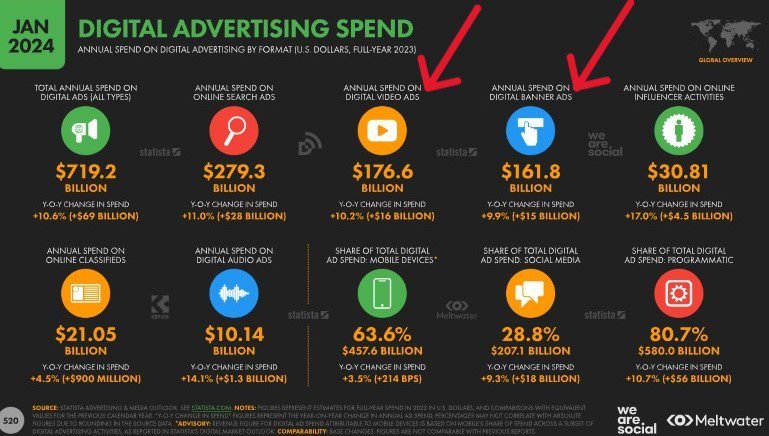
However, how much you make will depend majorly on the size of your traffic.
For a new blog that has few visitors, it may not be much in the beginning.
Your earnings will pick up as more people visit and use your site.
Thankfully, getting started is quite easy.
▪ Use ad networks
To get started, you only need to sign up with ad networks that are go-between for advertisers and bloggers/publishers.
They negotiate with advertisers and display related ads on your blog once users click to view your content.
Google AdSense is the biggest ad network in the world.
It is owned by Google and had the largest share of ad revenue worldwide in 2022 −$168.44 billion (Datareportal).
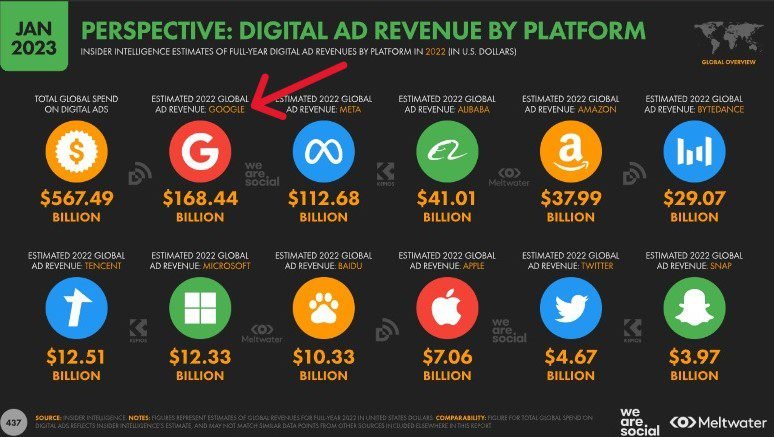
Google also has about 92% share of search engine market worldwide. So, it makes sense to sign up with them.
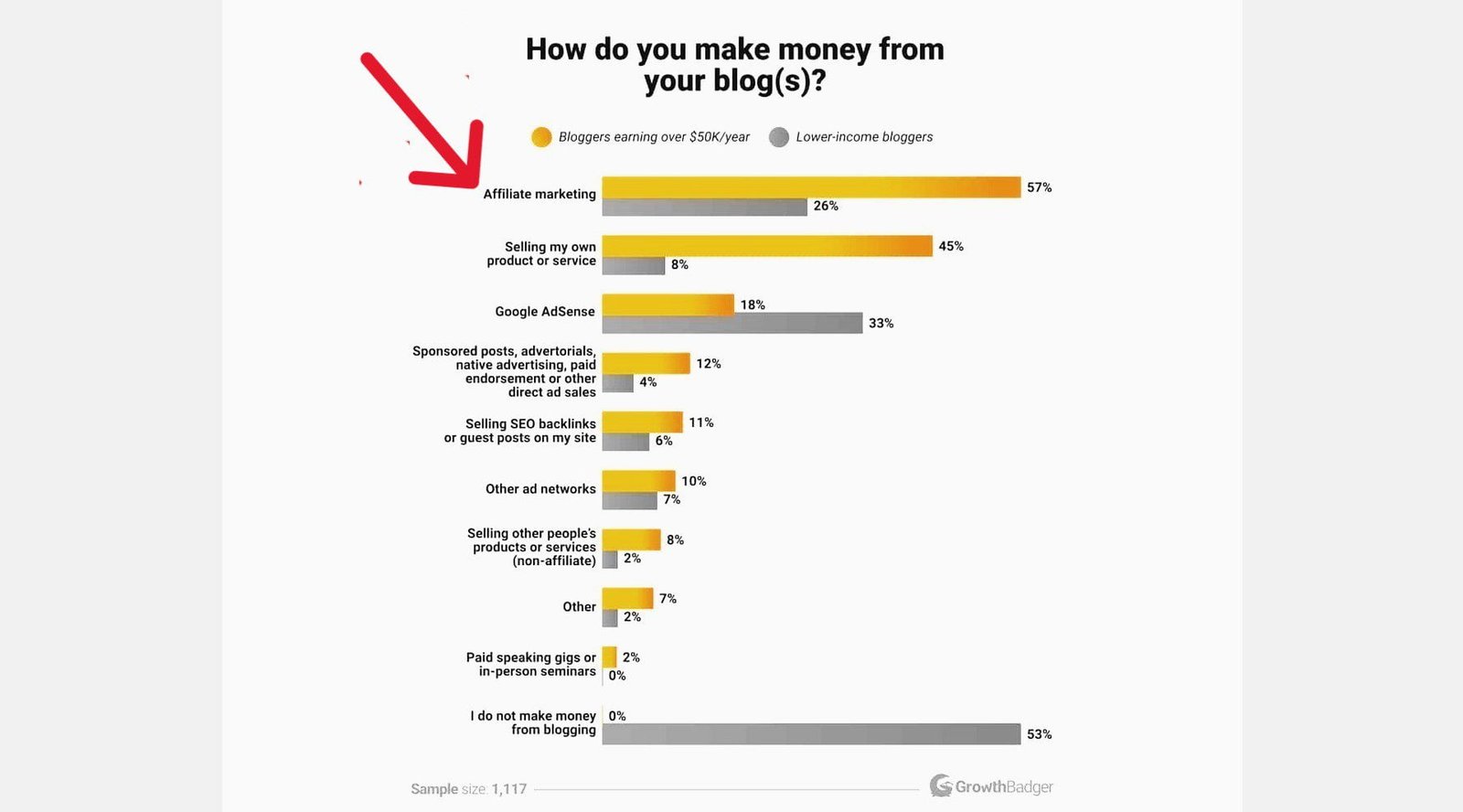
According to a study by GrowthBadger, 33% of low-income blogs and 18% of high-earning bloggers make money through Google AdSense.
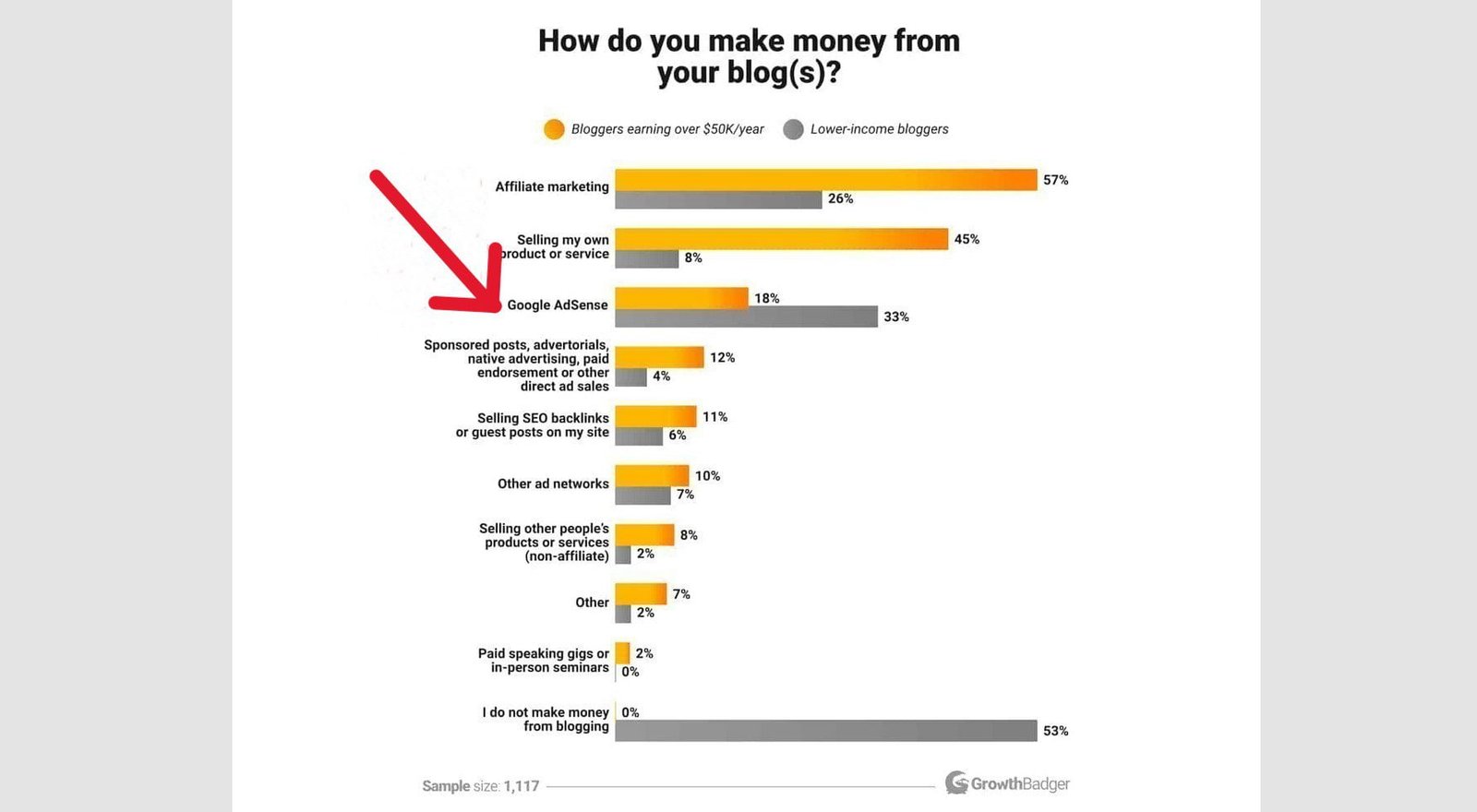
Google AdSense offers the highest click-through rates (CTR) for adverts.
That being said, they have strict rules and regulations you must meet before you can be admitted to their program.
Among other things, your blog should have high-quality, original content that’s already attracting traffic.
Visit Google AdSense Help to check the eligibility requirements for AdSense.
Once your blog is AdSense-ready, you can sign up for a Google AdSense account.
They will give you a short code to place on your site, and then, you can display ads.
If you choose to, you can sign up with multiple ad networks to sell more ad space on your site.
However, you only get a percentage of the revenue when you use ad networks.
▪ Sell ad space directly
Once you’ve built a sizeable audience, you can bypass ad networks, and reach out to advertisers to bargain directly with them.
However, you want to rent ad space to advertisers whose products and services match your content and will benefit your readers.
You can check for potential advertisers on your competitors’ sites, and reach out to them directly via email.
When you sell ads directly, all the money you make is yours.
You should create a media kit titled Advertise Here with your site’s information, statistics, and pricing.
2. Join Affiliate Programs
Affiliate marketing is also a great way to make money from your blog.
It is another popular channel that bloggers are using to rake it in.
Again, according to Kyle Byers of GrowthBadger, affiliate marketing is the second most popular monetization channel bloggers use to make money online.
57% of high-income blogs and 26% of low-earning bloggers make money with affiliate marketing.
Affiliate marketing is about recommending products and services you can vouch for on your blog, and getting a cut from the profits for every sale made through your referrals.
Your income through this strategy also grows as your traffic increases and more users trust you to make purchases using your links.
So many businesses worldwide have affiliate programs with good premiums that you can join.
To get started, register as an affiliate of companies whose products and services you want to recommend on your blog.
They will generate custom links that you can then display on your site.
Again, it is best to promote relevant products and services that will benefit your users.
You can automatically add and manage affiliate links to your content with a good plugin like Pretty Links or ThirstyAffiliates.
3. Sell Sponsored Posts

Selling sponsored (or branded) posts is another sure way to make money blogging.
Once you have a sizeable traffic, there are companies in your niche that will be willing to pay you to publish articles about their brand on your blog.
Brands and marketers prefer this strategy to advertising because it helps them to target the specific audience(s) they want to reach in one place.
Unlike adverts, your revenue doesn’t fluctuate with your audience size.
You can negotiate a fixed price with the traffic you attract. So, the deal is sealed whether your readers increase or decrease.
To get started with sponsorships, put out the word by setting up a catchy media kit page on your blog.
It should include your site’s info and stats such as monthly unique visitors, page views, demographics, pricing rates, etc.
Once related companies and businesses know their branded posts on your blog will lead to sales, they will want to take advantage of your offers, to turn some of your audience into their customers.
For example, if you run a thriving fashion blog for women, men, teens, or children, fashion designers, big-time tailoring companies, and the like, will want to use your platform to advance their course.
Another example: If you own a food blog, related companies may approach you to be their brand ambassador.
4. Sell Freelance Services

Doing freelance work is another popular way to monetize your blog.
Your blog gives you a good platform to showcase your skills and expertise in your field.
You can then start selling your services to your audience and to several different organizations, and earn money as a freelance.
Once you’re good at what you do, you will get gigs from different companies in your niche.
If you want to freelance, you’ll need to create a Hire Me page to let people know that you offer these services.
You also want to add this information to your key pages including your About page and Contact page.
Other than that, there is really no initial investment of time and money to get started.
5. Offer Consulting Services

Instead of working freelance, you can offer consulting services to help your clients function more effectively.
Consulting basically involves using your expertise to help a business or an organization identify and remove barriers in their operations, and providing a creative strategy to improve their performance.
The best part is you don’t need to own degrees or certifications to qualify as a consultant.
It you can offer expert advice in your field to companies so that they can be more effective, then you’re more than qualified to be a consultant.
Just like freelancing, you’ll need to set up a Consulting page to let people know about your consulting services.
You can also include this information in your About page and Contact page.
6. Offer Coaching Services

Coaching is very similar to consulting. They both help people solve problems and succeed, and they use identical methods to get the same results.
The major difference between them, however, is that while consulting helps to improve businesses, coaching focuses on improving people.
As a coach, you help your clients make positive behavioral changes in a specific area through personalized, one-on-one conversations.
The goal is to inspire them to become better versions of themselves which, in turn, impacts their lives and profession.
There are so many popular coaching niches that pay well. They include life coach, personal coach, health and wellness coach, performance coach, business coach, skill coach, retirement coach, relationship coach, and more.
You’ll need a booking form for your clients to book appointments on your blog.
You can create one with a good WordPress plugin like WP Booking Calendar or WP Simple Booking Calendar.
7. Sell Online Courses
These days, lots of people are buying online courses to learn new skills to better themselves.
You can package your skill(s) and experience in a course format and sell it to your audience.
Just to be on the safe side, however, first test the popularity of your course using a free tool like Google Trends.
That way, you can be sure your online course is what people are searching for.
Simply type the course name into the search field, and you’ll see the search interest over time.
Apart from text, you should consider including in your lessons’ structure other content types such as images, downloads, videos, audio, etc. to make learning interesting.
The common practice is to use personalized, one-on-one support for clients, or tiered membership with different features – different levels of services, benefits, and access to your content.
Some sites receive payments in installments while others receive in full. Choose the option you’re comfortable with.
You can create your online course using one of the best course creation platforms.
8. Sell Physical Products

Selling physical products directly to users is a big part of the monetization strategies of many blogs.
Many bloggers simply add a shop to their blog to offer their own products, while some create an affiliate store to sell other people’s products like Amazon.
Other people spare themselves the trouble of handling inventory and choose to create a dropshipping store instead.
Whatever option you settle for, just make sure it is what works well for you and your audience.
To get started, you can easily set up any of these stores on your blog using WordPress’ WooCommerce plugin.
It is the best store builder available, and it is free to use.
Another type of shop you can add to your blog is your own t-shirt store where you can design and sell unique and customized t-shirts to your users.
You can use a free plugin like WP-Spreadplugin to set up your t-shirt business. It has about 1000+ active installs, but the reviews are encouraging.
You can also explore the opportunity of selling your merchandise on eCommerce marketplaces like Amazon, to make more sales.
9. Sell Digital Products
Apart from online courses, you can offer other digital products such as e-books, downloadable music, webinars, photos, graphics, photos, and apps, directly from your blog.
Unlike physical products that are capital intensive, digital downloads require little investment.
The only major investment you need to make is the time you’ll invest into creating your products.
Furthermore, the logistics are more straightforward. You don’t need to take inventory, and customers will receive products electronically, immediately after making a purchase.
Compared to a dropshipping store, it is much easier and less risky to sell digital products.
Some Frequently Asked Questions (FAQs)
People ask lots of questions about how to start a blog.
Below are some of the most frequently asked questions, to help you better understand how to create one.
What is a blog?
A blog is a website where individuals or organizations regularly publish content—called posts—about specific topics. These posts are typically written in a friendly, informal tone and may include text, images, videos, or infographics. Blogs also feature static pages like an About or Contact page, and often include a comments section to encourage interaction with readers. Blogs serve as platforms for sharing information, providing help, or entertaining, and can be used for personal, professional, or business purposes. There are many blog types, and you can create one on any topic with enough audience interest.
Do bloggers make money?
Yes, the question is generally well answered. It clearly addresses the fact that bloggers can indeed make money, and it provides examples and insights into how they do so, including the potential for significant earnings. It also manages expectations by emphasizing the hard work and time investment required, which helps paint a realistic picture of what success in blogging entails.
However, the answer could be improved slightly by including more specific details or examples of how bloggers make money (such as through ads, affiliate marketing, sponsored content, etc.), which would give readers a better understanding of the various revenue streams in blogging. Additionally, a mention of how bloggers scale their income over time might add further value to the response.
Here’s a slightly expanded version:
Do bloggers make money?
Yes, they do! Blogging has grown into a lucrative business, with many bloggers earning five- or six-figure incomes, some monthly and others yearly. Bloggers from all over the world have shared evidence of their earnings, and many have transitioned to blogging full-time.
There are various ways bloggers make money, such as through ads, affiliate marketing, sponsored posts, selling products or services, and even offering online courses. Some bloggers started without a job, while others left their 9-to-5 careers to focus on their blogs.
However, success doesn’t come overnight. Achieving significant income requires hard work, time, and investment in creating valuable content and building a loyal audience.
In short, while blogging can be highly profitable, it takes dedication and effort to turn a blog into a successful business.
Yes, bloggers do make money and it’s become a thriving business for many. Some bloggers earn impressive figures, reaching five or six figures annually. and in some cases, monthly, and many have transitioned to blogging full-time. These earnings come from various sources such as affiliate marketing, sponsored content, product sales, ads, and digital products like courses or e-books. However, success doesn’t happen overnight. Successful bloggers often spend years refining their strategies, building their audience, and optimizing their content. While blogging can be lucrative, it’s a long-term commitment.
How do bloggers make money?
As mentioned in Step 8 above, bloggers generate income from a variety of sources. Some of the most common ways include:
- Ad Revenue
The most typical method is through selling ads via ad networks such as Google AdSense, Media Net, Propeller Ads, Adcash, and many others. Once your blog gains significant traffic, you can bypass ad networks and sell ad space directly to advertisers, often at a higher rate. - Affiliate Marketing
Bloggers earn commissions by promoting third-party products and services. They share custom affiliate links, and when readers make a purchase through those links, the blogger receives a commission. - Sponsored Posts
Bloggers can partner with businesses that want to feature their products or services. These companies pay bloggers to create and publish content that promotes their offerings in a natural, engaging way. - Product Reviews
Many companies approach bloggers to review their products or services. Bloggers are typically paid for both testing and writing a detailed, honest review of these products on their blog. - Selling Physical Products/Services
Some bloggers make money by selling physical products directly to their audience. This could range from branded merchandise to niche-specific products that align with their blog’s content. - Digital Downloads
Bloggers also generate revenue by offering digital products, such as eBooks, online courses, music, printables, or templates, that their readers find valuable.
For a more detailed breakdown of these income streams, refer to Step 8 in this guide.
How do I become a blogger?
To properly answer the question, let’s first define who a blogger is, and what they do.
A bare-bone definition of a blogger is someone who regularly creates content for a blog.
Originally, bloggers shared their life stories, opinions, photos, and day-to-day activities on their “weblog” (as it was called then) with their audience.
Then, it was more like an online journal.
However, blogging has evolved over the years and has become mainstream knowledge sharing and revenue generation.
Today, a blogger creates content to share their expertise and experience in a particular niche with their audience and make money from their blog.
Their primary aim is to teach, inspire, and educate their readers about the topic.
They also want to provide robust and helpful answers to their users’ queries to help them improve their lives.
Typically, among other things, bloggers create and maintain their own blogs by producing fresh, original, and useful content at least once a week, to keep their audience engaged.
Now, for so many people, blogging has become a business and a career.
So, to become a blogger, you only need to start your own blog, and regularly create content that solves problems for your target audience, based on your expertise. And if you want, you can make money from it.
If you don’t want to run your own blog, you can get full-time or part-time employment as a blogger with an established blog.
How do I start a blog?
That is what this guide is all about – how to start a blog and make money online in 8 simple steps.
✓ Purchase web hosting and domain name
✓ Install the best CMS – WordPress
✓ Select a good WordPress theme
✓ Create your first blog post
✓ Add essential features using plugins
✓ Optimize your site for SEO
✓ Promote your blog
✓ Make money from your blog
Can I start a blog for free?
Yes, you can. Many blogging/hosting platforms allow people to start a blog for free.
Free blogs are great for leisure blogging, and those not keen on building a career and business out of blogging.
However, they are not the best option if you want to run a successful blogging business.
Because they come with limitations that will stifle your blog in every way – from domain name to monetization.
So, don’t take the bait to start a free website, unless you do not plan to grow it big.
Is WordPress free?
Yes, WordPress (or self-hosted WordPress.org) is an open-source CMS and is 100 percent free.
That said, it cannot work alone.
It has to be installed on a web hosting platform before you can use it to build and manage your website.
That’s what the owners of WordPress.com have done. They have preinstalled WordPress on their hosting platform and offer a free plan with plenty of restrictions.
They also have control of the free websites created with their free hosting.
For example, they sell ad space on these free sites to advertisers and pocket much of the profits.
The best option, therefore, is to purchase an affordable hosting plan from a reliable web host like Bluehost or Hostinger.
They have different hosting plans specially designed for WordPress.
This way, you have complete and total freedom to build any WordPress site you want. Even a never-seen-before website.
By the way, WordPress.com offers equivalent paid hosting plans that give you full freedom, but they are way more expensive.
For a more detailed comparison, see our article on WordPress.org vs WordPress.com.
How much does it cost to start a blog?
It depends on several variables such as your budget size, the features you want on your blog, and the cost of the tools you use to set it up.
If you’re just starting out, I recommend you set up a self-hosted WordPress blog on Bluehost, instead of creating a free site on WordPress.com.
You can start with their Basic plan; it costs only $2.95 monthly and is billed yearly.
That will cost $35.40 for the 1-year option (because it is discounted).
The package includes a free domain for the first year, a free SSL certificate to secure your data and visitors’, and lots more.
So, the good news is anyone, anywhere in the world can afford to start a blog and turn it into a successful blogging business.
Please see my article on how much it currently costs to start a blog for more details.
How long does it take to start to make money from your blog?
It depends on a few different factors such as your blogging niche, the quality of your content, your promotional and SEO strategies, your traffic size, and the monetization methods you use, among other things.
Some blogs start to make money in the first month, some in the sixth month, while others could take a year.
That said, however, there is no overnight success in blogging.
You’ve got to put in the time and effort required, and patiently wait until you begin to see results.
Like Alex Nerney of Create and Go said, “The good news is, anyone can make serious money blogging with the right tools and action plan”.
Very true.
Can I start a blog without experience?
Yes, you can start a blog with zero experience.
And you don’t have to hire the services of a web designer to do anything.
There are countless DIY tools and articles like mine on the internet that are beginner-friendly and will help make setting up your blog a breeze.
And your website will look as if it was built by a pro.
I actually encourage people to do their stuff themselves.
When you create your blog by yourself, you put your unique stamp and signature, which is your personal style and preference, on it.
Amazingly, DIY websites are the cheapest to make; so, you get to save money.
Friend, there is nothing to fear; you can do it. Even, the so-called professionals today started with zero skills themselves.
How do I pick a good domain name for my blog?
Despite the number of registered domain names globally – 369 million+, with a little creativity, you can still come up with domain name ideas and choose a good domain name for your blog.
For instance, if your personal name is unique, brandable and memorable, you could choose to name your blog after you. It is common practice across the internet.
Another popular option is to coin a name around a target keyword in your niche or blend two words to form a portmanteau. E.g. ‘medicare.com’ from ‘medical’ and ‘care’.
Whatever name you choose, make sure it is short, universal, pronounceable, and easy to spell.
What should I blog about? Which niche should I choose?
Selecting a blog niche is one of the critical steps to take when creating a blog.
There are a thousand and one niches you can pitch into.
However, choosing the right niche will help you start on the right foot.
It is the first on the list of the things you need to do to succeed online.
A blog niche is simply a spotted need, want, or problem of a particular group of people you can address with your content.
5 elements should be present in every niche.
Now, for a niche to be considered profitable, it must pass the Enough Niche Test.
This simply means it should have enough of these 5 elements. They are:
➀ People/problems – There should be enough people to help and enough problems to solve in this niche.
➁ Proficiency – You should be knowledgeable enough to tackle the problems in the niche.
➂ Passion – You should be passionate enough about the topic.
➃ Sustainability − Enough people would still be very interested in reading about the topic years from now.
➄ Profitability – There should be enough money-making opportunities in the niche.
You’ll have to research online using free SEO tools like Google Trends, for 3 of these factors.
Find out people’s interest in the niche for the past 12 months and the last 5 years.
The 5 years research is a pointer to how sustainable and relevant the topic will be for years to come.
Also check the money-making opportunities of the niche.
For example, affiliate marketing. Find genuine products to promote to your audience and earn a commission on each sale.
Also, check your competitors’ sites to see what other channels they’re using to make money.
The other two factors are what you’ll find out from within you.
How much expertise or first-hand experience do you have about the topic, and how enthusiastic are you?
Once you have enough of all these five elements, that is your niche right there – that is what you want to blog about.
For more details, see my article on how to choose the perfect niche for your blog.
How do I stand out in my niche?
The only way to stand out from the competition is to embrace your uniqueness.
Sometimes, we are the ones who are most critical of ourselves.
But there is only one you in the whole planet. Your fingerprints and dentition, among other things, attest to this fact.
So, if you can pour yourself into your content and blog, you will stand out.
While some people won’t like your style, many will celebrate what you have to offer.
Very successful people also have people who criticize them, but what does it matter?
They’ve grown thick skin when it comes to criticism.
Thankfully, you can moderate users’ comments at the end of your blog posts.
As a matter of fact, however, you can use those negative comments to improve yourself and your work.
What does ‘self-hosted’ mean?
Simply put, ‘self-hosted’ is when WordPress is installed on a web host to build and maintain a blog.
This is the best option to start a blog if you want full control over it and make serious money blogging.
The alternative is to create a free blog which is not the best idea for many people.
Because, though you enjoy free hosting, your blog can’t grow big – you are only given limited space and freedom to operate.
That’s why I recommend hosting from a reliable, beginner-friendly web host like Bluehost or Hostinger, and using WordPress to set up your blog.
With a self-hosted blog, you will have absolute control over every aspect of your site, including finances.
And there is no limit to how much you can make.
For more, check out my post on the difference between WordPress.com and self-hosted WordPress.org.
Already started a free blog, what can I do?
Too often, people make the mistake of starting a blog on free blogging platforms, only to realize later that they cannot achieve their dream of building a career and business in blogging.
Luckily, it is quite easy to move your blog from any of these free platforms, whether WordPress.com, Blogger, Medium, or any other platform.
You can switch to a web hosting service where you can use WordPress for free and freely build the kind of site you want.
Most top web hosting companies offer this service to help you safely import your content to your new blog once you purchase hosting.
Conclusion
Blogging is big business now.
The beautiful thing is that anyone with some skills and passion to bring fresh help to people in any niche can start a blog and do so, and in the process, make good money.
In this guide, I explain how to start a blog and go live in 30 minutes.
However, you need to optimize every post for SEO and promote your blog for the right people find it easily.
And who knows? You might just be the next big thing online.
And there you have it – how to start a blog and make money (anywhere).
I hope this guide helped you learn how to start a blog, and how to optimize, promote, and monetize your content.
Please feel free to consult my article titled 27 simple SEO best practices recommended by Google, to help your search rankings.
If you like this article, kindly help me spread the word among your friends. Thank you!