
Last updated on May 2nd, 2025 by Kenneth Ojeisekhoba
OXERBLOG > BLOG > SIMPLE SEO BEST PRACTICES YOU NEED TO FOLLOW
Disclosure: Oxerblog relies on its readers’ support through referral links. I may earn a commission from some of these links, at no additional cost to you.
This guide breaks down 27 essential SEO best practices—rooted in Google’s own recommendations—to help your site climb search rankings and attract high-intent, organic traffic.

Whether you’re building a new blog or managing an existing site, two things matter most: publishing high-quality, helpful content and making sure people can actually find it.
That’s where SEO (search engine optimization) comes in.
SEO is the strategic process of identifying what your audience is searching for, creating content that meets that intent, and optimizing it for maximum visibility in search results. Done right, SEO ensures your content aligns with user needs and search engine standards—boosting discoverability and performance.
And the timing couldn’t be more critical. With millions of pages published daily, competition for visibility is fiercer than ever. Ranking at the top isn’t just nice—it’s essential to see meaningful results.
Going into 2025, the #1 organic result on Google gets 39.8% of all clicks, while the #2 and #3 spots drop to 18.7% and 10.2% respectively (First Page Sage).
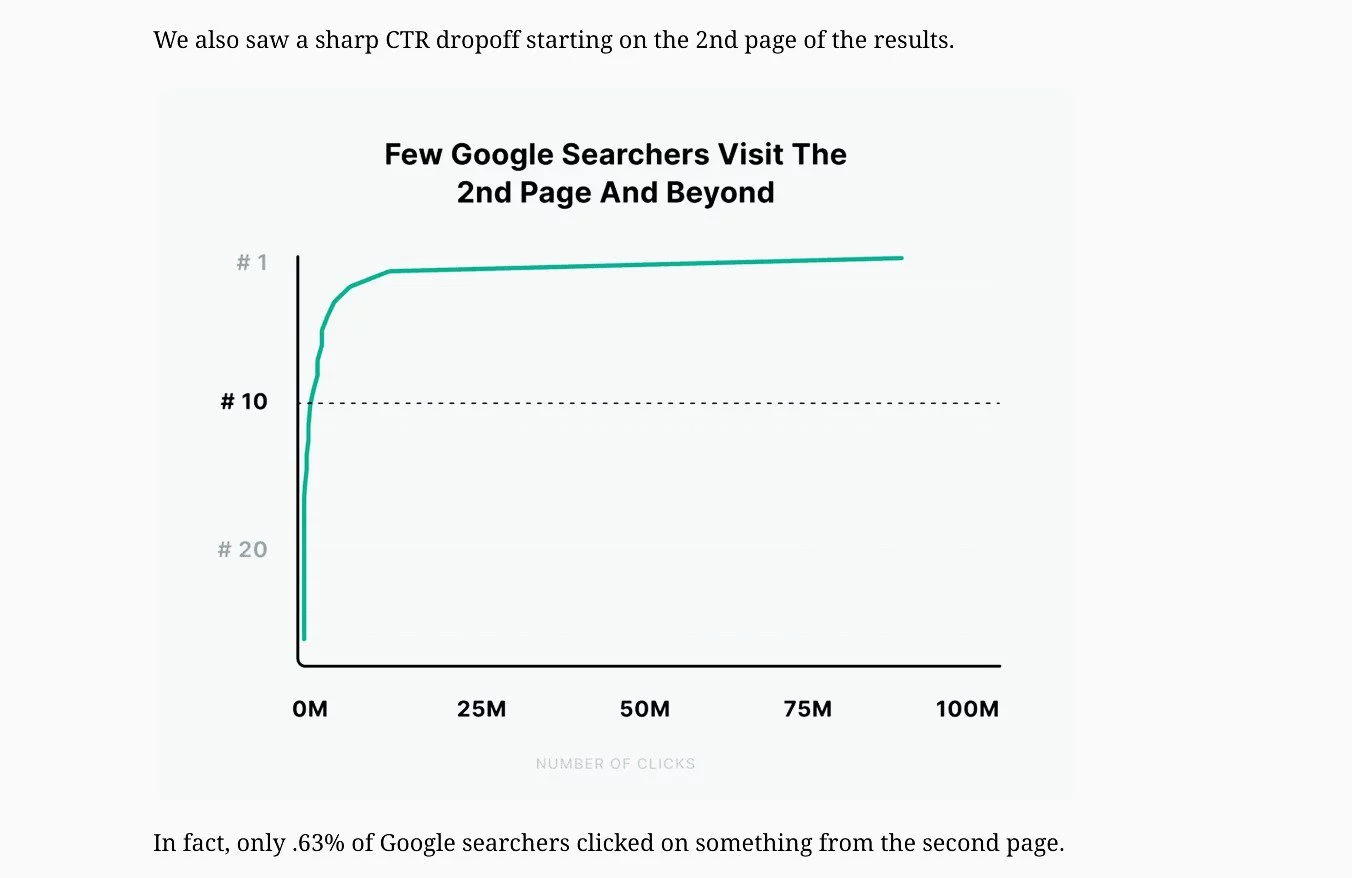
Pages beyond the first results page? They’re almost invisible—Backlinko found that just 0.63% of users click on results from page two or beyond.
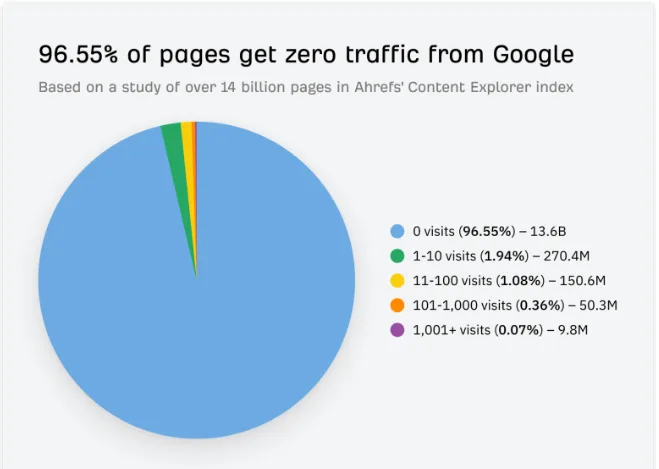
That’s not unusual. According to Ahrefs, 96.55% of pages get zero organic traffic from Google. Only 1.94% receive more than 10 visits per month.
Meanwhile, over 50% of all trackable website traffic comes from organic search—and that figure has stayed consistent for years (BrightEdge).
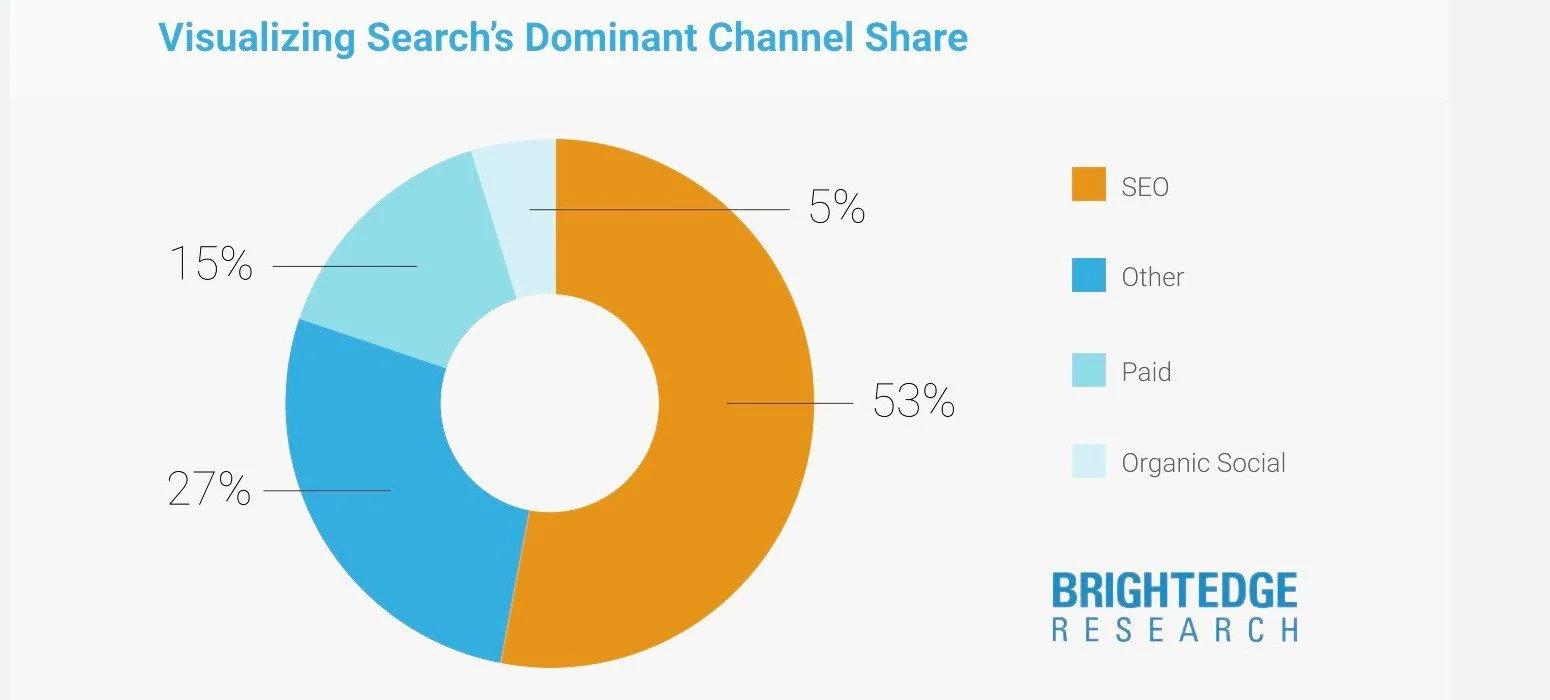
The takeaway? If you want your content to perform, it needs to rank—and rank high.
The 27 SEO strategies in this guide are backed by Google and apply to websites of all sizes and types. Implement them properly, and you’ll dramatically increase your chances of showing up where it matters most: page one.
Here’s what we’ll cover:
Table of Contents
▪ Why is SEO Important for Every Site?
SEO Best Practices: 27 Simple Ways To Improve Your Rankings
1. Set Up A Readable Permalink Structure for Your Site
2. Find Keyword That Your Target Audience Are Searching For
3. Select Keywords That You Can Offer A Fresh Perspective On
4. Create Quality Content That is Relevant and Helpful
5. Make Sure Each of Your Pages Has High E-E-A-T
6. Make Sure Each Page Has a Different URL
7. Give Each Page a Unique Title Tag
8. Create an Eye-Catching Title Link for Each Page
9. Write a Robust Meta Description Tag for Each Page
10. Use Heading Tags to Give Structure to Your Pages
11. Use Good Links Between Related Pages on Your Site
12. Connect Your Pages to Relevant Authoritative Sites
13. Target Backlinks from Credible Sites
14. Add High-Quality Images to Your Content
15. Create High-Quality Videos for Your Pages
16. Add Structured Data Markup to Your Pages
17. Make Your Site Mobile-Friendly
18. Optimize Your Site’s Loading Performance
19. Keep Your Site Safe and Secure with HTTPS over TLS
20. Ensure Your Site is Compatible with Different Browsers
21. Create a Navigational Page for Your Visitors
22. Use Website Navigation for Better User Experience
23. Create an XML Sitemap for Search Engines
24. Create a Robots.txt File for Your Site
25. Check If Your Site is Visible to Search Engines for Crawling and Indexing
26. Monitor Your Performance with Google Search Console
27. Keep Your Content Updated, Fresh and Useful
▪ Bonus Strategy: Create an RSS Feed of Each of Your Posts
▪ Frequently Asked Questions (FAQs)
Now let’s set the ball rolling.
What is SEO?
According to Google, SEO is the process of making your website and its pages more accessible and relevant to search engines like Google—so that more of the right users can find your content.
Done well, SEO helps boost your site’s organic rankings, increasing visibility, clicks, and user engagement. Optimization can be applied to your entire website and to specific pages you want to rank in search results.
Google has made it clear: organic rankings are earned. The more your site aligns with SEO best practices, the better its chances of ranking well and driving traffic.
Who Needs SEO?
If you run a blog, manage a business site, operate an eCommerce store, or lead a digital marketplace—you need SEO to attract more visitors and users via search engines, especially Google.
If your site is new or small, you need SEO to get noticed.
No matter how big and established your brand is, you need SEO to stay competitive.
In short: Every website needs SEO.
Why is SEO Important for Every Website?
SEO is one of the most powerful ways to reach your audience.
- 68% of online exeriences begin with a search engine (BrightEdge).
- 75% of users never scroll past the first page (HubSpot).
Only SEO-optimized content has a real shot at ranking on that critical first page.
If search engines can’t find or understand your pages, they won’t rank them—meaning your potential traffic, leads, and revenue are going elsewhere.
This guide offers 27 current, easy-to-apply SEO practices that anyone can follow, regardless of technical ability.
27 simple SEO Best Practices for 2025
1. Set Up A Simple, Readable Permalink Structure for Your Site
Your site’s permalink structure is very critical to your website’s online success.
It is one of the first things you should set up early during the building stage.
Because it defines the individual web address known as the Uniform Resource Locator (URL) of each piece of content you add to your site.
So from day one, choose a simple, reader-friendly URL structure that can help both visitors and search engine tools easily find and quickly understand each item on your site.
Thankfully, WordPress checks the Post name option, by default. It is pretty much the best option right out of the box.
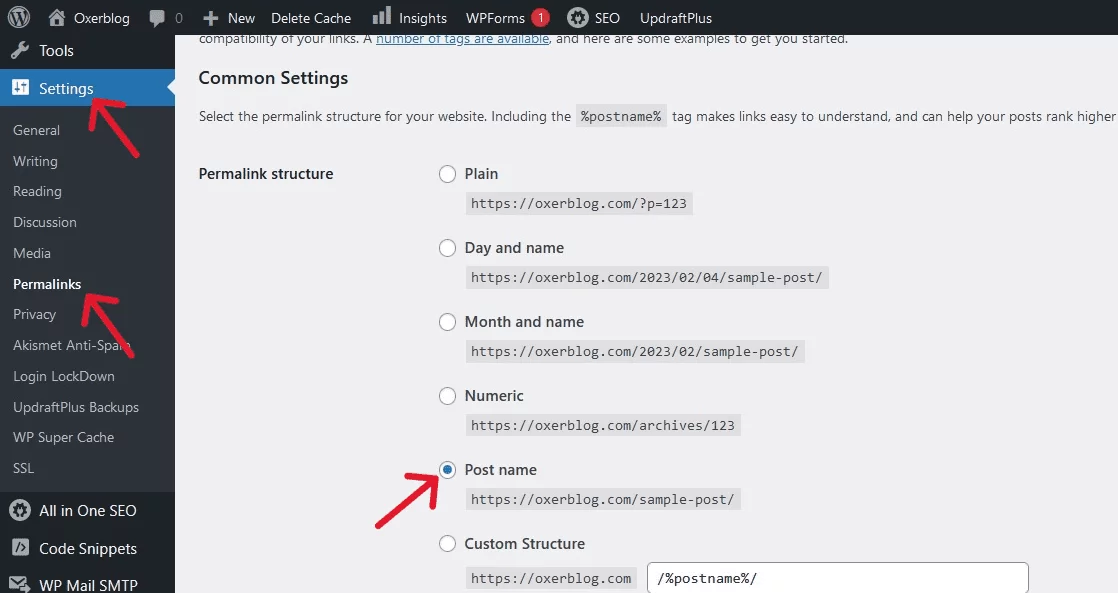
For most websites, this permalink structure will work just fine.
So, if you’re using WordPress, for instance, your post (or page) title is used automatically as its URL once you click on Save draft.
For example:
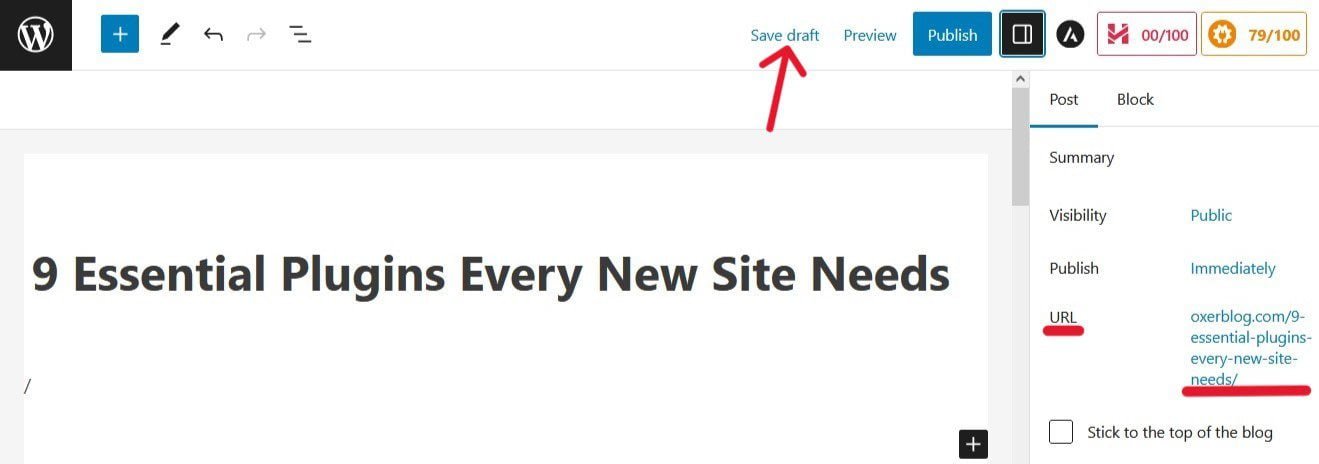
However, depending on the type of website you want to build, you can still choose another intelligible permalink structure.
For example, if you’re creating a news website, you may want to include dates in your URL structure.
So, depending on whether your publication will be daily or monthly, you can choose either of these out-of-the-box options:
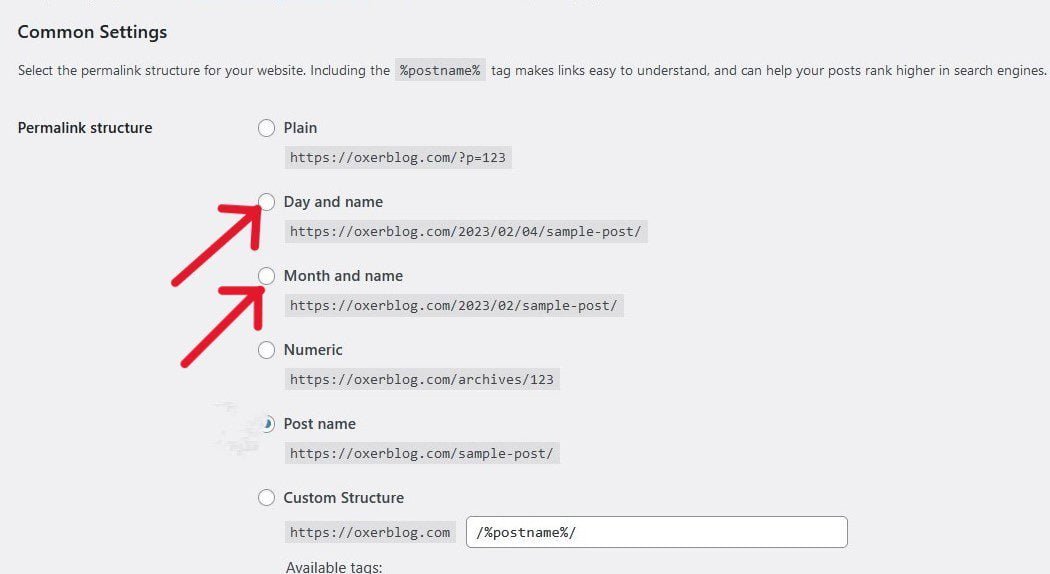
These options may not be ideal for your website if your content isn’t that topical.
Likewise, you may want to categorize your pages, if you’re building an online store.
So you would need to include the category tag to your permalink structure using the Custom Structure option:
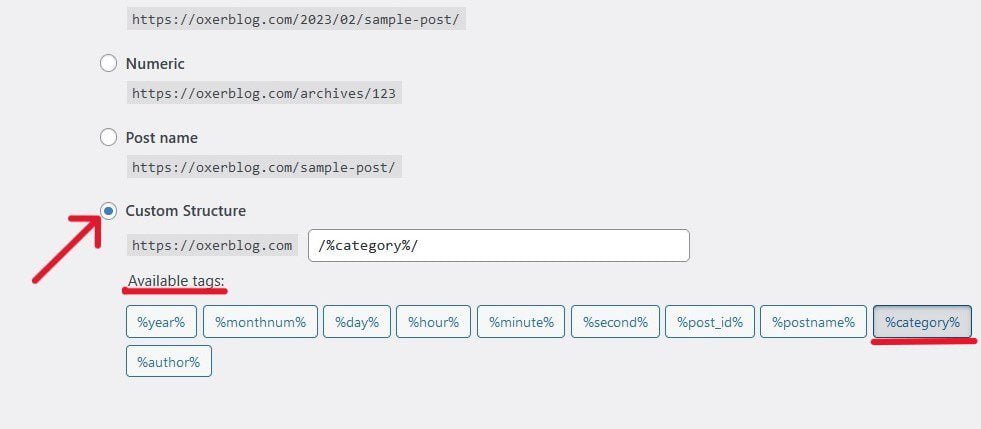
Note: All the Available tags can be used to customize your permalinks. That said, add what is only necessary.
Google recommends you set up the simplest URL structure possible for your website.
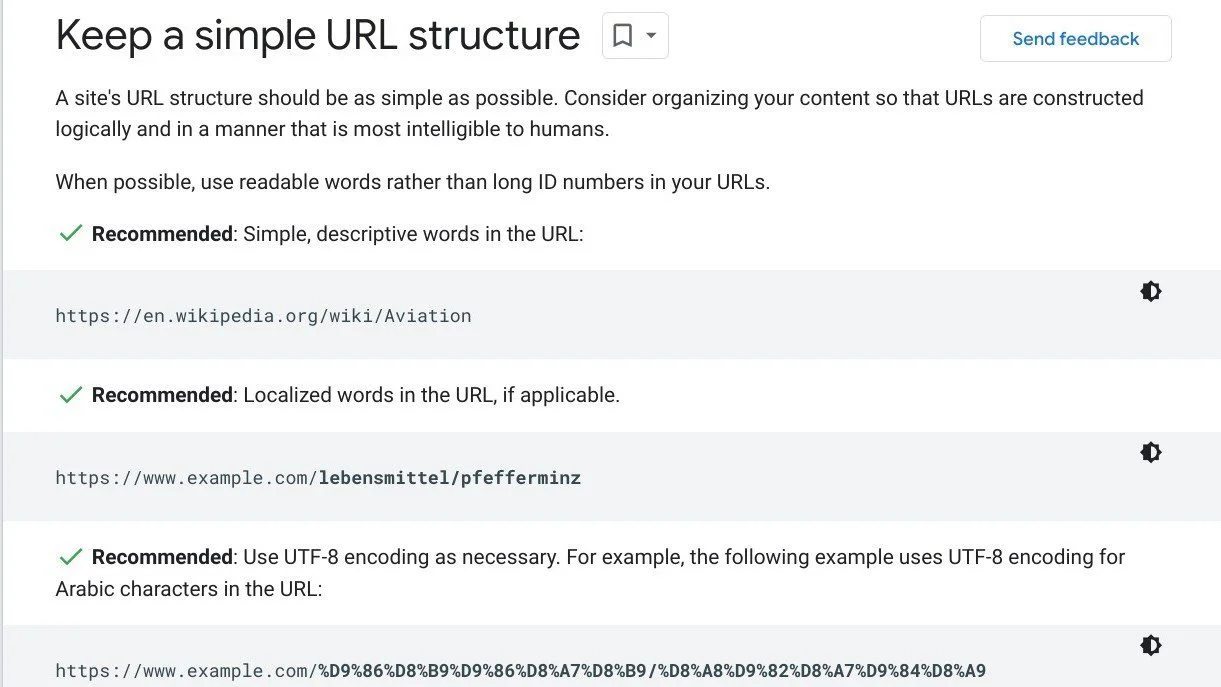
Whatever option you choose, make it as short and user-friendly as possible. And once you set up your URL structure in the beginning, you want to stick with it throughout.
You don’t want to tamper with it down the road. Because this will break your links and in turn, affect your site rankings and traffic.
As the name suggests, a permalink is a permanent hyperlink or URL that specifies the permanent address of each page, image, and every other item on your site.
That is why you want to get it right from the get-go.
To set up the most appropriate URL structure for your website, head to Settings ≫ Permalinks on your WordPress dashboard.
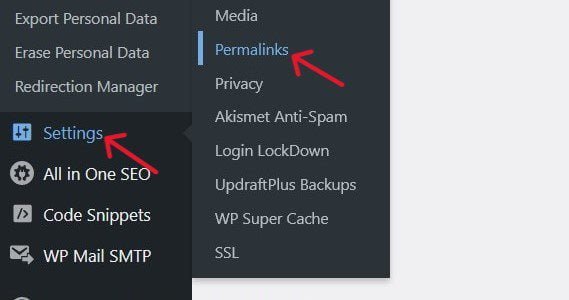
On the Permalink Settings screen, scroll down to Common Settings ≫ Permalink structure.
Once you’re done, click the blue Save Changes button at the bottom left of your screen, to save your changes.
Best current practices for setting up a user-friendly permalink structure:
✓ Use simple, descriptive words in your URL. For example:
https://www.oxerblog.com/develop-a-robust-seo-strategy/
✓ Use hyphen (-) instead of underscore (_) to seperate words in your URLs
✓ If your site is targeting a region, consider using a locale-specific URL structure. For example:
https://example.xy (for country specific-domain)
https://xy.example.com (for subdomains with gTLD), or
https://example.com/xy/ (for country-specific subdirectory with gTLD)
2. Find Keywords that Your Target Audience is Searching for
Again, 68% of users start their online activity in either Paid or Organic Search (BrightEdge).
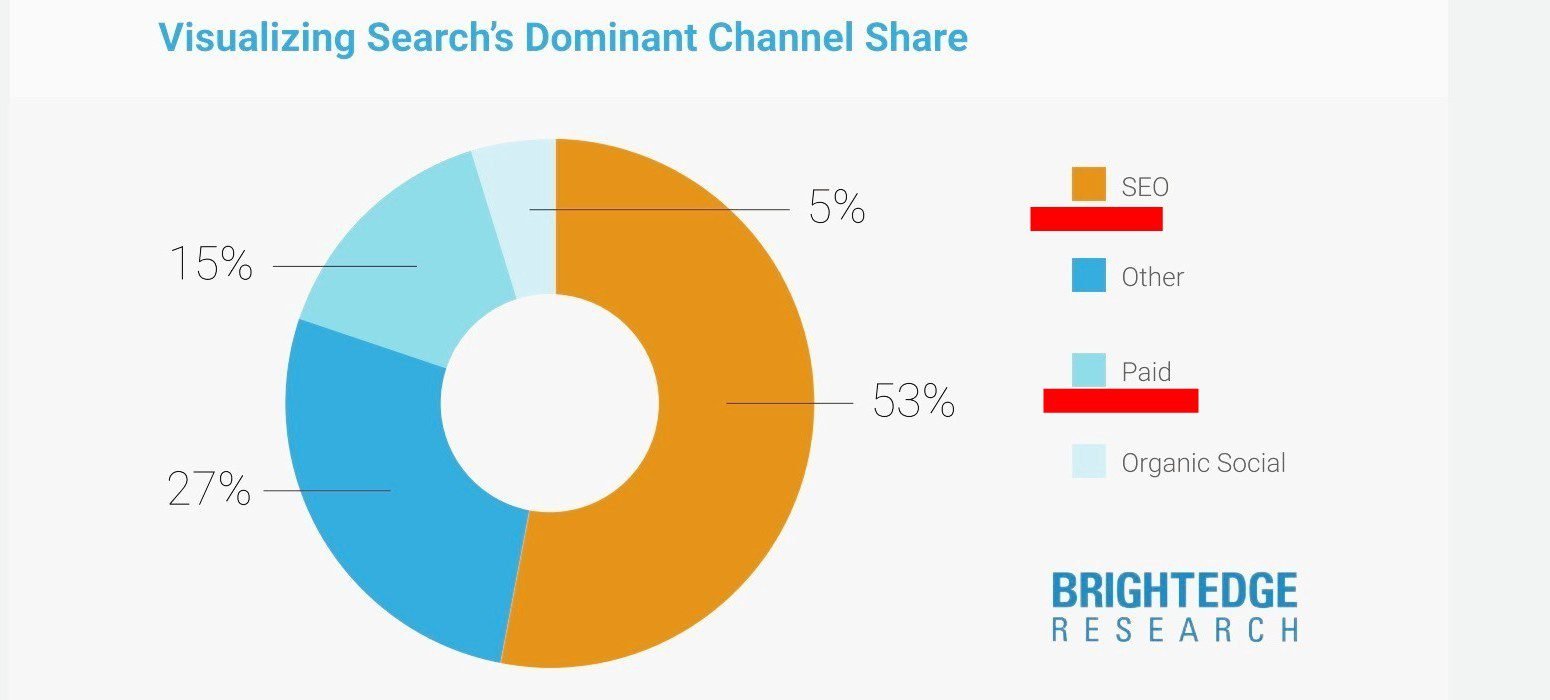
These search queries are referred to as keywords (or SEO keywords).
So when you want to start writing your pages, the first thing to do is to find keywords that your target audience uses to locate your kind of content online.
These keywords are the terms you’ll optimize your content if you want your pages to hit the bull’s eye in Organic Search.

That way, your pages stand a good chance of ranking for those keywords and driving more targeted traffic to your site.
This is important because Google says “keywords are the most basic signal for determining whether a page’s content is relevant to a search query.”
In other words:
Keywords are the first signal search engines look for in your content to index and match it to a user’s query.
So again, SEO keywords are simply the exact search terms that people use to find your kind of content, product(s), or service(s) online.
They range between one word and multiple words like a phrase, or sometimes, a question.
Keywords can be grouped into short-, medium-, and long-tail.
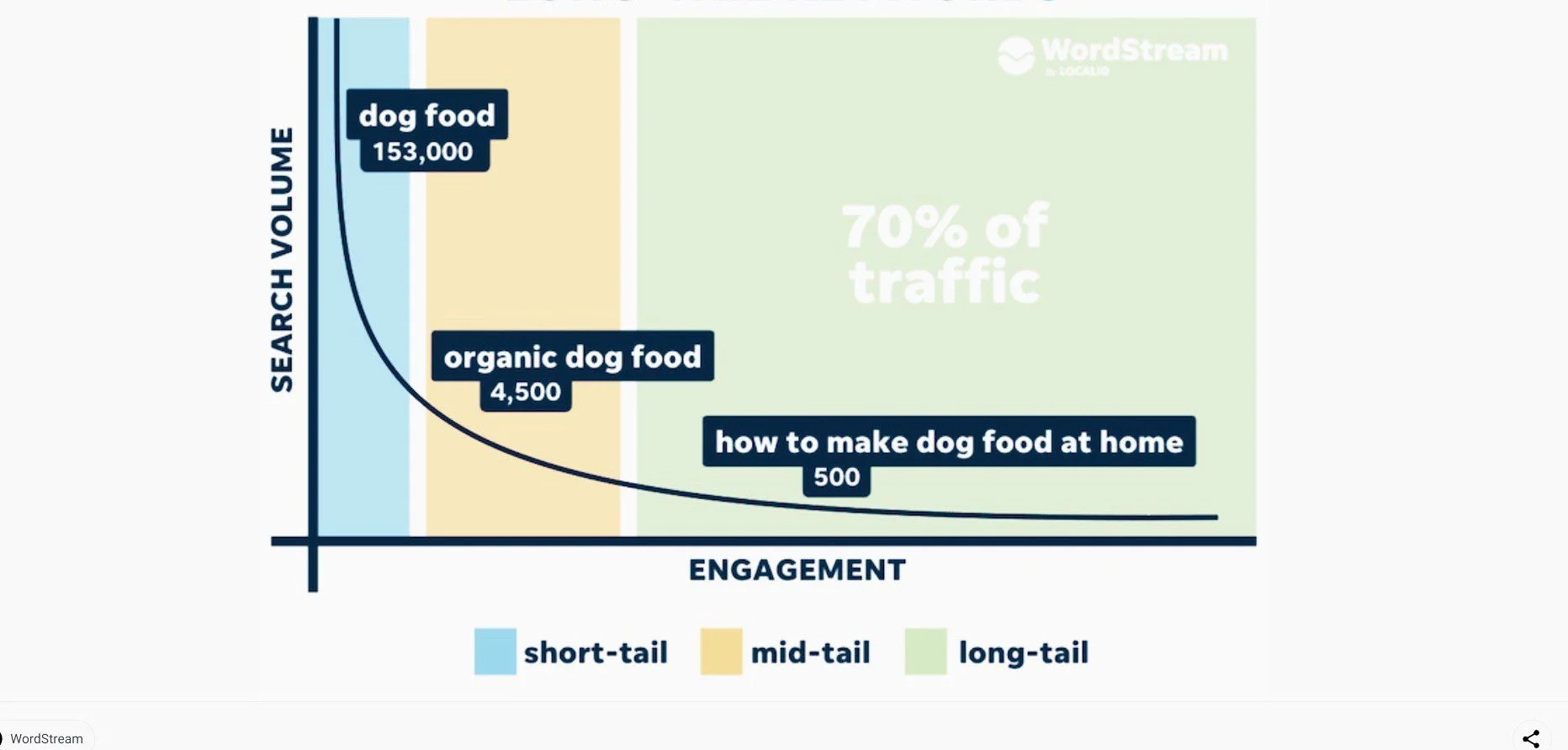
Your target users’ keywords are the building blocks of any successful SEO campaign.

In other words, like Backlinko said, SEO is pretty much impossible without keywords.
So, find and strategically add your target audience’s keywords to your content and you’ll be speaking their language.
Again, this is the first signal to Google that the information in your content is relevant to those terms.
▪ Conduct Keyword Research
While keywords are the building blocks for any serious SEO campaign, keyword research is the starting block.

In simple terms:
Keyword research involves finding and decoding the terms that searchers use in their queries to find products, services, or any other content they’re interested in.
Your SEO strategy can only be successful when you focus on finding the words and phrases your audience enters into their browsers to search for content like yours.
More importantly, you need to unravel the search intent behind these keywords.
Search intent is simply what readers want to find out about the keywords.
To summarize, find out what keywords your audience is searching for and what they want to know about them (more on this later).
Also, find out the search volume and competition for each keyword.
Here’s why keyword research is important:
Conducting keyword research helps you to find the exact keywords that will work perfectly well with your SEO strategy, and achieve your goal faster.
▪ Brainstorm Your Audience’s Keywords
To get started, think of the likely terms visitors would use to locate your kind of page.
Note that to find the same content a beginner’s search query will be different from that of an experienced user.
Again, like Google said, you should anticipate such differences in search queries and optimize your content for both groups.
This will help boost your chances for better results unless you want to create content for a specific level of users say beginners, for example.
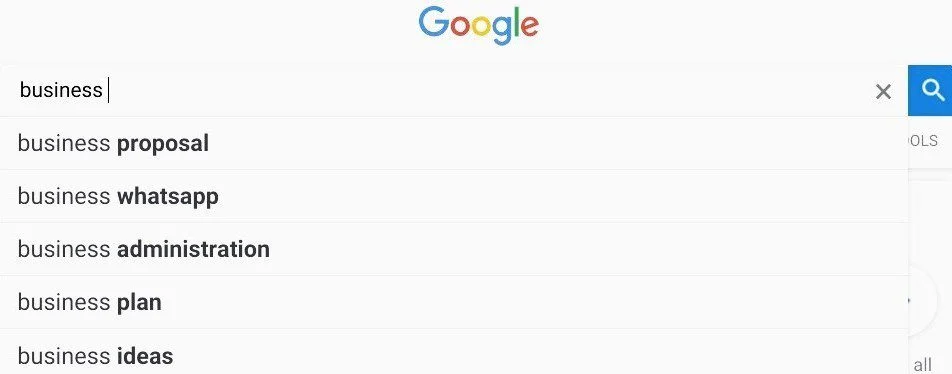
Next, type these words, phrases, and questions you’ve brainstormed into search engines to generate more keyword ideas.
Search engines are a rich gold mine of keywords.
Google, Bing, and others will suggest many keywords your target users are typing. This is known as Google (or Bing) Suggest or Autocomplete.
▪ Use Keyword Research Tools
Once you’ve gathered enough keyword ideas, sift out the best, based on search volume, competition, and your understanding of the search intent.
There are so many great free and premium SEO tools that you can use to do your keyword research, such as Google Trends, Keyword Planner, AnswerThePublic, SEMrush, Ahrefs, etc.
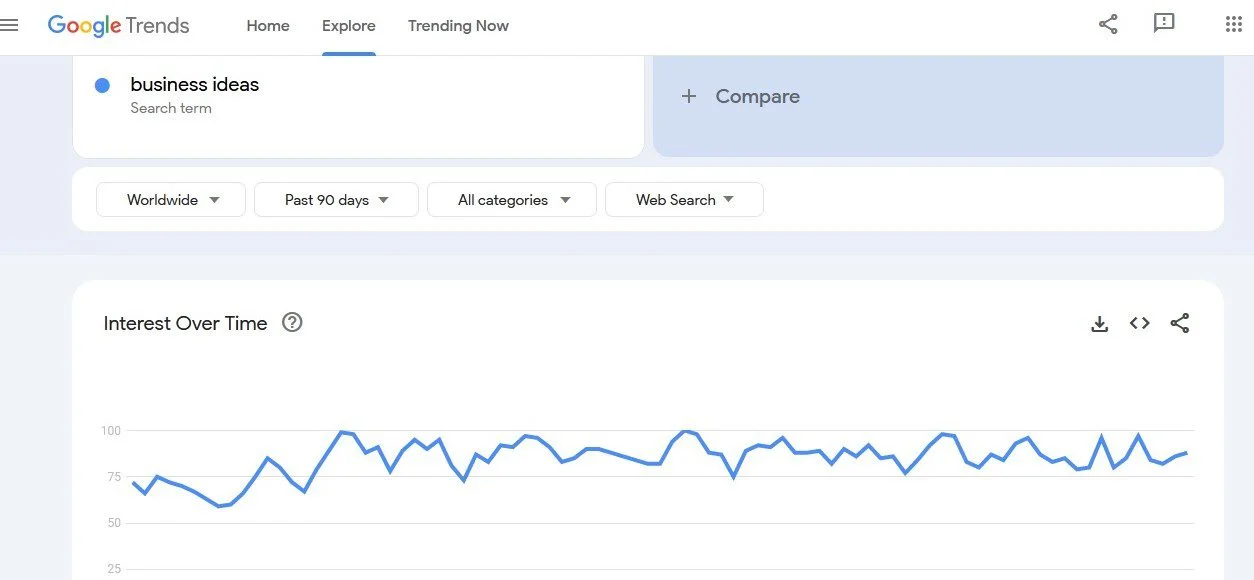
These SEO tools will help you sort the keywords that can help you get the best results.
They will also show you how difficult it is to rank for the keywords, their search volume, and traffic potential.
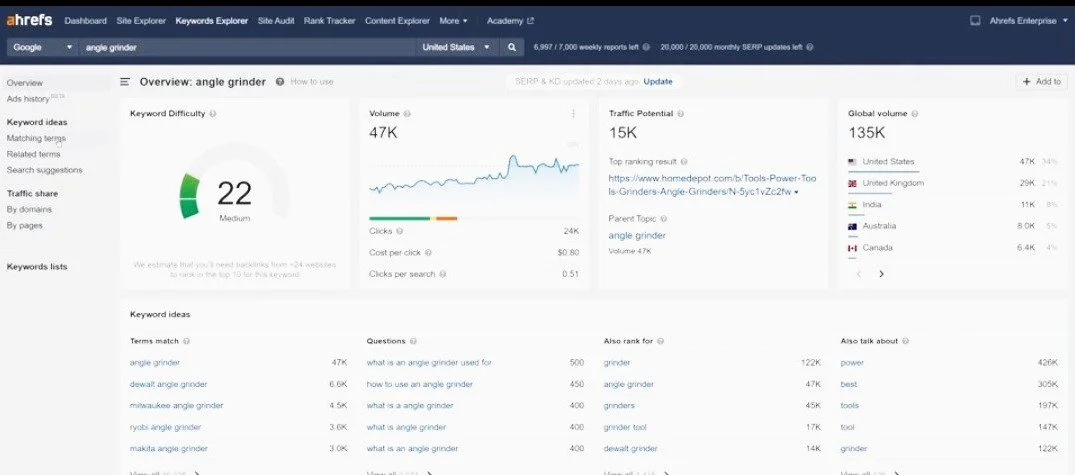
You can also fish for keywords from ranking websites in your niche using, mostly paid tools.
You want to choose keywords that have decent traffic potential and low competition.
Also, pay attention to search interest over time. You want to target keywords with consistently high search interest.
In addition, look for keywords that are either not well-addressed or completely missing in your competitors’ content.
▪ Find Related Queries, Keyword Variations and Synonyms
It is good practice to find related search terms, keyword variants, and synonyms of your keywords, and include them neatly in your content.
These terms are known as related keywords.
Some of the best places to find related keywords include People also ask and People also search for sections on page 1 of search results.
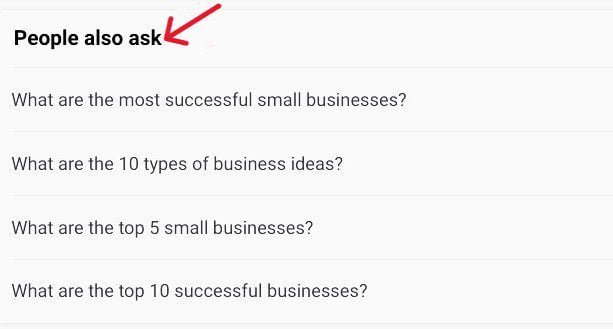
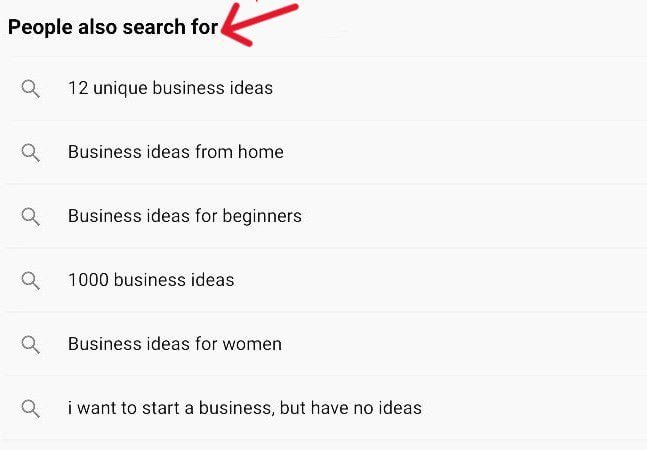
This will make your content richer and a hub of information.
Also, users who search the web for these related terms are captured by your content.
Above all, when searching for keywords, select the ones you understand the search intent very well.
Once you have some keywords you can work with, you’re ready for the next step.
3. Select Keywords That You Can Offer Fresh Perspectives On
There is an ongoing debate about which keywords are the best, especially for beginners – short, medium, or long-tail?
Some people say long-tail words, others say medium-tail.
I would say pick the keywords you know you have up-to-date, original information about.
According to Nick Fox, Vice President of Product & Design, Search and Assistant at Google, most queries are open-ended questions, and so, have multiple answers. He writes:
“Another important element of organizing information is helping you learn more about a topic. After all, most queries don’t just have a single answer – they’re often open-ended questions…”
He also said in another place:
There’s a wide range of information that exists in the world that isn’t currently available on the open web, so we look for ways to help people and businesses share these updates, including by providing information directly to Google.”
In the intro of an overview of their Search Quality Rater Guidelines, Google writes:
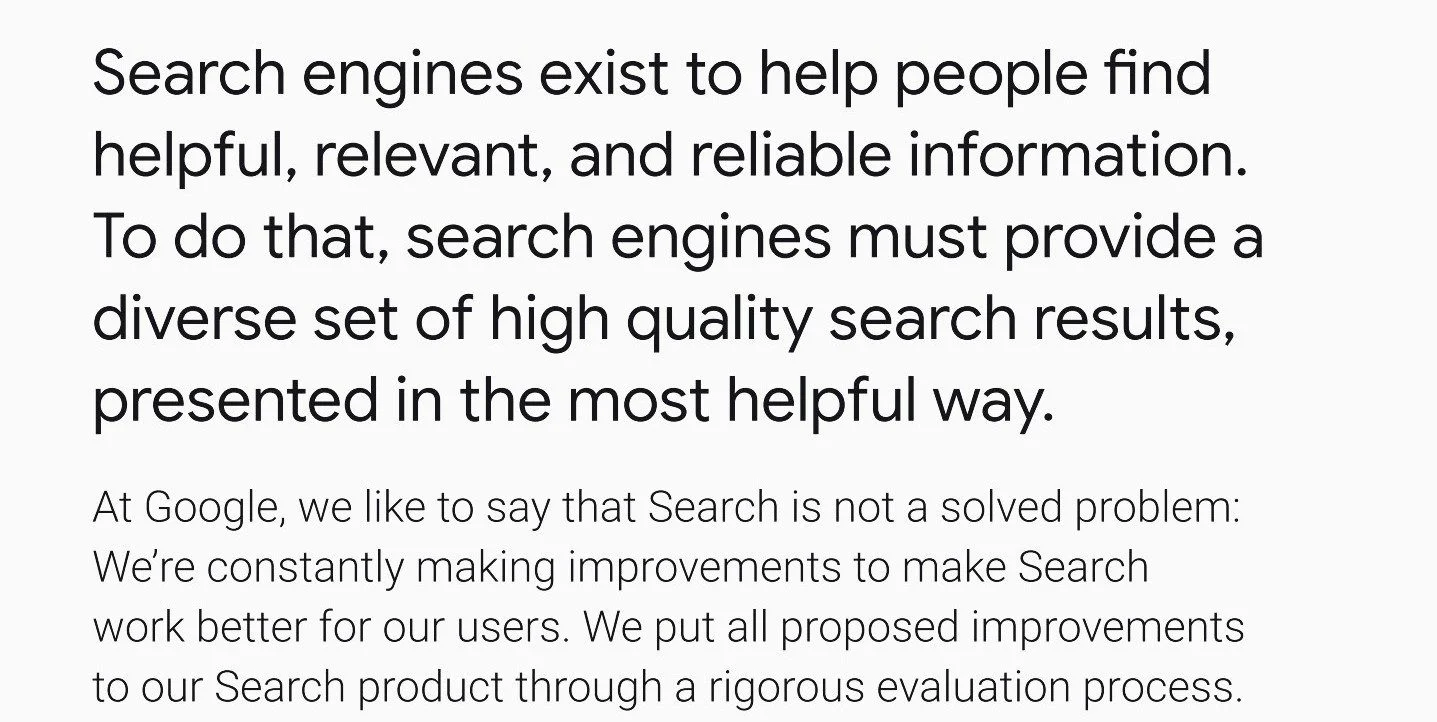
This gives us an important clue that there are still many opportunities to rank even for the so-called difficult keywords if you can provide fresh, reliable, and useful information.
Because the beautiful thing about open-ended questions is that there can never be a single answer.
So, as Nick Fox said, so many queries are open-ended questions, and they likely haven’t been fully answered in Search.
Open-ended queries are keywords that aren’t limited to a set of options; so they have no fixed answers.
They allow for the formulation of answers, rather than a selection from a set of possible results.
People can answer based on their complete knowledge and understanding of the question.
So, the answer varies from person to person, and the question can only be answered with a unique perspective that usually prompts a longer conversation – starting with “what”, “why”, and “how”.
Such queries usually are to gather insights rather than just answers.
And according to another Google official, Danny Sullivan, that is what people are actually searching for most times:
“For many searches, people aren’t necessarily looking for a quick fact, but rather to understand a more complex topic. We also know that people come to Search having heard information elsewhere, with the aim of seeing what others are saying to form their own opinion.
In these cases, we want to give people tools to make sense of the information they’re seeing online, to find reliable sources and explore the full picture about a topic.”
So, if you have fresh insights into any query that can provide useful and reliable information and help users learn more about a topic, those are the keywords you want to select.
The bottom line is that open-ended questions are broad and have many possible interpretations and answers.
That is what Google recommends in its SEO Starter Guide:
“A great idea is to search Google for subjects of interest in your field. If you can’t find a good answer, create a blog post about the subject – chances are that other people are searching for the same thing.”
You can always add something new or different to a so-called “saturated” niche or keyword.
Google reiterates this idea in another place in their SEO Starter Guide:
“Consider creating a new useful service that no other site offers. You could also write an original piece of research, break an exciting news story, or leverage your unique user base. Other sites may lack the resources or expertise to do these things.”
Again, according to Nick Fox, while in some cases, there’s a single answer (and Google serves the most helpful results),”…sometimes queries can have many interpretations”, and not all the answers might have been provided on the web.
4. Create Quality Content that is Relevant and Helpful for Users
Once you choose your best keywords, go ahead and create quality content that is reliable and very helpful to your target audience.
This is the kind of content that Google is looking for.
If the content matches what users are looking for, there is a chance your page will rank high in Organic Search.
Their ranking structure ensures that “the most relevant information rises to the top.”
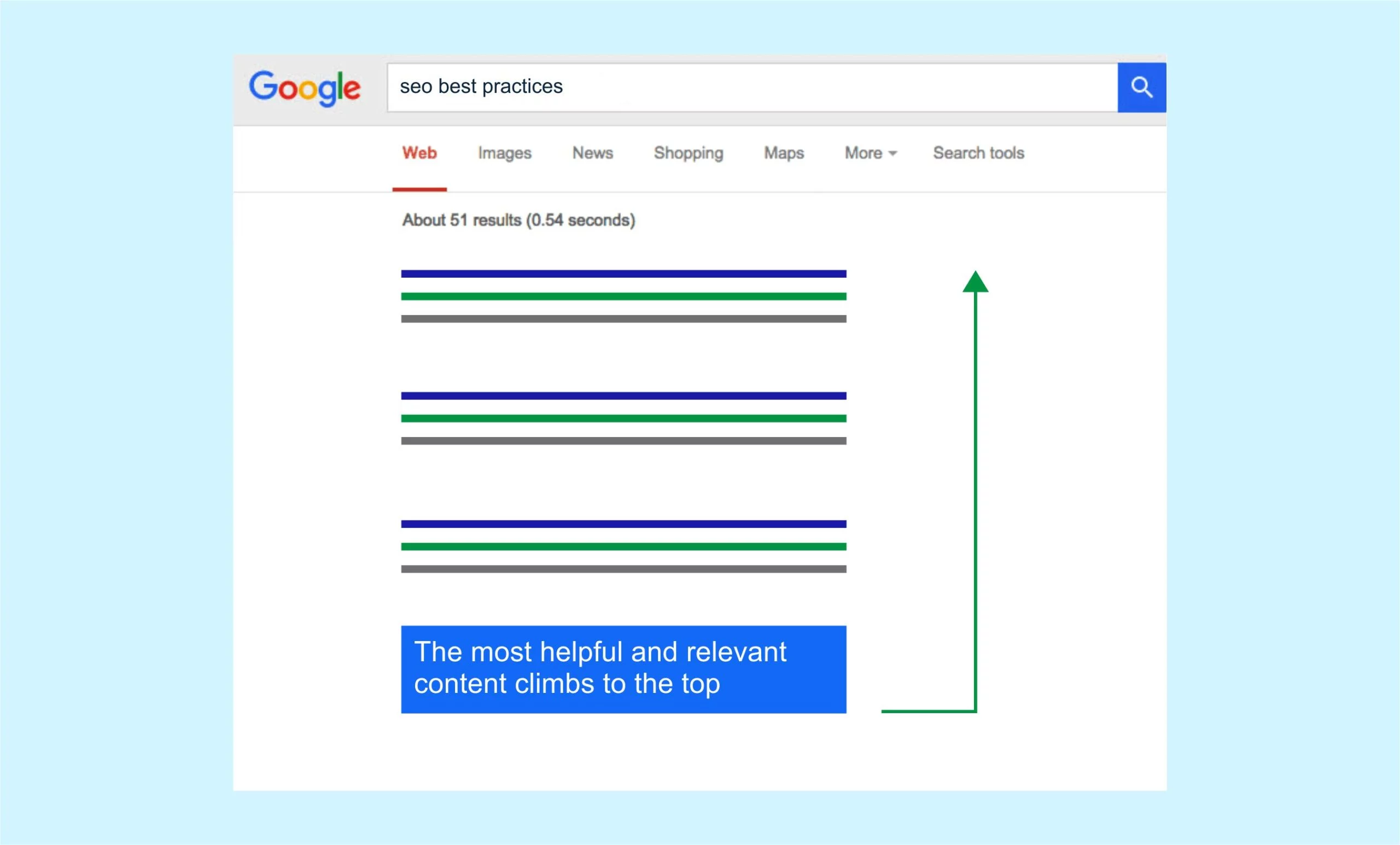
To do this, Google’s algorithms use several key factors and signals to determine and rank the best results available in their Search index.
They include a query’s text, content relevance, sources’ expertise, content freshness, pages’ usability, and the searcher’s location and settings.
That said, Google says the emphasis placed on each factor varies, depending on the type of query.
For example, the sources’ expertise plays a bigger role in returning relevant results for sensitive health queries than it does for tourist destination searches.
Let’s take a brief look at each of these key ranking factors:
▪ Search intent
The first thing Google’s algorithms try to do is determine the intent behind a query: put simply, the meaning of a query. Then, they match it up with the most helpful content in their index.
Google uses the content of the query, and where applicable, the user location to deduce the search intent.
This split-second process includes correcting spelling mistakes for the words of the query and generating the best synonyms that match the keyword.
Google has figured out that sometimes the words in a query are not exactly what users want to find out.
So, the most relevant results aren’t necessarily the ones with the exact keywords, but the content that fully satisfies the search intent behind the query.
Here are some examples from Google:
▸How to change a light bulb. i.e. replace
▸Does the post office change foreign currencies? i.e. exchange
▸How to change the brightness on a laptop. i.e. adjust
Let me add 3 other examples:
▸How to change the oil of your car, i.e. service
▸How to change the color of your hair, i.e. dye
▸How to change the color of your car, i.e. paint
So, to create “rankable” content, you must decode exactly what searchers want from the words of their queries.
Also, identify synonyms that best match the meaning of the keyword and use them in your content.
Next, find out what type of content is ranking on page 1 of search results and create that form.
These answers are ranking because Google continues to receive positive signals from searchers’ interaction with them.
▪ Content relevance
The next thing Google says it does is sort content that contains information relevant to a search query.
Again, Google says, “The most basic signal that information is relevant is when a page contains the same keywords as the search query.”
Furthermore, they also assess the relevance of the content by images and videos, among others.
So, to create content that is relevant to a query, include the keywords naturally and strategically in your content without going overboard.
It is a good practice to focus on one lead keyword per page with a few supporting (and relevant) keywords.
Also, add related images, videos, or both to help users better understand the text (More information about these in Steps 14 & 15).
▪ Content quality
Next, Google says its systems try to select high-quality results by identifying signals that show their content demonstrates high E-E-A-T (Experience, Expertise, Authoritativeness, and Trust).
For example, a good signal that a page has high E-E-A-T and can be trusted is the number of high-quality backlinks it attracts from authority websites.
So create reliable and useful content that people, especially authoritative sites, can trust and will want to link to (More on these in Steps 5 & 13).
User-friendly pages
Google algorithms also analyze if the content has a good user experience, especially on mobile.
User-friendliness includes the ability to view the full content easily on all devices and screen sizes, and page load time.
So make sure your content is easy to use, especially on mobile devices (More detail on this in Step 17).
▪ Freshness of the content
While freshness can vary, make sure each of your pages contains up-to-the-minute information on the topic.
To keep your content fresh, among other things, cover the topic more fully, update your statistics, and fix any broken links.
Using your main keyword, create unique and valuable content with a fresh perspective, or bring people up to speed on the topic – something completely new that satisfies the search intent.
As long as it is what users are searching for, your content will continue to rank high.
And when users find good content, they will tell others about it.
To optimize your content, here are some best current practices to follow:
✓ Crack the search intent for your keywords.
✓ Select a primary keyword (and several secondary keywords) that you want to rank for per page.
✓ Create unique content that satisfies keyword intent, and brings a fresh perspective to the table.
✓ Place your main keyword within one of the introductory paragraphs of your content.
✓ Include a good mix of your keyword variations and synonyms around the content, to give users and search engines a better understanding of what the page is about.
✓ Write well-organized, enjoyable, user-friendly content that promotes easy navigation.
✓ Include your main and related keywords neatly and strategically in content without going overboard.
✓ Add related images or videos, or both, to your content.
✓ Provide accurate and meaningful information, and edit your content – make sure you correct grammar and spelling mistakes as much as possible.
5. Make Sure Each of Your Pages Has a High Level of E-E-A-T
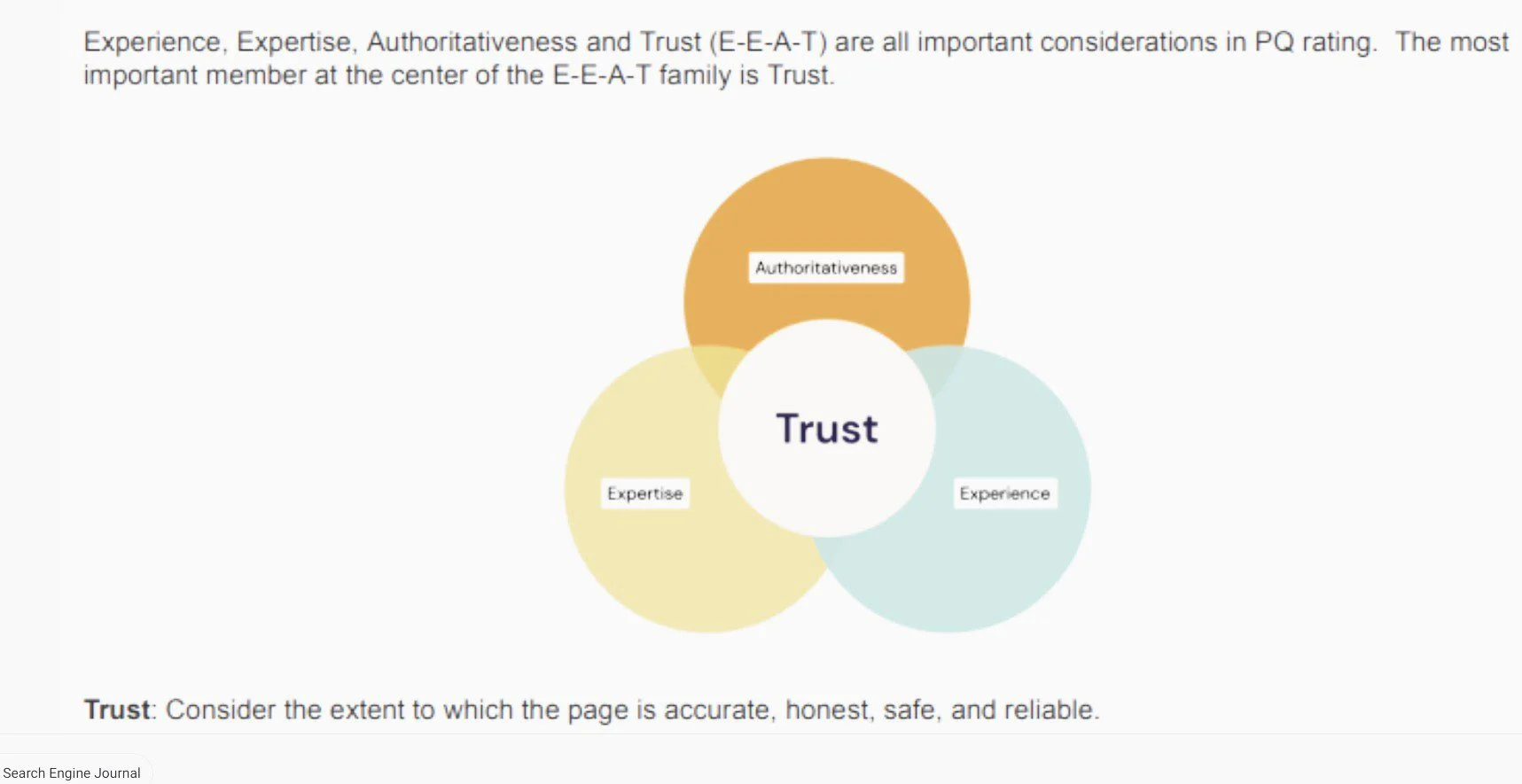
E-E-A-T (or “Double-E-A-T”) is an acronym for Experience, Expertise, Authoritativeness, and Trustworthiness.

It is one of the several important quality characteristics that Google considers when selecting an overall Page Quality rating.
Of the 4 factors, Trust is the most important component. The other 3 contribute to it.
Google believes “sites that demonstrate authoritativeness and expertise on a topic are less likely to publish false or misleading information.”
It used to be just E-A-T, but in its updated search quality rater guidelines, Google says it now assesses the quality of each page (and website) based on E-E-A-T, among others:
▪ The creator’s first-hand, life experience
▪ The creator’s expertise
▪ How authoritative the creator, the page, and the website are
▪ How trustworthy the creator, the page, and the website are
Then, it gives the page (and website) an E-E-A-T rating, which is part of what determines its quality.
Google expects “all pages and websites to have an appropriate high level of first-hand experience or expertise, authoritativeness, and trustworthiness, for their purpose.”
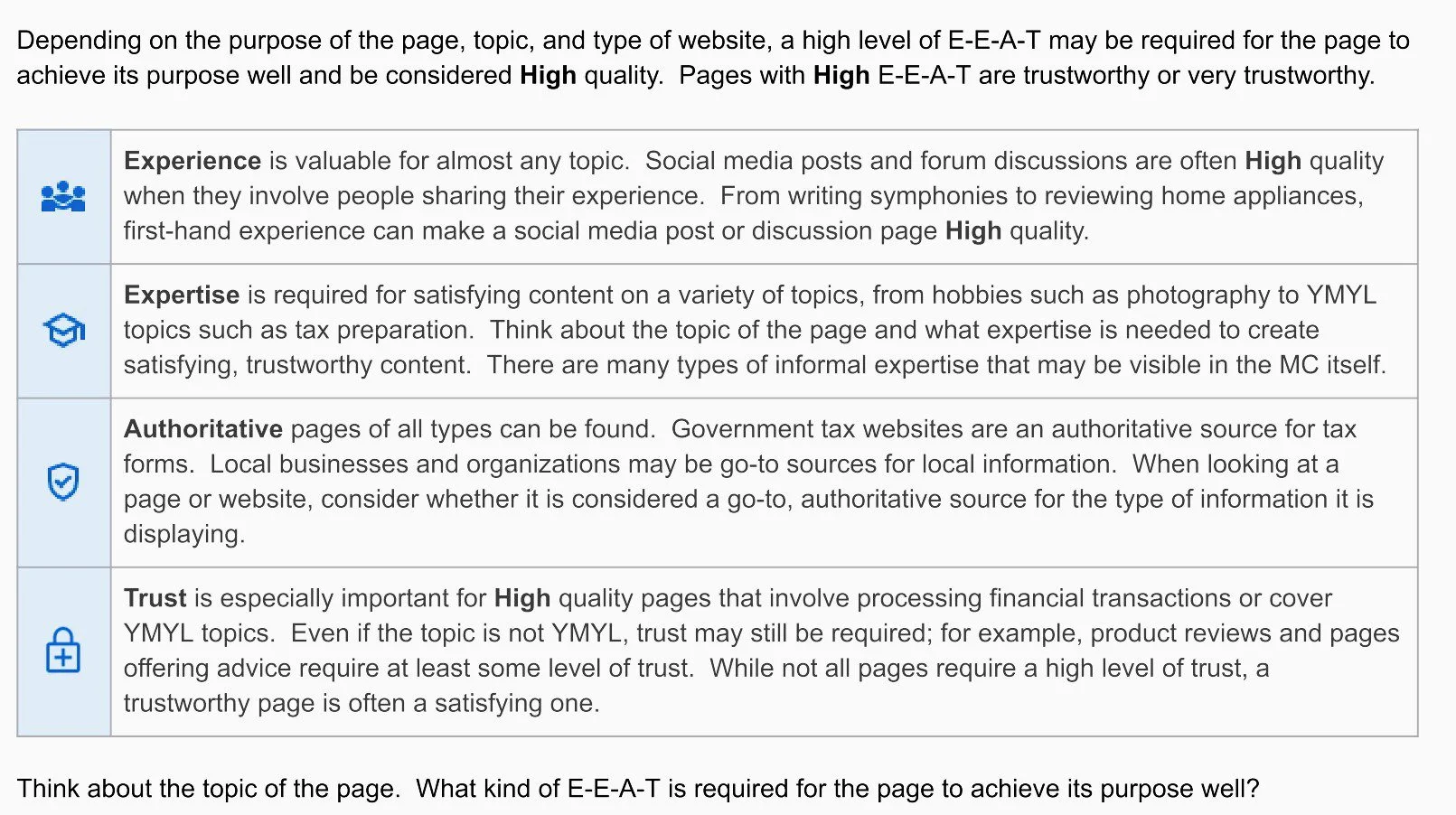
However, expectedly, some pages and websites have a higher level of E-E-A-T than others because of how sensitive the topics are.
According to Google, “they could potentially impact a person’s future happiness, health, financial stability, or safety.”
Google calls them Your Money or Your Life (YMYL) pages and websites, and so they require higher standards.
That said, less sensitive content also must have high E-E-A-T, although not as high as YMYL pages.
So, more sensitive content requires more formal expertise, while less sensitive pages require less formal expertise.
For example, Google says:
“high E-E-A-T medical pages should be written by people with appropriate medical expertise, accreditation, while high E-E-A-T content on home remodeling or parenting should come from “expert” or experienced sources that users can trust.
So whatever the case, Google expects all pages to be written or edited by people with the appropriate level of expertise or experience so that the content can have the required authoritativeness and trustworthiness.
“high quality pages and websites need enough expertise to be authoritative and trustworthy on the topic.”
It is all about making sure your content can be trusted.
So, if you have the requisite expertise or life experience, and your content (including its sources) can be trusted, it raises its level of E-E-A-T.
And pages with high E-E-A-T are rated high and stand a chance to rank well in Google Search.
To attract a high E-E-A-T score, Google recommends that you:
✓ Make sure your pages are written by appropriate experts or experienced sources that users can trust.
✓ Create a satisfying (or comprehensive) amount of high-quality content for the page’s purpose.
✓ Build a positive reputation in your niche.
✓ For YMYL pages, provide factually accurate information that can be verified, and adequate information about the creator of the page.
6. Make Sure Each Page Has an Individual URL
The content of every page is unique, and so should their URL.
A URL is the permanent address of a particular webpage that anyone can use to locate and access it on the Internet.
Like every building on a street in a particular location has a specified address, every webpage, image, video, etc. should have a different URL.
A separate URL per content helps search engines easily find, crawl, index, and serve each page to the appropriate request.
For example, here is the URL of this post:
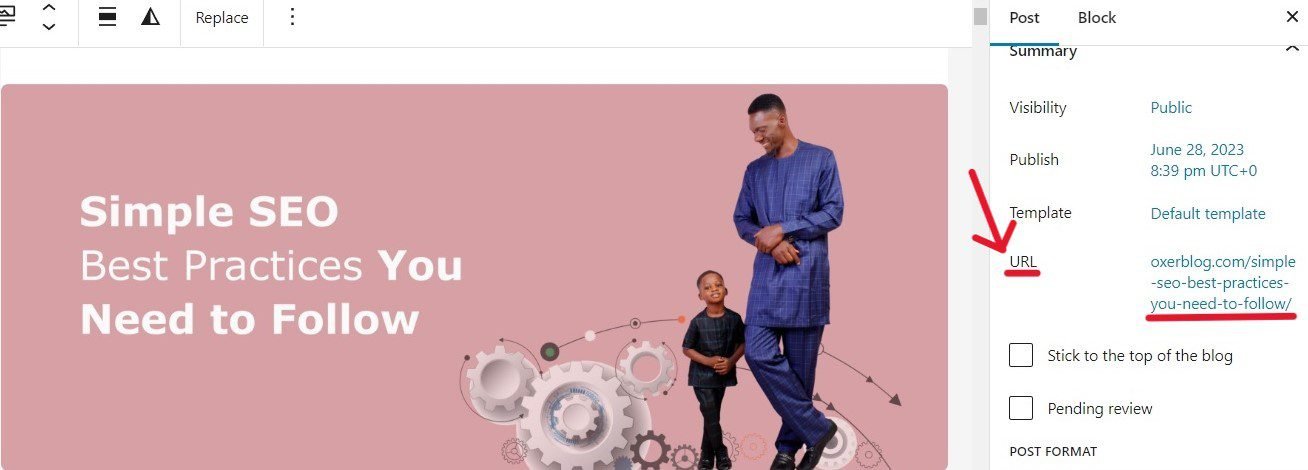
This is the only content with that URL.
Again, each of your page URLs is defined by the permalink structure I discussed in Step 1.
The simpler your permalinks, the more SEO-friendly your page URLs.
Best practices for optimizing your URLs:
✓ Give each page on your website a unique URL.
✓ Use short, simple, readable words in your URLs (relevant to the page and site’s structure) instead of numbers.
Words that describe each page’s content are friendlier to search engines and users than long, undescriptive ID numbers.
For example, https://yourdomainname/seo-best-practices makes more sense than https://yourdomainname/id652=2390a8c
✓ Include the main keyword for each page in their URL. For example, my target keyword for this article is “SEO best practices“:
https://www.oxerblog.com/simple–seo–best–practices–you–need–to–follow
URLs with words similar to the lead keyword have a 45% higher CTR compared to URLs without a keyword (Backlinko).
✓ Use punctuation to separate the words in your URLs. Google recommends using hyphens (-) instead of underscores (_).
✓ Where you can, avoid using dates because they make your URLs longer. On top of this, dates in URLs do not update.
For example, if you create an article in 2024, and update it in the future, say in 2025, the date will still read 2024.
You can use Google’s URL Inspection tool to test whether your URLs are indexable, among other reports.
7. Give Each Page a Separate Title
Again, every page is different; so you want to create a unique title for each.
A page title is the <title> element (or title text) that is placed within the <head> element of the HTML document.
The title text should describe accurately to users and search engines, in one short sentence, the contents of the page.
So, page titles play a very significant role in optimizing your pages for Search.
It is actually one of the factors that search engines use to determine if your page is worth serving in a search results page in response to a query.
People often confuse page titles with title links, but they are different.
Your page title is the title tag placed within the <head> element of the HTML document.
Your title link is the clickable headline that appears in search results (if your content is served to a query).
If it is well-written, Google says the contents of your page title can appear as the title link for the search result.
So your title tag can be one of the many sources of the title link for your search result.
Best practices for optimizing title tags:
✓ Make sure every page has unique title text. This will help users and search engines easily distinguish between two pages.
✓ Use high-quality, concise title text that accurately describes the contents of each page.
✓ Use short, descriptive text in the <title> element. MOZ recommends keeping your title tag length under 60 characters, for display purposes.
According to Backlinko, title tags between 40 and 60 characters have the highest CTR.
✓ Add your main keyword to your page title or, even better, let it be the first word.
✓ Avoid keyword repetitions or variations in your titles.
✓ Include other words related to the content of a particular page.
8. Create an Eye-Catching Title Link for Each Page
Your title link is the title of your result that visitors can click on to view your content when your page is served in SERPs in response to a search query,
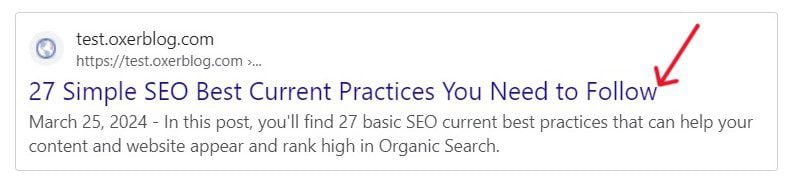
It is completely different from your page title which is the <title> element within the <head> element of the HTML page.
However, Google says “the contents of your page title can serve as the title link for the search result”, if your page features in Google Search.
“title links are critical to giving searchers a quick insight into the content of a result, and why it is relevant to their query”.
So, they’re “first-impression makers”.
They most likely are the first experience searchers will have with your website.
Like Google said, “they’re often the primary information visitors use to decide whether or not to click through to view your content.”
That’s why they are probably the most important on-page SEO factor.
So you want to create high-quality text across your pages that search engines can use as your title links.
Again, statistics show that 53% of all unpaid website traffic emanates from organic search results (BrightEdge).
The good news is you can influence how your title links appear in search results.
Apart from your page titles (or title tags), Google automatically generates your title links from a bunch of other sources:
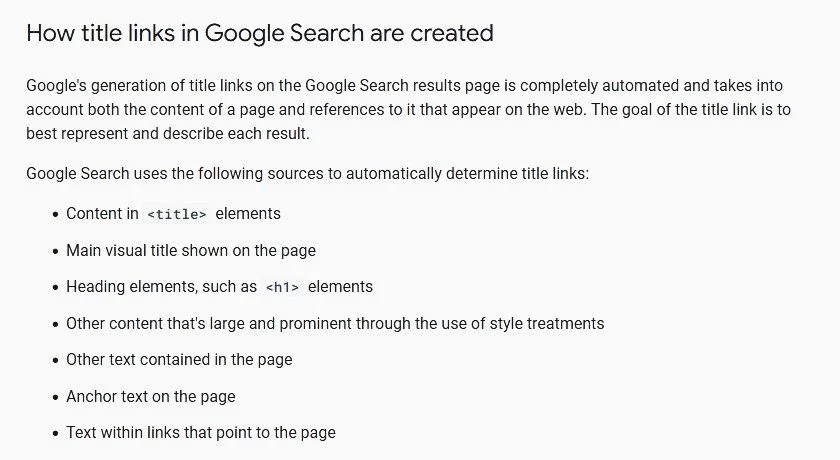
So, you want to write great content in these places that give accurate descriptions of each page, the kinds that can prompt visitors to click on your title links, should Google use any of them in Search.
However, once you follow their best practices, you can specify your preferred options to Google.
Best Practices For Prompting Your Title links:
✓ Make sure each page has a unique title.
✓ Use descriptive and concise text for your page titles, in case they appear in search results.
✓ Include your lead keyword and a few descriptive terms in your text without going overboard.
✓ Write your page headings very clearly and distinctively. Google could use it too.
✓ Allow search engines to crawl your pages.
✓ Use the same script and language as the primary content on your pages.
9. Write a Robust Meta Description Tag for Each Page
A meta description tag is a block of text (about one or two sentences long) that summarizes the page’s content.
It is usually placed within the <head> element of the HTML document, just below the title tag.
Search engines also read your meta description when adding your pages to their index alongside your title tag and URL.
Furthermore, your description tag is one of the sources of the snippet displayed directly under the clickable title link of your search result.
For example:
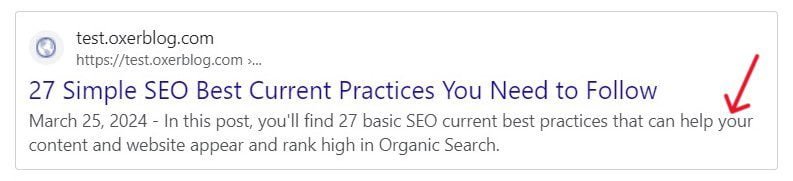
Google says your search snippet gives users a quick and useful overview of what a particular page is all about.
It is the first mini-content searchers will read when your page is served in search results.
Visitors use it to determine if your content is what they want to click to view.
So if it summarizes the page’s content better and matches a user’s query, search engines can use your meta description as a snippet in search results.
Like URLs and title text, description tags can also significantly impact a page’s click-through rate (CTR) in search results which can, in turn, push up its position in Search.
This is why writing great and unique meta description tags for each of your pages is a good SEO practice.
So you want to write a short, detailed, and well-optimized description that sums up the page’s topic.
It should include your main keyword and relevant information that accurately summarizes the page’s contents.
While your page title can be a few words or a phrase, your description tag can be as long as you want.
That said, search engines will only display a part of your description as its snippet, depending on a user’s device and screen size.
Best Practices For Optimizing Your Meta description tags:
✓ Write a detailed and engaging description that accurately summarizes the page’s contents. That way, you can influence your snippet in search results.
✓ Create a unique description tag for each page, to help users and search engines easily identify and understand the page’s contents. Though it can be taxing, it is great for SEO.
✓ Each description should summarize every relevant information about the page.
✓ Add only the main keywords for each page to your meta description. Avoid stuffing a description with keywords. Google doesn’t use such for snippets.
10. Use Heading Tags to Give Structure to Your Pages
Using relevant heading tags to chunk your content according to their importance, is another great SEO practice.
Headings tags (or simply headings) help introduce a hierarchical structure to each page which enhances its appearance and makes it easy to navigate and to read.
You can also use headings to highlight the key points in your article. That way, users and search engines can easily understand what a page or section is all about.
Furthermore, using headings enables you to explore different areas of a topic.
This helps you create richer and fuller content that fully satisfies the search intent.
The WordPress editor, for instance, comes with a unique block called Heading.
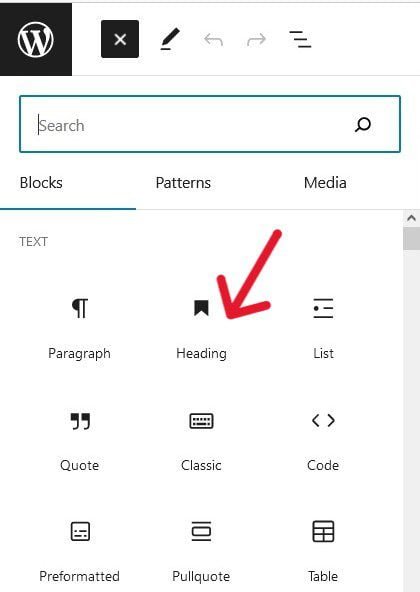
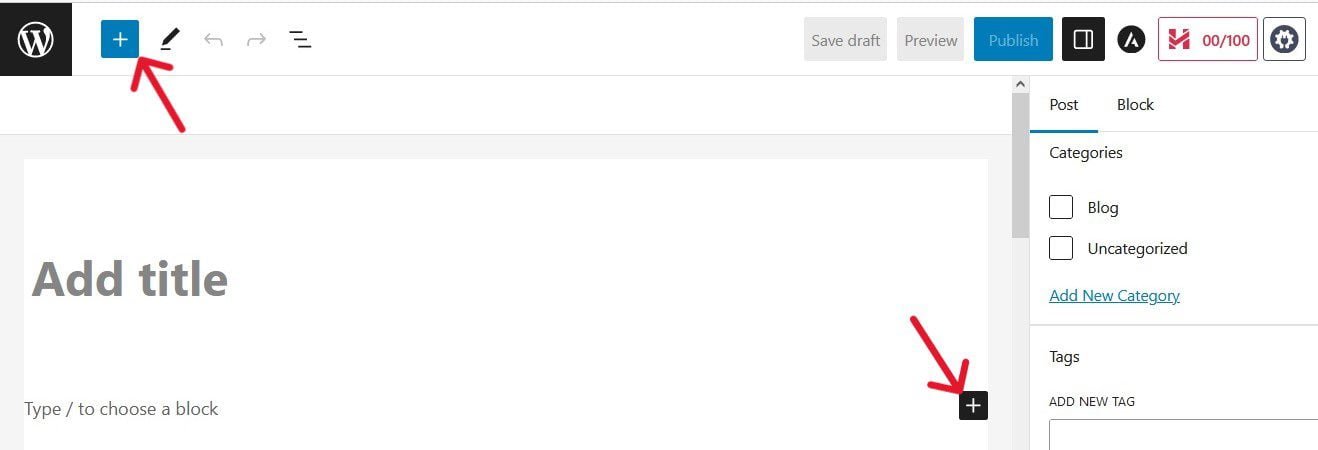
To access it, click on the blue or black (+) sign on the edit screen to bring up the list of blocks.
Then click on the Heading option, and on H2 at the top of the screen to see the six heading levels (H1 to H6).
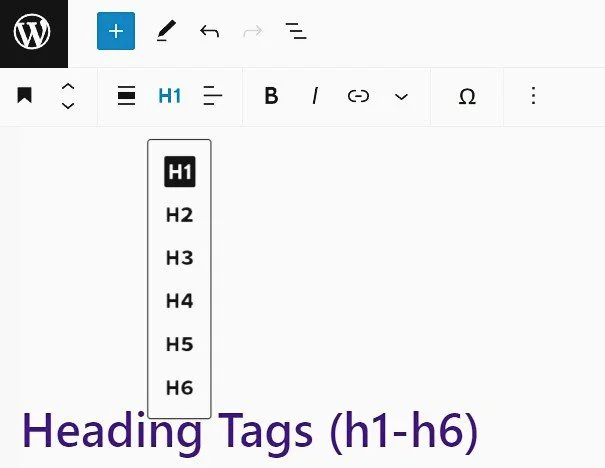
Depending on the length of an article, you can organize your content using headings 1 to 6, according to their importance.
H1 is the main heading (or title) showcasing the page’s subject matter.
By default, it is the Add Title field on the editor screen. H2 to H6 are the subheadings covering different aspects of the topic.
For example, if you’re writing a “how-to” guide, H1 will be the main heading that tells readers what the article is all about. While H2 to H6 will be the subheadings, exploring various elements of the topic.
Having said all that, Google doesn’t care whether you use all six heading tags or arrange them in serial order.
Best practices for optimizing your headings:
✓ Use short, catchy, and straight-to-the-point headings.
✓ Use headings where it is appropriate. Overuse of heading tags can be counterproductive.
✓ Include, or better still, frontload your lead keyword for each content in your main heading (H1).
✓ Add related keywords to subheadings that are beneficial to the topic (or section).
✓ Use only text in your heading tags that help define the page’s structure.
11. Use Good Links Between Related Parts on Your Site
Another effective way to improve your site’s SEO is to create crawlable links between related pages, and relevant sections of a page, on your domain.
These links are called internal links (or internal backlinks).
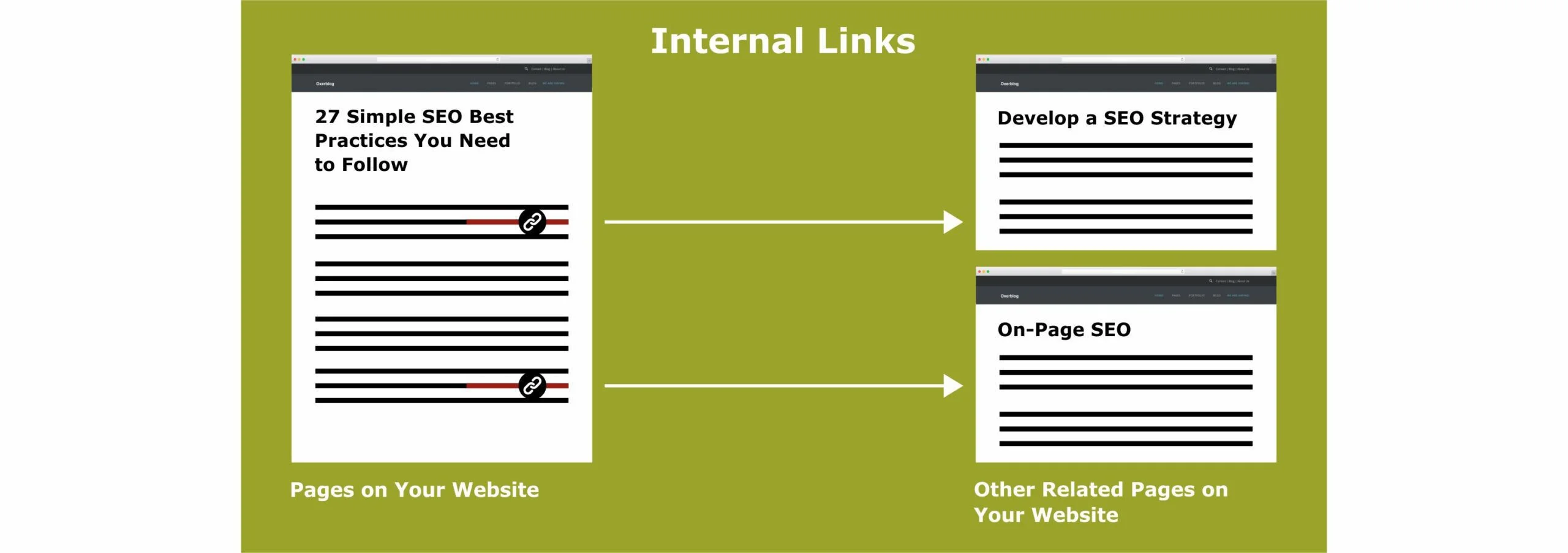
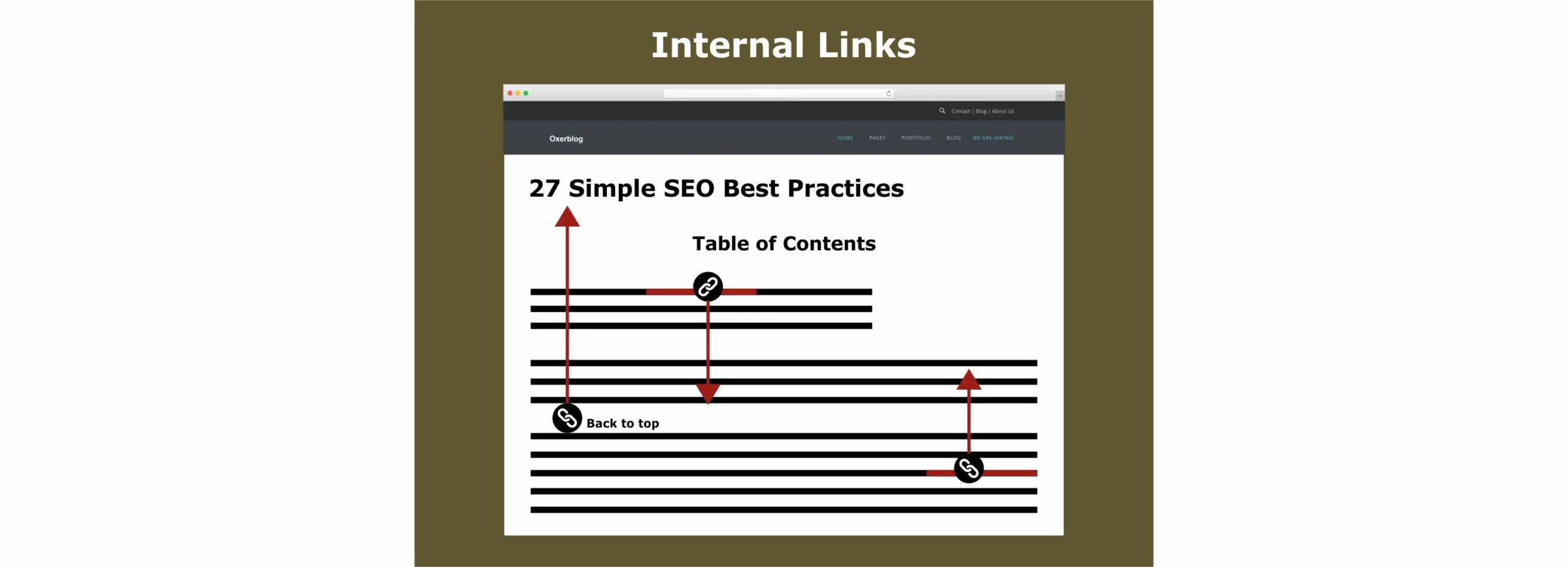
In its SEO Starter Guide, Google says crawlable internal links are one way it finds new pages to index and possibly feature in search results.
So create internal links on your pages to help users and search engines easily navigate to other related areas that add more information about a topic.
That way, all your new and important pages will easily be located and accessed by search engines via your internal links.
Google recommends at least one link between your page and another that provides more context on a topic.
This can encourage readers to spend more time on your site.
And when users spend quality time exploring your content, it signals Google that your website is a warehouse of information.
According to a SEMrush study, dwell time and the number of pages visited per session are second and third-ranking factors respectively.
Typically, internal links should be from your high-authority pages to relevant low-ranking content, and from fresh content to stale content.
Best Practices For Optimizing internal links:
✓ Write very descriptive anchor text in your link that gives users and search engines a clear idea of what to expect on the linked page.
✓ Use a few words, usually a short phrase or sentence.
You want to avoid lengthy anchor text in your links such as a long sentence or even a short paragraph.
✓ Make the anchor text in your links distinguishable from other text on the page so that users can easily identify them.
✓ Make sure every link isn’t a mere decoration but is crawlable to the linked area or page.
✓ Add your primary keyword to the anchor text of each link without going overboard.
✓ Create only links that make sense and improve your website navigation.
✓ Avoid using generic anchor text such as “click here”, “go to this page”, or “see this article”.
✓ Use a clickable table of contents to help users easily link to sections that interest them on the page.
This also helps search engines better understand your page’s content.
✓ Each page should have at least a link to other related and helpful content on your site.
12. Connect Your Pages to Relevant External Sites
Linking to definitive related resources on high-authority domains especially, can help establish a good reputation for your website in your niche.
These types of links are called external or (outbound) links.
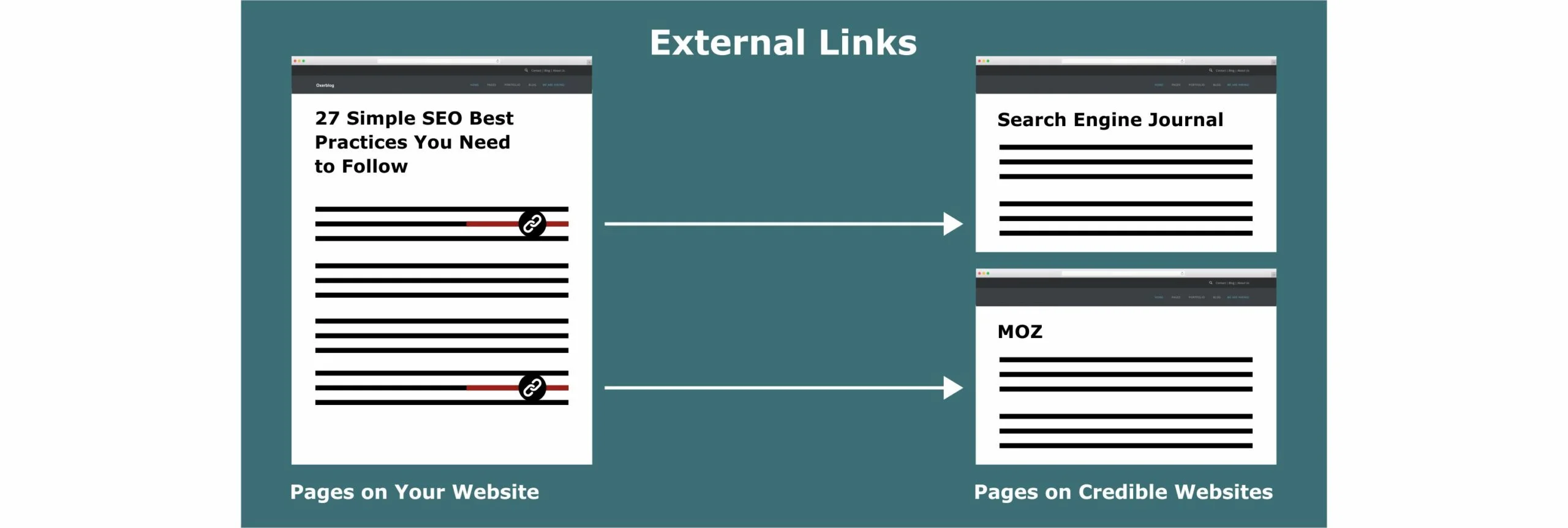
Especially for a new site that very likely won’t have any backlinks initially, linking to established websites can help your website quickly climb in search results.
Because users and search engines will see your content as information-rich, invaluable, and trustworthy.
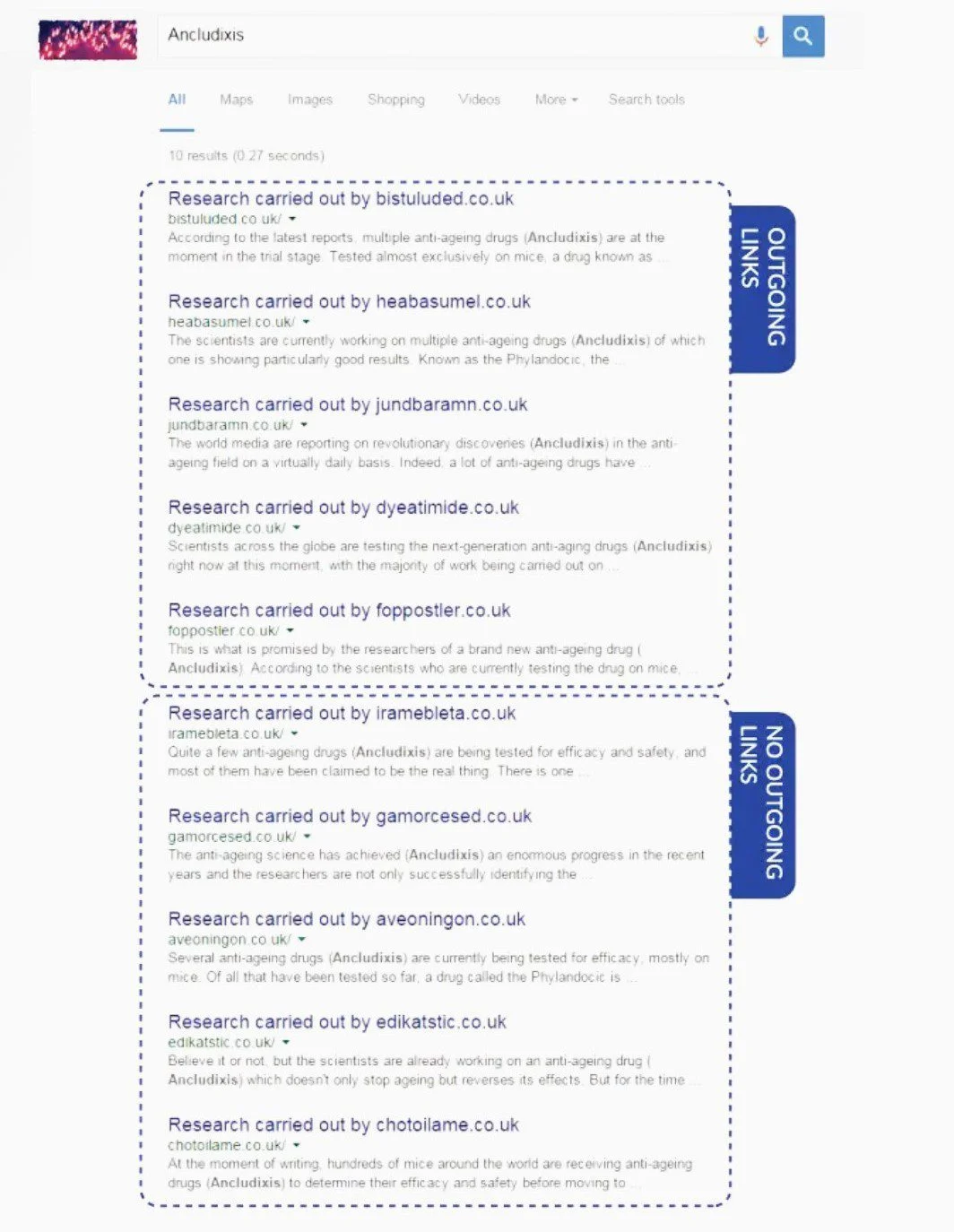
In 2020, Reboot Online had a rerun of an experiment they first conducted in 2015 on whether outgoing links are a ranking factor.
They created 10 new websites and wrote a 300-word article on the same topic for each site.
They tried to keep all the variables pretty much the same – content structure, text length, keyword use and position, etc.
They then created clickable links from 5 websites to 3 authority sites, while they only mentioned them in the text of the other 5.
Below are their search results after 5 months:
The sites with external links outranked those without any.
Best Practices for Optimizing your external links:
✓ Use descriptive, concise link text that helps users and search engines easily guess the content of the linked resource.
✓ Your anchor text should provide more context and relevance between your page and the linked content.
✓ Avoid using generic anchor text such as “click here”, “find out more”, or “read more”.
✓ Make your links crawlable and well-marked.
✓ Use only keywords that help readers understand the page you’re urging them to visit.
✓ When you are not sure of the source, add “nofollow” to your link, to discourage search engines from crawling the linked page from, or associating it with, your site.
✓ For any kind of paid links, use “sponsored” or “nofollow“.
13. Target Quality Backlinks from Credible Sites
It is good when you link your pages to related high-authority sites, sending visitors to read more about a particular topic. This makes Google view your site as well-researched.
It is much better, though, when these websites link to yours, and refer their users to your page(s) to either learn more or as their source of information.
This increases your site’s profile greatly.
Because Google sees this as top-rated sites “endorsing” your page(s) as timely, reliable, and helpful which passes some authority to your site.
According to Danny Sullivan, Public Laison for Search:
“…the number of quality pages that link to a particular page is a signal that a page may be a trusted source of information on a topic.”
These types of links are called high-quality backlinks (or inbound links), and they are the best type of link.
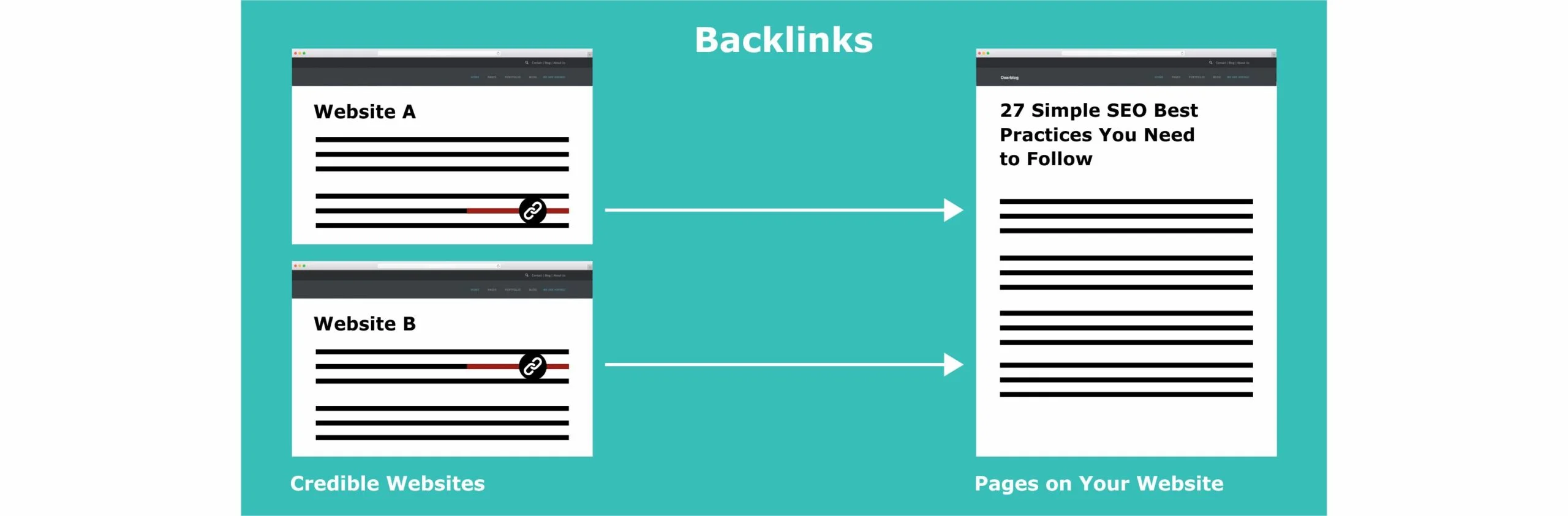
Backlinks are high up in search ranking signals. They’re one of the first 3 ranking factors.
So, the more of these big “endorsements” you get, the higher your pages will climb in search results.
Again, Google says one of the factors it uses to determine if a page is helpful and demonstrates E-E-A-T is to look at the number of prominent websites linking or referring their users to it.
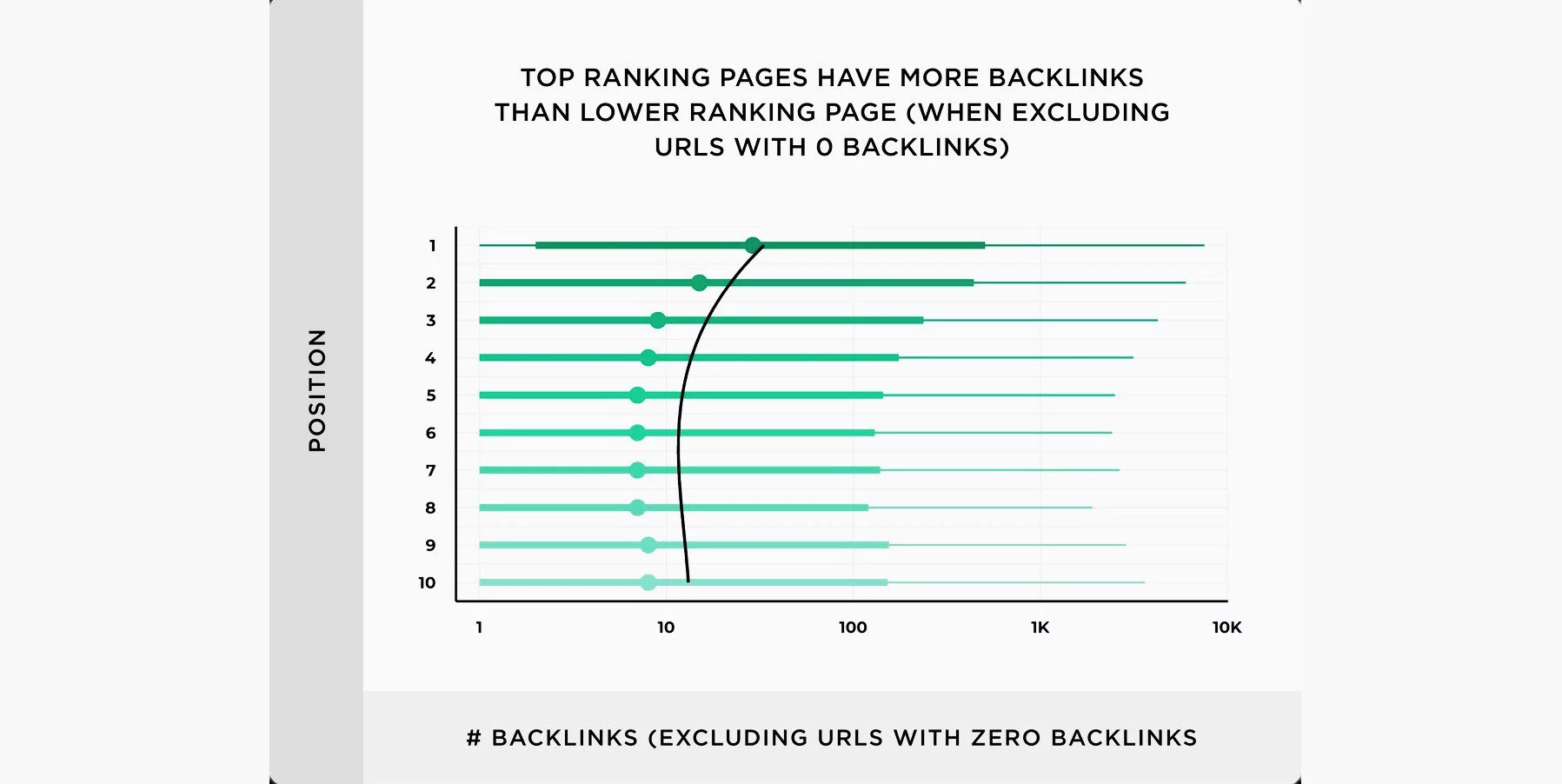
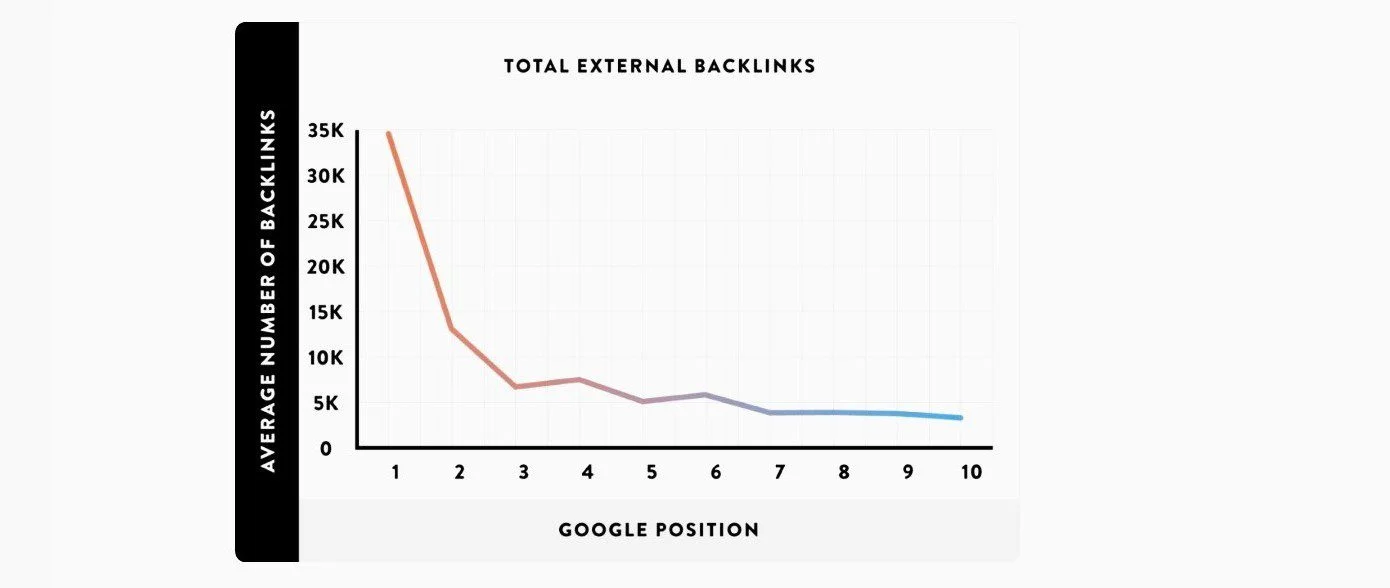
A Backlinko study says there is a correlation between the number of quality backlinks and website rankings.
If your site is relatively new, it can be extremely difficult to get leading sites to link to it just like that, in the beginning.
But the cheering news is that the Web is where people are ready to support and help one another.
That said, you’ve got to work at it.
First, you need to create linkable assets on your site that can attract quality backlinks.
A linkable asset is an original piece of high-quality content that brings something new to the table − the kind that is shareable and worth linking to.
For example, as Google said, “It could be an original piece of research, an exciting, breaking news, a new, useful service, or any other thing that other sites lack the resources or expertise to do.”
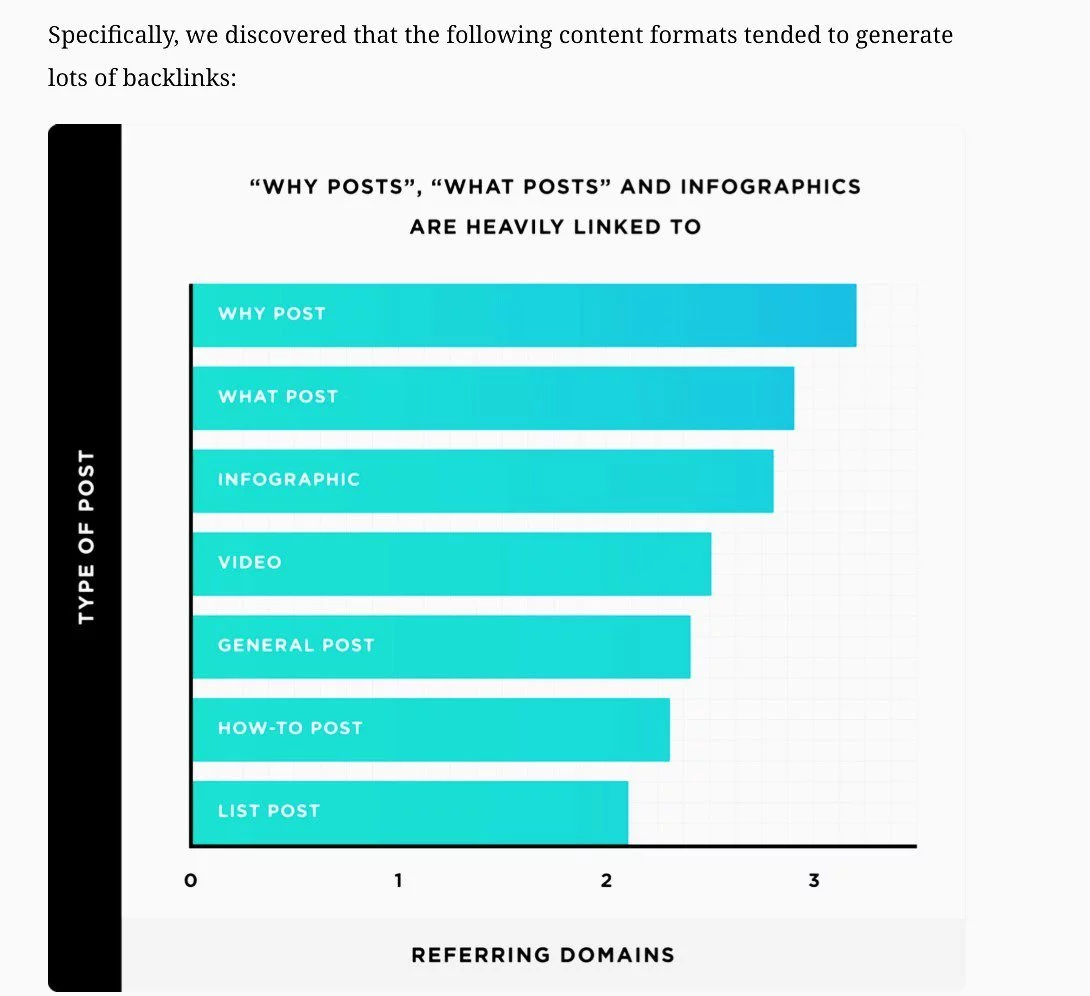
And according to another study by Backlinko, some content formats are more likely to attract more backlinks than others.
Once you have your link assets in place, you’re ready for the next phase.
Google recommends you reach out to any sites that should know about your new content once you go online.
Because, apart from that Google finds new content through links from other pages, backlinks convey on your page value that you cannot get from any other type of link.
If your site is new, however, Google says your backlinks will grow gradually as people discover your content via search especially and link to it.
However, you can fast-track its discovery by effectively promoting your content to the right people.
14. Add Quality Images to Your Content
A picture, they say, is worth a thousand words.
Adding images to your pages can improve your content, attract more relevant traffic, and boost your site’s rankings in search results.
Greatly.
For example, Google features a couple of images in the Image result section on the first page of their search results.
Your images can also appear on Google Search results page as text result images, rank in Discover and Google Images, and send more traffic to your site.
However, they have to be high-quality, unique images that have been properly optimized for SEO according to Google’s best practices.
Just like text, users and search engines place a high premium on original images.
So, using fresh, engaging images on your website can quickly establish your credibility and help you stand out easily.
A while ago, Shai Aharon wrote about a recent experiment they carried out at Reboot.
They found that websites with unique images ranked higher than sites with duplicate images.
This is how they did it:
They registered 10 brand new domains and divided them into two equal groups.
They then added 50 original images (10 per site) to one group, and 50 popular stock images (10 per site) to the other.
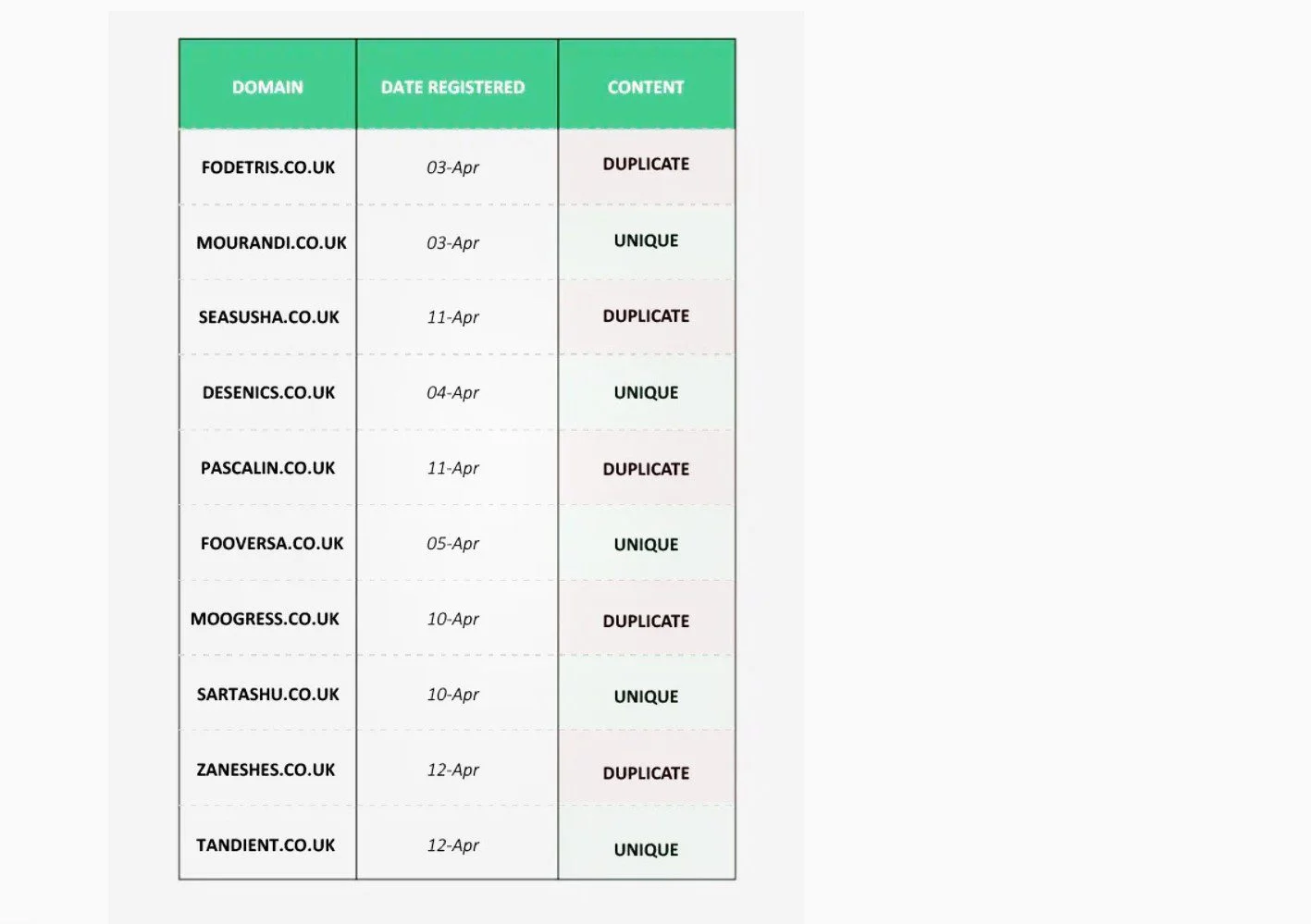
After 3 months, the sites with unique pictures ranked #1, 2, 5, 7, and 8, while those with duplicate images occupied 3rd, 4th, 6th, 9th, and 10th in search results.
Even in Google Images, these unique pictures got a preference, according to the research.

This test shows clearly that websites with never-seen-before pictures perform better in Search than sites with stock imagery.
Because search engines do not encourage duplicate content, including images.
And stock images are considered duplicate content because they are used on multiple sites across the Web.
While it can be very challenging to create original images 100 percent of the time, you want to minimize duplicated stock pictures in your content as much as possible.
This will help you improve greatly user experience on your site.
best practices for optimizing Your images :
✓ Make sure you add only unique and useful images that enhance your original content on each page.
✓ Optimize the placement of each image on the page. Place them where they are most relevant to the text, and site the most important one close to the top of the page.
✓ Give each image a short, readable filename, title attribute, and alt text that describes your image − to improve user experience with your content.
✓ Include your main keyword in the filename, title attribute, and alt text to help Google and visually impaired users better understand each image. But avoid keyword stuffing.
✓ Use high-quality photos for better appeal.
✓ Add appropriate structured data to your images to help relevant users quickly find your content as rich results.
Remember to include a prominent badge to give users relevant information about your pages which can drive more targeted traffic to your site.
✓ Compress your images using a good plugin, to improve your page loading speed.
✓ Use lazy-loading to also boost your site speed.
15. Create High-Quality Videos for Your Pages
Today’s internet users rely on videos more than ever.
Statistics show that people watched an average of 17 hours of online video per week in 2023.
88% of users said they would like to see more videos from brands in 2022 – an increase of 3% from the previous year.
With the growing popularity of video format on the Web, adding videos to your pages can boost your visibility and rankings on various SERPs and help you engage more relevant visitors.
Google says it finds and indexes videos from millions of sites and matches them to queries in the main search results, Video mode, Google Images, and Discover.
For instance, 26% of Google Search results are video thumbnails.
Like other publishers, you can provide video formats of your blog posts and embed them on the page.
This way, you give users more options to access the same content.
You can also host your videos on other big platforms like YouTube, Facebook, and Vimeo.
Moreover, a video can go viral within hours of creating it.
And people who otherwise wouldn’t have read your pages can view your content and quickly become ardent users.
For instance, according to Wyzowl, 73% of users said they’d prefer to watch a short video to learn about a product or service, compared to 11% who’d rather read a text-based article.
Take a look at a few more stats:
As of 2022, video constituted 82% of all global internet traffic.
According to BrightEdge, adding high-quality videos to relevant pages will engage users and keep them about 50% longer on your site.
Videos will increase your click-through rate and improve your organic traffic by 157%. (This means more quality backlinks and reduced bounce rates).
Pages with videos are 53 times more likely to rank on the first page of Google Search.
With all that said, you need to optimize your video content for SEO (especially mobile), to stay ahead of the competition, attract more viewers, and achieve better results.
best practices to optimize Your Videos:
✓ Make sure that each video is available on a page that search engines can easily find and index
✓ Create a standalone page for each video (with a unique title and description), added to its original page with primary text format.
✓ Add an appropriate HTML tag to your video to help search engines easily identify it.
✓ Provide a high-quality, unique thumbnail image for each video to be eligible to appear on Google.
✓ Use structured data to describe your video’s content URL to help Google understand what it is about, and to serve it to users.
✓ More than 75% of all videos are viewed from mobile devices (eMarketer). So optimize your videos for mobile.
✓ Create an XML video sitemap with a list of all your pages containing videos.
16. Add Structured Data Markup to Your Pages
Aside from the typical text results, major search engines like Google now display special features called rich results on page 1 of search results (in their desire to serve users with more relevant answers).
These rich features include key information on mostly business-related entities such as products and services, business locations, opening hours, recipes, event listings, videos, and company logos.
So apart from aiming for top rankings in the text results, your site also has the opportunity to be dominant on page 1 as rich results by adding structured data markup to your pages.
Structured data markup is a standardized machine-readable code that enables you to classify and describe your pages’ content more accurately to search engines.
This gives search engines a good understanding of your content, so they can render your pages in useful and eye-catching ways to more relevant search queries and visitors.
This, in turn, can significantly improve your pages’ visibility, attract more users, and increase your CTR in search results.
While it isn’t a ranking factor, valid structured data makes it easier for your pages to appear where they are relevant and can rank for the right terms.
Typically, most structured data use the schema.org language with universal formats to provide information about a page and to classify its content.
There are different content types you can add structured data to. These include articles, books, review snippets, videos, recipes, courses, Q&A, products, movies, how-tos, and FAQs.
You can find the full list of content types that support markup language in the Google Search gallery.
Your structured data can be eligible for rich result display if follow Google’s guidelines.
Best practices:
✓ Use structured data with any supported notations markup to describe your content.
✓ Use the Data Highlighter tool in Google Search Console to tag the data fields on your site with your mouse, or the Markup Helper tool to markup elements in your page or email.
✓ Check your markup with the Google Rich Results test to make sure there are no mistakes in the implementation.
✓ Avoid invalid markup.
✓ Avoid changing your site’s source code.
✓ Avoid markups that cannot be seen by users.
✓ Avoid creating fake reviews or adding irrelevant markups.
✓ Track your marked-up pages in Search Console’s Rich result reports after deployment.
Also, follow the guidelines specific to your structured data type.
You can also test your page with Google’s Rich Result Test to see the preview.
17. Make Your Site Mobile-Friendly

Mobile is crucial to the success of any blog or website today.
Users increasingly rely on mobile to access digital content, products, and services.
According to Statcounter, across the world, smartphones continue to generate more traffic than all other devices.
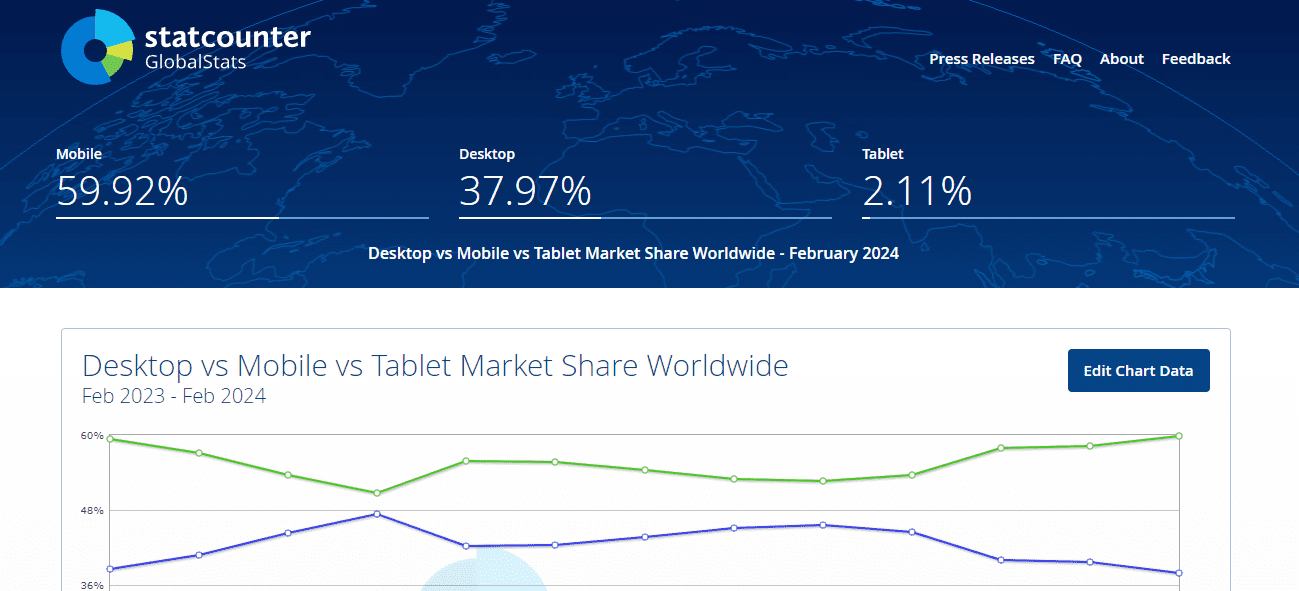
So most visitors will probably be accessing your website through a mobile device.
Google has the lion’s share of web searches on all devices and has long prioritized mobile searches.
So, mobile-friendliness has been a ranking factor since 2015. And in 2019, Google launched its mobile-friendly indexing.
Mobile-first indexing simply means that, as a rule, Google uses the mobile version of your content for indexing, ranking, and generating snippets.
Because the desktop version may not display properly on a mobile device.
So, to rank in Google, you should prioritize making your site mobile-friendly during the setup process.
The goal is your mobile visitors should have a great user experience on your site just like your desktop users.
With that said, here are some of the latest best practices to create a mobile-friendly site that is ready for mobile-first indexing:
Best practices for optimizing your site for mobile devices:
✓ Choose a responsive web design that is consistent with all devices and all screen sizes.
If you’re building a WordPress site for example, pick a good theme that will display well on mobile, desktop, and tablet.
✓ Ensure your images, videos, etc. display correctly on desktop and mobile.
✓ Make sure that your content is easily accessible to mobile users without any obstruction by an interstitial.
Mobile is the future, and the only way to be part of that future is to make your website mobile-optimized.
Once you set up your blog or website, use Google’s Lighthouse tool to see whether your pages meet the criteria for a mobile-friendly page.
You may also want to assess your site’s mobile performance with the Lighthouse tool.
It will show you a list of pages mobile users have difficulty viewing well.
18. Optimize Your Site’s Loading Performance
Users and search engines also place a high premium on site speed.
While high-quality content remains sacrosanct, loading performance will further boost your chances of success online.

Site speed is simply how quickly a site (or page) loads and renders on a searcher’s screen.
Google continues to push for a good user experience on the web.
They continue to emphasize the significant role of loading experience, alongside other factors, in search results.
“Performance plays a major role in the success of any online venture. High-performing sites engage and retain users better than low-performing sites”.
So, for well over a decade now, loading performance has been a ranking factor in Google Search rankings.
However, with more queries from mobile devices in recent years, Google announced in its “Speed Update” in 2018 that page loading times have become a ranking factor for mobile searches.
So, like Website Builder Expert said, loading time shouldn’t just be a matter of personal preference.
If your blog or website is going to be successful online, you’ll need to pay serious attention to your page load times, especially for mobile searches.
Users want to find what they search for in a fraction of a second.
According to Think with Google, any delay in page load time severely affects bounce rates.
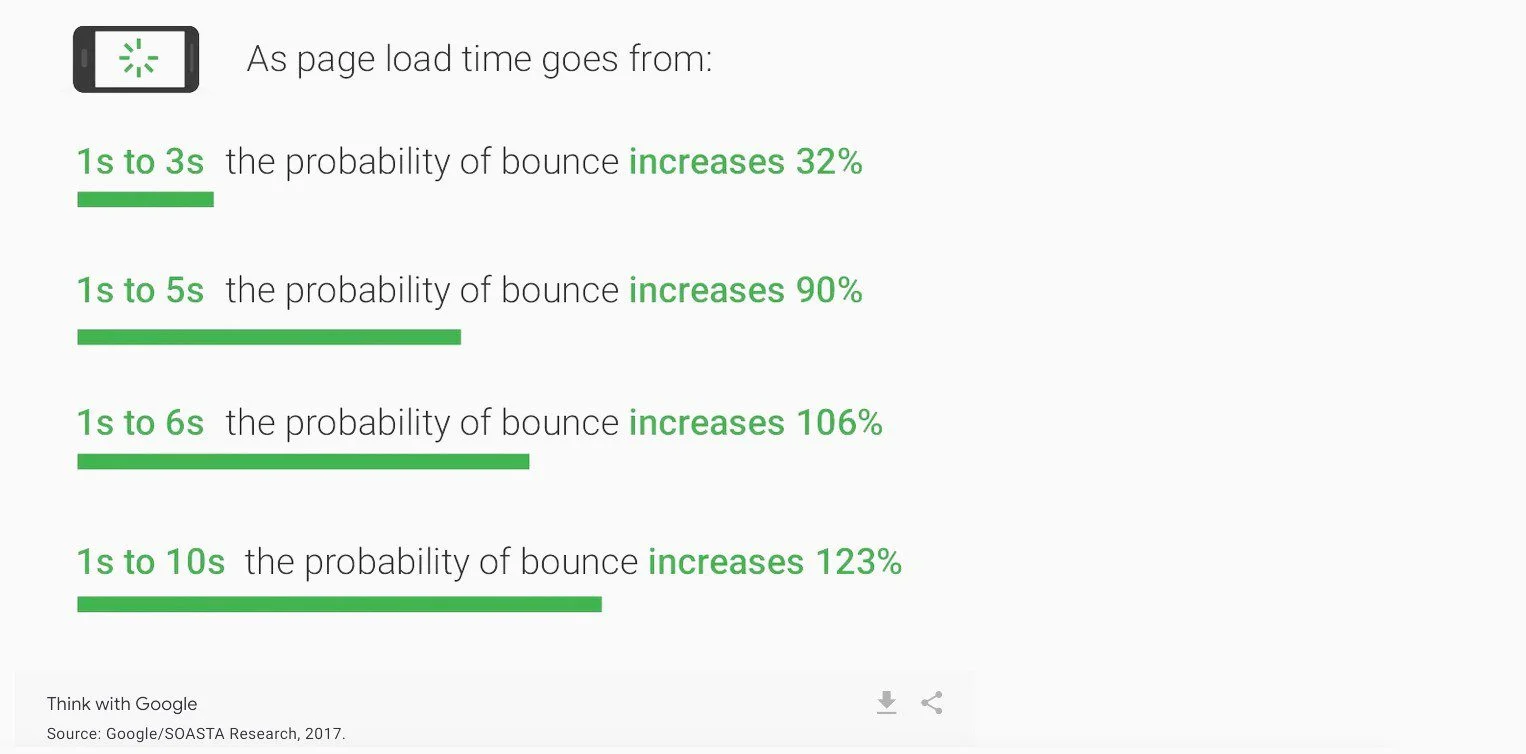
And a high bounce rate is a signal to search engines that the page isn’t helpful to users, so they simply downgrade its rankings.
So your goal from day one should be to get your site loading fast and to stay fast, to keep your users happy.
You can measure and monitor your page’s loading performance, responsiveness, and layout stability using a set of metrics called Core Web Vitals (CWV).
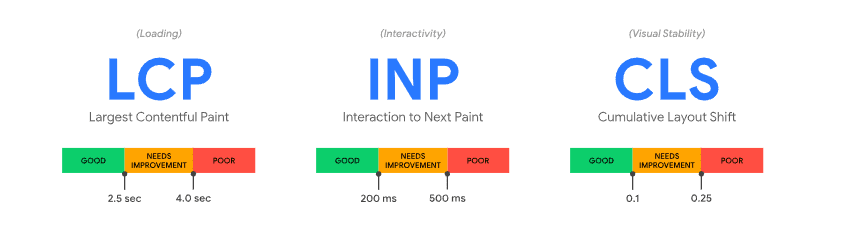
Google has free speed tools that you can use to measure these important user-centric performance metrics.
GTmetrix is another very good free tool.
These tools provide a detailed report of your site speed, including recommendations on improving your load time on desktop and mobile devices.
The healthier your site’s CWV, the faster your page speed, the happier your users will be, and the higher your search rankings.
However, note that search intent and rich-information pages remain dominant ranking factors.
Google says “A good page experience doesn’t override great, relevant content”.
Having said that, fast mobile speed will add to your rich content’s value. Which can translate to more page views, conversions, and revenues.
Best practices for optimizing your site speed:
✓ Optimize your images for Search by compressing their sizes without losing quality with a tool like Smush, kraken.io, EWWW Image Optimizer, or Compressor.io.
✓ Use a WordPress caching plugin like WP Super Cache, W3 Total Cache, or WP Rocket to allow users quick access to your pages subsequently after the first load.
✓ Use a content delivery network (CDN) like Cloudflare or Flastly to enable speedy content delivery on servers closest to a query.
✓ Choose a simple, lightweight theme for your web design.
✓ Lazy-load your images and videos at the browser level. So at page load time, the browser defers the loading of an image or video to when the user needs it.
✓ Upgrade your web hosting plan and, if necessary, web hosting company as your traffic increases.
✓ Use a plugin like WP Rocket plugin to improve your speed.
✓ Delete redundant plugins from your site.
✓ Don’t upload a plugin unless you need it. And delete it once you’re no longer using it.
19. Keep Your Site Safe and Secure with HTTPS over TLS
Every website is vulnerable to hacks and malicious attacks, regardless of the content on the site.
So, you need to take steps to protect your site and keep users’ data safe and secure from the outset.
HTTPS (Hypertext Transfer Protocol Secure) is the first line of defense to secure your site’s connection.
It is an internet communication protocol encrypted via the Transport Layer Security (TLS). [TLS is the updated, more secure version of Secure Sockets Layer (SSL), still commonly referred to as SSL].
HTTPS is a lot safer, compared to the original, non-secure HTTP.
Website owners rely on it primarily to protect their websites, and to ensure the security of all exchanges between their users’ browsers and their sites (against what is commonly referred to as a man-in-the-middle attack).
So, HTTPS ensures no one can eavesdrop let alone hijack any communication, transaction, or data transfer between you and your visitors.
When a website is secured by an SSL certificate, HTTPS appears in the site’s URL.
User trust and confidence is boosted when visitors see that your site’s connection is secure.
With the locked padlock icon, they know that the information they send or get is private.

If your pages aren’t served over HTTPS, it can cause your ranking to dip.
Because HTTPS is an important element of page experience signals that Google uses to rank pages in Search today.
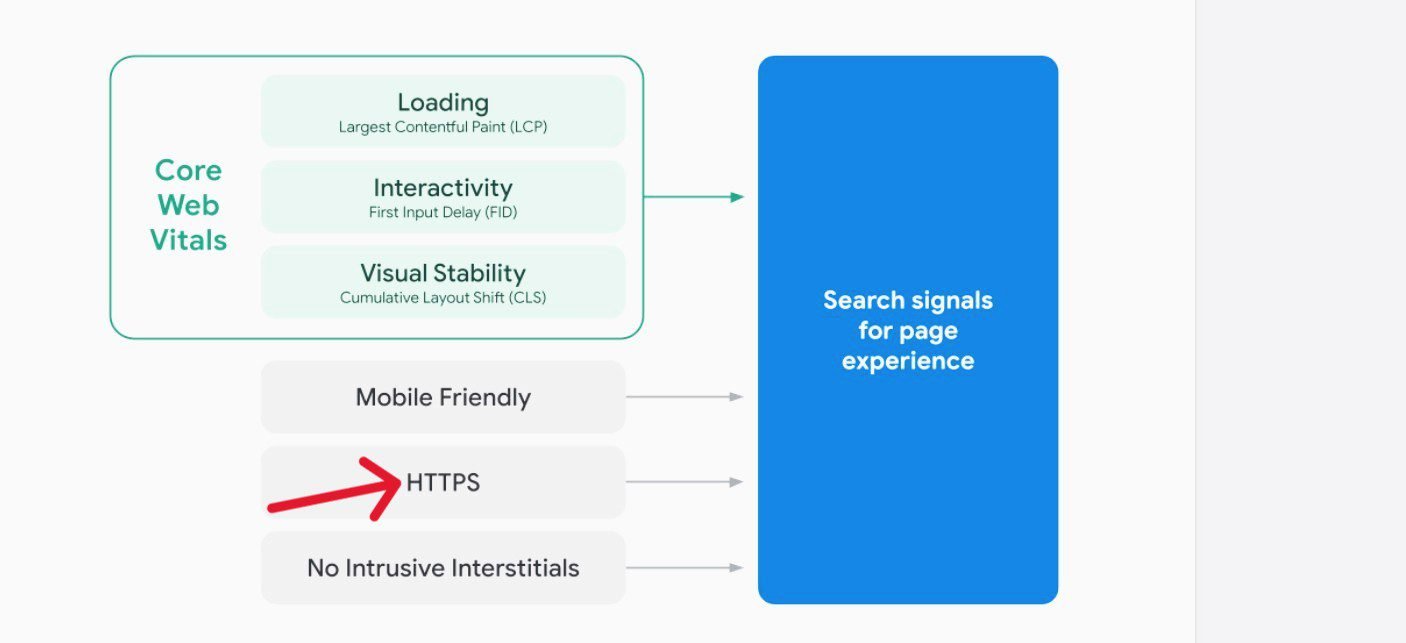
For example:

Thankfully, all top WordPress hosting providers offer free TLS certificates (if you’re building a self-hosted WordPress site).
If you’re already hosted on a platform that doesn’t have TLS certificates in their packages, head over to Let’s Encrypt right away and pick one for free.
Best practices for securing your site:
✓ Check if your site has a secure connection. Your site is at risk if your pages do not have a locked padlock symbol.
✓ You want to obtain a security certificate as proof that you’ve enabled HTTPS on your site. Certificates are usually issued by a certificate authority (CA) after they verify the ownership of your website.
✓ If you’re using WordPress, make sure your site and all the third-party tools you use on it such as your theme and plugins are constantly updated to the latest version.
20. Ensure Your Site is Compatible with Different Browsers
Browser compatibility can seriously help your SEO.
Visitors will be accessing your pages using a variety of browsers.
Top web browsers include Chrome, Opera, Safari, Edge, Firefox, and Samsung Internet, and their market share varies from region to region (Statcounter).
Although the W3 Consortium sets common standards and regulations for all browsers, each browser has a unique mode of text translation and so reads and displays the HTML code a little differently from others.
Even different versions of the same browser translate and display the same HTML code differently.
So, your website can look different to users because of their browsers.
While your site will render correctly in some browsers by default, it may show errors in others.
That’s why you can’t rely on default browser-specific behavior, hoping a browser (or a version of a browser) will, on its own, detect your content type or translate your site code correctly.
You need to specify an encoding for your pages to display correctly and give visitors a great user experience across multiple browsers.
If your visitors can’t get a good view of your website in a particular browser, you lose all the traffic from that browser.
So right from the development stage, you want to make your website’s design render optimally in both new and old browsers, to widen your reach and improve your traffic.
Best practices to make your website look great on every browser:
✓ Use a clean, valid HTML and CSS to write your pages. You can validate your code and style with W3 Consortium’s HTML and CSS validators, while HTML Tidy can help you clean up your code.
✓ Specify an encoding for your website, and place it at the top of your pages to help browsers locate it easily.
✓ Test your site’s appearance and functionality in various old and new browsers. Google Analytics can provide you with a list of browsers visitors use to view your pages.
✓ If you’re using the WordPress CMS, choose a theme that is compatible with all the popular browsers.
21. Create a Navigational Page for Your Visitors
Google recommends that you create a simple navigational page right out of the gate, to give visitors a great user experience on your site.
A navigational page clearly displays the hierarchical structure of your pages, to help users quickly and easily find the content they want to view.
Visitors can always refer to this page when they have trouble finding pages on your site.
This will help keep visitors on your site which means more dwell time, reduced bounce rate, and increased conversions and clicks.
A navigational page is different from the typical homepage or HTML sitemap.
The page hierarchy should allow users to go from general to more specific content.
Also, you want to link and group related pages to help visitors easily discover pages that corroborate each other.
You can list all the pages on your site (if you have a few), or the important pages (if you have a large website) that you want visitors to find instantly.
While search engines will also use this page to get a good crawl coverage of all your pages, it is mainly aimed at your human visitors.
To set up a navigational page on your site, follow these best practices:
✓ Create your navigational page for human users and your XML sitemap for search engines.
✓ Create a well-organized hierarchy that allows visitors to flow from general pages to more specific, relevant pages on your site.
✓ Ensure all your pages are reachable through clickable text links from your navigational page and other related pages.
✓ The anchor links should include the pages’ titles to help users easily identify what the page is about.
✓ Make sure the links on your navigational page are constantly updated. And if there is a broken link, use a custom 404 page to guide users back to a working, related page.
22. Use Website Navigation for Better User Experience
Using website navigation on your site can make a big difference in user experience and engagement with your content.
That said, if visitors can’t find what they are looking for with a just few clicks, they’ll simply move to another site.
But if they can navigate your site and find what they want without difficulty, they’ll stick around and explore further.
This can impact your rankings, traffic, conversion rates, and sales.
So, in addition to a navigational page, you want to include some user-friendly and streamlined navigation menu options on each page.
However, while your navigational page displays the overall hierarchical structure of your pages, a page’s navigation menus should show a few links to other related and relevant pages and their positions in the site hierarchy.
So, whatever page a visitor lands on in your domain, there should be a variety of easy-to-use navigation menus to help them understand and explore your site effectively, and lead them to where they can take the desired action.
Depending on the page, the eventual call-to-action could be to sign up for your email list, buy a product from (or through) you, register for a course, learn more about a topic, etc.
Popular website navigation menus include the top (or header) menu, footer menu, sidebar menu, and breadcrumb list.
Best practices for website navigation:
✓ Place your menus in the typical places where people expect them to be – the top, the foot, the sidebar, etc. Create clear, interactive, easy-to-understand navigation paths that make sense to visitors.
✓ The fewer clicks on a page, the better, which means people can quickly find what they’re searching for.
✓ Be consistent in your navigation design and placement. Make sure your menus and links are clickable and responsive.
✓ Use simple, descriptive words that match what people are searching for in your links.
✓ Make sure your menus are mobile-friendly because of Google’s Mobile-First Indexing.
✓ Use structured data for some of your menus. Google recommends using structured data markup when showing breadcrumbs.
23. Create an XML Sitemap for Search Engines
The best way to quickly help search engines like Google find your pages is to build and submit an XML sitemap file.
A sitemap is a file on your site with all the URLs of pages, videos, images, and other files you want search engines to crawl and index.
You can also add other valuable information about each URL, such as how important a page is relative to other URLs, when it was last updated, and how frequently it changes.
Simply put, a sitemap tells search engines which pages and files you think are important on your site.
And that helps them crawl your site more efficiently.
Google says every new website needs a sitemap, partly because in the beginning it has little or no backlinks (i.e. external links from other sites to yours).
Also, you should consider creating and submitting a sitemap if your site is large, and your pages are not well linked to each other, or if you have many videos and images or news pages.
However, you can skip the idea of building a sitemap if your website is pretty small (i.e. your important pages are less than 500), your pages are well linked, or you have just a few media content or news pages.
That said, while creating a sitemap for your blog or website isn’t compulsory, Google says having one can be a plus to any site.
A sitemap compliments a robots.txt file. In fact, the best place to site your sitemap is in your robots.txt file, because it is the usually first place web crawlers visit on a site.
You can also submit it directly to Search Console to make it available to Google.
Google’s recommended limit for a single sitemap is 50MB (uncompressed) and 50,000 URLs.
So if you have a larger file or more URLs, you’ll need to create multiple sitemaps of that size.
You can submit your multiple sitemaps directly or create and submit a sitemap index file that points to a list of these sitemaps.
To learn how to create a sitemap, visit Google Search Central.
24. Create a Robots.txt File for Your Site
While you want search engines to easily find and crawl your important pages, there are unimportant pages and sections you don’t want to be crawled.
That’s where a robots.txt file comes in handy.
A robots.txt file (or robots exclusion standard) helps web crawlers like Googlebot to know which pages they can and cannot crawl and index.
A robots.txt file is like the rule book of your site for web crawlers.
It is usually the first point of call for web crawlers visiting your site.
Without an active robot.txt file, web crawlers will crawl all your pages, whether important or unimportant. And that will eat into your site’s crawl budget.
Web crawlers usually have a crawl budget for every site at a given time.
A crawl budget is simply the number of pages a crawler wants to crawl each time it visits your site.
So a robots.txt file helps you to manage your crawl resources and traffic, to avoid overloading your site with requests.
Again, you can use a robots.txt file to prevent unimportant pages, images, videos, and audio files from appearing in Search.
Your users will still be able to access to all these files on your site.
So a robots.txt file strictly manages your crawl traffic; it doesn’t affect your web traffic.
Note: Not all crawlers are well-behaved. Therefore, some crude crawlers may not follow the directives on your robots.txt file.
That should, however, not discourage you from writing a robots.txt file for the decent ones.
You can test the coverage and syntax of your robots.txt file by using the robots.txt Tester tool.
Make sure your robots.txt file doesn’t disallow your website’s JavaScript, CSS, and image files.
If it does, it will badly affect Googlebot’s ability to render and index your content.
This, in turn, will harm your rankings.
Learn how to properly create a robots.txt file in this Google Search Central guide.
25. Check If Your Site is Visible to Search Engines for Crawling and Indexing
Just before you make it live, ensure that your site can be seen by search engines so they can crawl and index it.
For instance, if you’re using WordPress, it has a built-in option that allows you to hide your website from search engine crawlers when it is still under construction.
So, if you check the box accidentally or on purpose, to discourage visibility during the building stage, none of your important pages will be available to search engines for crawling and indexing.
That means none of your pages will show up in search results.
So, once you’re ready to go online, check if your site’s visibility option is unchecked.
To do this, simply go to Settings ≫ Reading in your WordPress dashboard.
Then, scroll down to Search Engine Visibility, and make sure you uncheck the Discourage search engines from indexing this site box.
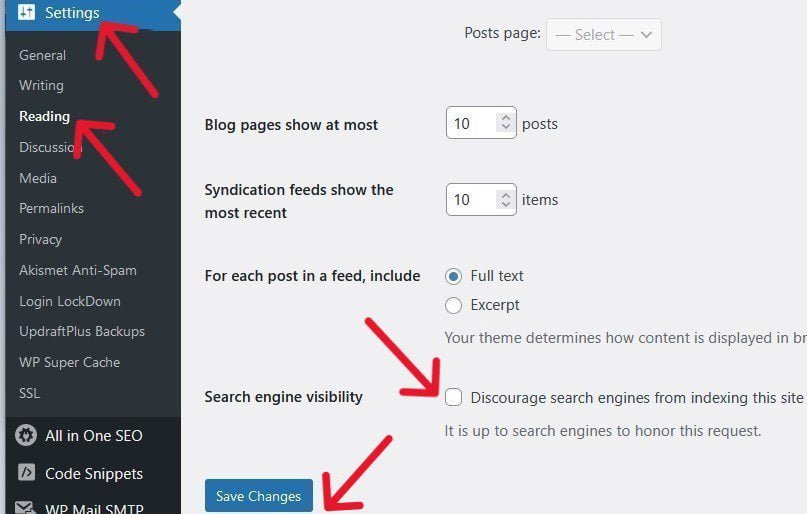
Click the blue Save Changes at the bottom of the page to save your new settings.
Once you’re sure your site is visible on the web, check whether it has been indexed by Google and other search engines.
To do this, simply do a Google search for your site’s home URL. For example: site: yourdomain.com.
If it has been indexed, you will see the search results. But if your site has no search results, it isn’t yet in Google’s index.
So you’d need to take the following steps to get your site crawled and indexed:
✓ Use the URL Inspection tool to check if Googlebot can access your pages.
✓ Make sure other sites that should know about your site are aware it is now online, and that it is well linked from these websites.
✓ Ensure you’re not unintentionally blocking search engines from crawling your site with a robots.txt file or storing them in a password-protected directory.
✓ Check if Google received an error when trying to crawl your site.
✓ Make sure you didn’t add a “no index” tag to your content.
✓ Make sure your site’s design isn’t making it difficult for search engines to crawl its content effectively.
However, if your site is new, crawling and indexing may take a while.
So you have to be patient and continue monitoring Google Search Console’s Index Coverage report.
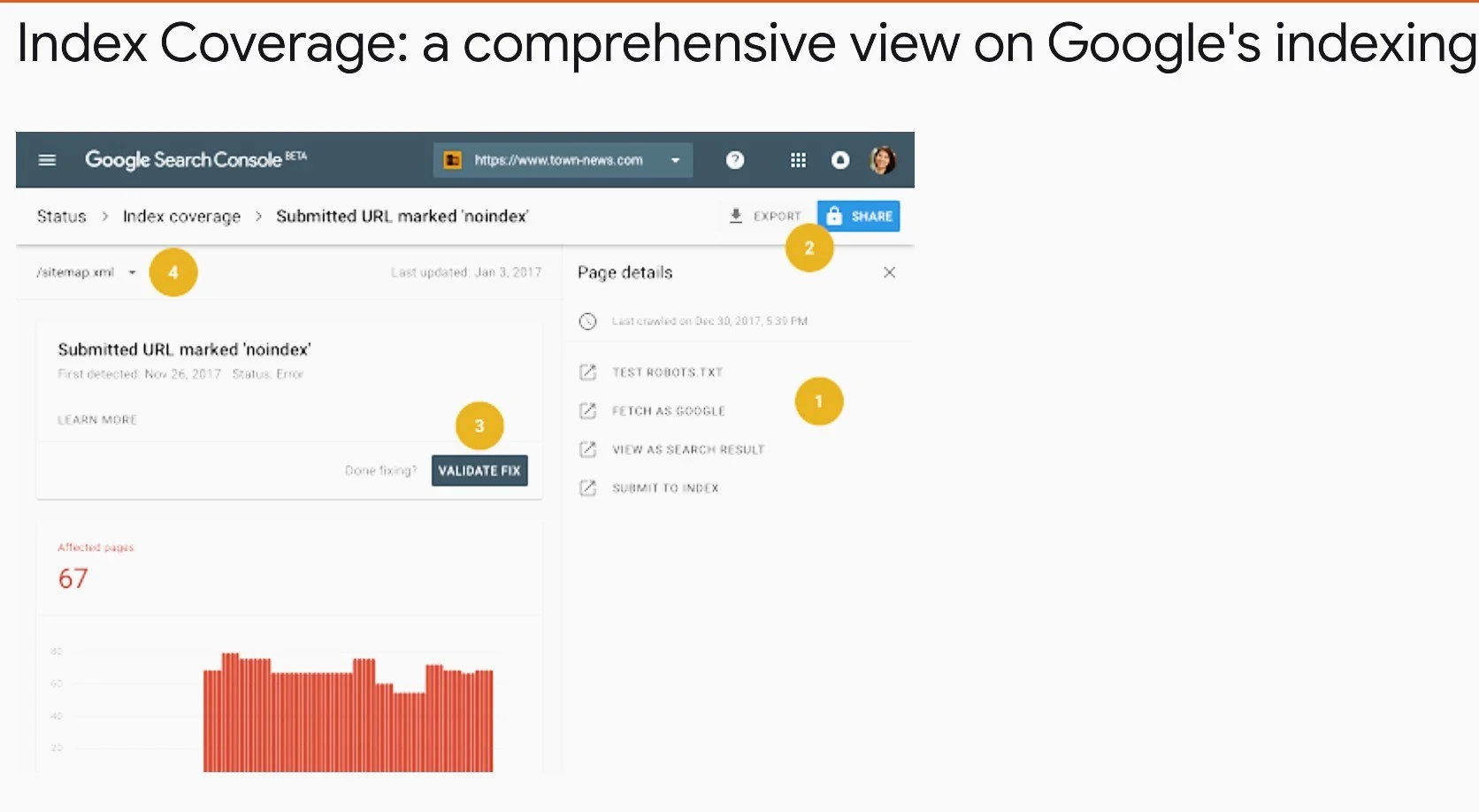
It will show you which pages Google has found on your site and help you identify and fix any indexing issues.
You can submit your crawl request for just a few URLs using the URL Inspection tool, or create and submit a sitemap with many URLs.
26. Monitor Your Performance with The Google Search Console
To prove you mean business with your site’s SEO, add it to the Google Search Console (GSC) from the get-go (to track its search analytics).
Search Console is a free umbrella tool from Google that can provide you with a wide range of information about your site’s behavior in Google Search.
These must-have tools and reports can help you measure, analyze, and improve your organic traffic such as clicks (CTR), impressions, and positions in search results, plus identify and fix issues on your web pages.
For instance, the Performance Report will show you the search queries that visitors are using to find your content, and which pages bring you the most traffic, among other things.
So you get to know how your SEO techniques are working, or if you need to change them.
The URL Inspection tool provides detailed crawl, index, and serving information about your pages, directly from Google Index.
So you’ll know which important pages are not indexed, and why?
The Mobile Usability Report will show you which pages are not optimized for mobile, what are the issues, and how to fix each. With Google’s Mobile-First Indexing policy, you want to make sure your site is mobile-optimized.
Google Search Console also allows you to submit your XML sitemaps and individual URLs for crawling to make sure that Google always indexes your freshest content.
Another beautiful thing about GSC is that it will alert you through email whenever Google identifies any issue on your blog or website.
So with Google Search Console, you can fully track your performance in Google Search and make the necessary improvements to your website.
All this, in turn, can make a big difference in your rankings in Google Search.
Next, you don’t have to log in daily to view your Search Console dashboard.
Unless Google notifies you of a problem that needs urgent fixing, you can check your web analytics say once every month.
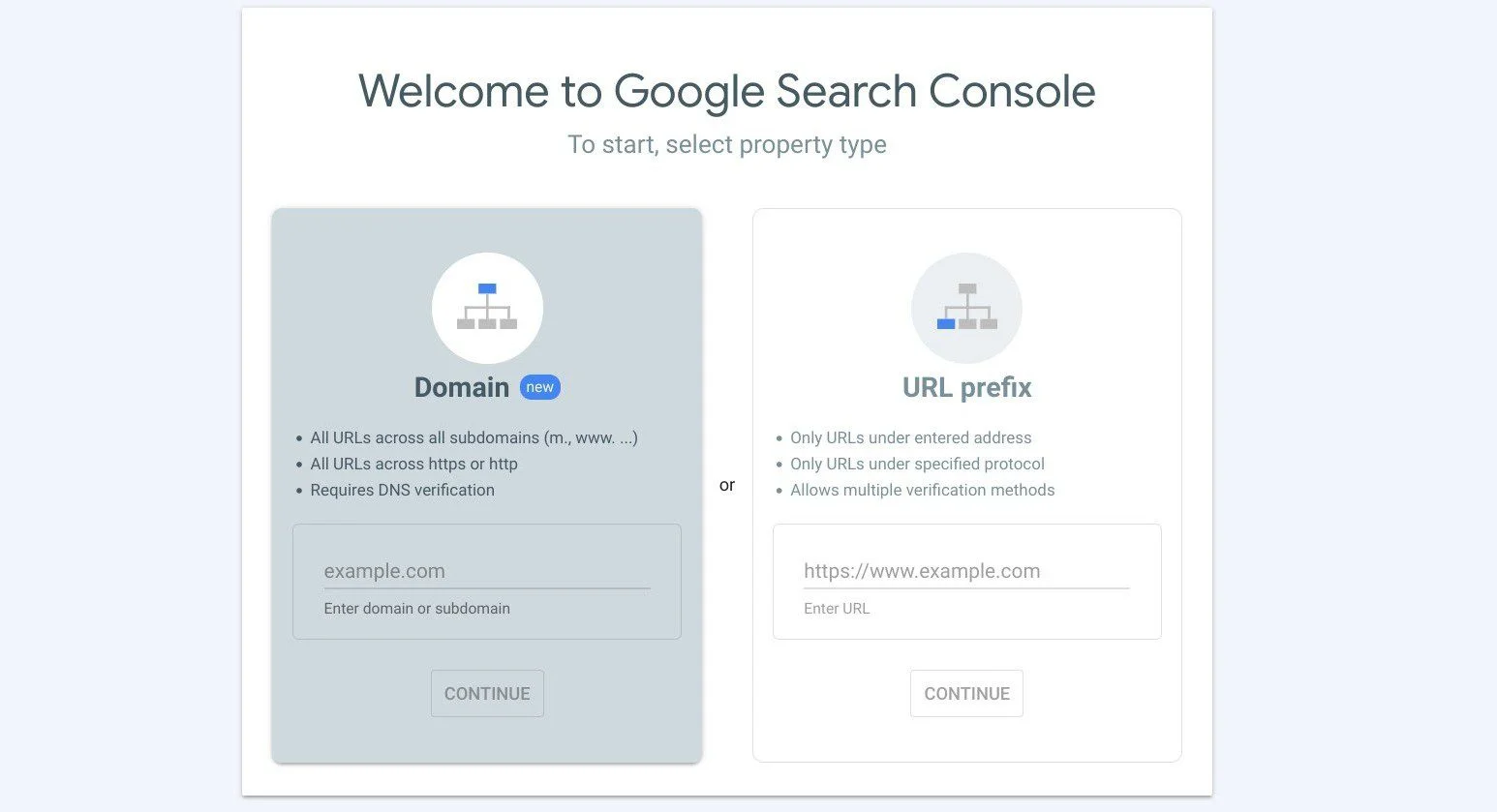
To get started, click through to their welcome page, and type in your site’s domain name or page’s URL.
By the way, using the Google Search Console tool isn’t a prerequisite to feature in Google Search. Whether or not you use it, you’ll rank if you qualify.
But this free tool is a gift from Google to help you perform better on their platform.
27. Keep Your Content Updated, Fresh and Useful
As the world is evolving, people’s information needs are constantly changing.
New things are always happening in the world, so the available information and the meanings of queries are also changing at an incredible pace.
This is why Google prioritizes serving the most relevant and freshest results to search queries.
So, Google crawlers are constantly crawling and indexing the Web for fresh content at an enormous scale.
And they’re continually “investing in new techniques to ensure that they’re reflecting the latest accurate information.”
For your site to appear and rank in search results, you need to always keep your content up-to-date, fresh, accurate, and helpful – especially content with trending keywords.
In their official Search blog, Google writes:
“Search results, like warm cookies right out the oven, or cool refreshing fruit on a hot summer’s day, are best when they’re fresh”.
So, among other factors, Google uses the freshness of the content to determine which results are most relevant and helpful for a given query.
Unless the query includes a specific date, the most recent results will be displayed in SERPs.
In one short sentence, freshness and relevance are a key ranking factor.
That’s why you can’t afford to be slack about regularly publishing fresh, relevant content for your old and new posts. If not, your ranking will take a nosedive.
As a searcher yourself, you will most likely want to see relevant, helpful results with new and trustworthy information, even if you do not specify in your query.
As Google says, while different searches have different freshness needs, you want to ensure that your pages only contain up-to-the-minute content.
Best practices:
✓ Update old articles regularly
Updating old articles isn’t simply about changing dates and a couple of data in the content. It is about putting out the most relevant and recent information that is helpful to the reader or viewer.
It is also about regularly carrying out a link audit to find any broken or outdated link and fixing it.
Like Moz said, you’ve got to keep your site updated promptly to benefit your users which can increase search clicks, user engagement, and fresh links.
A frequently updated site encourages users to keep visiting – as long as your content remains valuable and engaging.
✓ Create new content regularly
Google recommends you write one useful post weekly, instead of churning out low-quality, irrelevant content daily.
On the other hand, writing infrequently isn’t also a good idea.
Creating new content regularly will keep your existing user base engaged and attract new visitors.
One way to find new blog post ideas in your niche is to search for what other posts didn’t properly address or even address at all.
Also, according to Pandu Nayak of Google Search, 15% of daily searches are completely new queries.
This also is a golden opportunity to create original content on a regularly basis.
Remember to create natural, clickable links between your new posts and old, related content.
Also, submit your new post to Google for crawling and indexing once it is ready.
Bonus Strategy: Create an RSS Feed of Each of Your Posts
An RSS (Really Simple Syndication) feed is a great way to deliver your content to the right people and grow your readership.
An RSS feed is an online file that generates an automatic update of your site’s content and delivers it to subscribers in reverse chronological order so that the top entry is always the latest content.
This removes the hassle for users, of constantly checking your site for updates and new content.
The RSS feed also shows other key information about the article including the author, publication date, RSS Feed URL, and link(s) back to the post.
Google “strongly recommends you publish your content’s feeds, to notify users of new updates on your site”.
You can publish the entire content as a full feed or a teaser paragraph as a partial feed.
For a full-content feed, users can view the full post in their RSS reader without visiting your site, while for a partial feed, people will need to click through to your blog to read the full text.
Users who like your site and don’t want to miss your fresh content will probably be happy to subscribe to your RSS feed and add you to their favorite websites.
So, each time you update or publish a new post, they instantly receive a notification, and can easily view it whenever they want via their RSS reader.
You first need to set up an RSS feed for your content before interested users can subscribe and link their RSS readers, to receive instant updates of your fresh posts.
Frequently Asked Questions (FAQs)
Here are some frequently asked questions on SEO best practices to you may find helpful.
Is SEO still relevant in 2025?
SEO has never been more relevant and more needed than now.
First, SEO helps you create content that users are looking for and helps them (searchers) to easily find your pages in search engines.
Second, with the competition for better visibility on organic SERP getting fiercer by the day, SEO is the only legitimate and possible way to improve your rankings.
Google, the largest search engine in the world, says SEO is how you make your site better for search engines:
“SEO is what you do to make sure your site works well with Google Search.”
What Google and other search engines continue to do is adjust SEO best practices to help blogs and websites rank higher on their search results.
So, some SEO techniques become outdated and irrelevant while new ones take over.
For example, it used to be that all you needed to do to rank is just include keywords in your content. Today, it is about keyword intent, not just keywords.
The summary is, there is no other way to create helpful content and make it more visible on search result pages other than conducting SEO.
So, SEO is still very much relevant in 2025.
How can I improve my SEO in 2025?
You can improve your SEO by doing the followings, among others:
✓ Create content that satisfies the intent behind a keyword
✓ Offer fresh perspectives to popular keywords
✓ Deliver a good page experience
✓ Improve user experience signals on your site
✓ Make your website navigation easier for users and search engines
✓ Get more quality backlinks from credible sites
✓ Make your site responsive on all devices and browsers
✓ Create fresh, helpful, and relevant content regularly
✓ Constantly update your site and content
Conclusion
Whichever niche you’re in, if you want to create content that resonates with your audience all the time, start and stay with SEO.
Again, a little above half of your traffic will come via organic search – 53.3%.
For example, for a site that gets 1 million visits per month, about 533,000 come through search engines.
If you get 100,000 visitors monthly, about 53,300 come from organic SERP.
So if a website isn’t properly optimized for SEO, they would be losing those number of users every month.
Think about that.
Dozens of SEO best practices are recommended by Google. The tips above are some of the current and basic practices, and a great jumping-off point to pursue your SEO goals.
The more of the techniques you implement, the higher your rankings, and the better your traffic.
And who knows! You might just be the next big thing online.
And there you have it – 27 simple SEO best practices you need to follow today.
I hope this article helped learn how to optimize how your pages appear and rank high in search results.
Once you start creating content for your new website, use this guide to get your SEO off to a flying start.
You should also see my post on developing an effectively robust SEO strategy to grow your website.
If you like this article, kindly help me spread the word among your friends. Thank you!